From UDF to UDR in Firebird 5
Soundex, Cologne Phonetics, PSQL, Free Pascal and Visual C++ in a practical benchmark
IBExpert Ltd - Technical White Paper
Executive Summary
Firebird applications have been able to extend the database engine with external functions for many years. Older installations commonly used UDFs (User Defined Functions). Modern Firebird versions provide UDRs (User Defined Routines), a substantially better integrated architecture.
This white paper follows the transition from UDF to UDR through a practical example: phonetic name matching using Soundex, a German-adapted Soundex variant, Cologne Phonetics, and distance and similarity functions. The same functionality was implemented as Firebird PSQL stored functions, a native Lazarus/Free Pascal UDR, and a native Microsoft Visual C++ 2022 UDR.
The most surprising finding was that programming language was not the dominant performance factor. Once Free Pascal and C++ used a comparable low-level strategy, optimized FPC was typically only about 10 to 25 percent behind Visual C++.
1. From UDF to UDR
UDFs were a proven way to move calculations into external DLLs or shared libraries across many Firebird generations. The old UDF interface, however, belongs to an earlier generation of API design.
UDRs are the modern successor. SQL still calls native code, but integration uses Firebird's modern plugin and object-oriented API, with cleaner handling of data types, NULL values, metadata, character sets and routine lifecycle. For new Firebird 5 extensions, UDR should therefore be regarded as the natural replacement for classic UDFs.
2. Alternative: PSQL stored functions
Many algorithms can be implemented entirely as Firebird PSQL stored functions. This greatly simplifies deployment: no extra DLL, no Linux shared library and no platform-specific binary.
PSQL is particularly attractive when easy installation, backup/restore and platform independence matter more than maximum computational throughput. The real question is not whether PSQL can solve the problem, but whether it is fast enough for the expected call volume.
3. Why phonetic name matching?
Exact string comparisons are often insufficient for names. Klemt, Klemmt, Klempt and Klemp are technically four different strings, but may all be relevant when searching for the same person.
Phonetic algorithms map names to codes that reflect pronunciation more than exact spelling, making typing errors, historical spellings and variants easier to detect.
4. Soundex
Soundex normally creates a short code consisting of an initial letter and digits representing similar consonant groups. It is simple and fast, but was primarily designed for English names.
Our project therefore implemented SOUNDEX and SOUNDEX_DE. The German variant additionally normalizes forms such as Ä/AE, Ö/OE, Ü/UE, ß/SS and common letter combinations.
5. Cologne Phonetics
Cologne Phonetics is often more appropriate for German names. It uses context-sensitive rules and produces a variable-length digit sequence.
Klemt → 4562, Klemmt → 4562, Klempt → 45612, Klemp → 4561. Klemt and Klemmt become phonetically identical, while the other variants remain very close.
6. Distance and similarity
COLOGNE_DISTANCE first calculates Cologne Phonetics for both names and then the Levenshtein distance between the codes. A distance of 0 means identical; 1 means one insertion, deletion or replacement is required.
PHONETIC_SIMILARITY converts this into an easier-to-use value from 0 to 100. In our example Klemt/Klemmt returns 100, Klemt/Klempt 80 and Klemt/Klemp 75.
7. Three implementations, identical results
The five functions SOUNDEX, SOUNDEX_DE, COLOGNE_PHONETIC, COLOGNE_DISTANCE and PHONETIC_SIMILARITY were implemented in PSQL, as a Lazarus/FPC UDR, and as a Visual C++ UDR.
Before performance testing, 10,000 test rows were checked. The final versions produced zero mismatches for all five functions. Identical checksums also confirmed that the implementations processed the same results.
8. PSQL versus native UDR
PSQL proved surprisingly practical for the simpler phonetic functions. As computational work increases, the native UDR advantage becomes much larger, especially for distance and similarity calculations.
|
Function |
Native UDR (typical) |
PSQL (typical) |
Interpretation |
|
SOUNDEX |
~0.04 s |
~0.8 s |
Native clearly faster |
|
SOUNDEX_DE |
~0.05 s |
~0.9 s |
Native clearly faster |
|
COLOGNE_PHONETIC |
~0.04 s |
~1.6 s |
Native clearly faster |
|
COLOGNE_DISTANCE |
~0.06 s |
~4.5 s |
Native substantially faster |
|
PHONETIC_SIMILARITY |
~0.06 s |
~6.5 s |
Native substantially faster |
The absolute values come from different benchmark forms and should not be interpreted as a pure microbenchmark ratio. The important point is that PSQL is functional and quite capable for simpler tasks, while native UDRs scale much better as procedural computation increases.
9. The first C++ versus Pascal comparison
The first FPC version used convenient UnicodeString processing, UnicodeUpperCase and general string operations. The C++ implementation worked largely on UTF-8 bytes directly. C++ therefore initially appeared four to five times faster in some tests.
This was not a fair compiler-only comparison: the implementations were doing different amounts of internal work.
10. Making the comparison fair
The FPC version was rewritten to use the same low-level strategy: UTF-8 remains byte-oriented in the hot path, German special characters are normalized using their UTF-8 sequences, ASCII uppercasing is performed directly, temporary string operations are reduced, and Cologne/Levenshtein use compact buffers.
The SQL interface and results remained unchanged.
11. Optimization effect in Free Pascal
|
Function |
Original FPC |
FPC Fast UTF-8 |
Improvement |
|
SOUNDEX |
~136 ms |
~40 ms |
~3.4× |
|
SOUNDEX_DE |
~79 ms |
~47 ms |
~1.7× |
|
COLOGNE_PHONETIC |
~152 ms |
~43 ms |
~3.5× |
|
COLOGNE_DISTANCE |
~269 ms |
~62 ms |
~4.3× |
|
PHONETIC_SIMILARITY |
~271 ms |
~62 ms |
~4.4× |
Most of the performance gain was therefore achieved without changing programming language.
12. Optimized FPC versus Visual C++
|
Function |
Visual C++ 2022 |
Optimized FPC |
Approx. C++ lead |
|
SOUNDEX |
~34 ms |
~40 ms |
~18% |
|
SOUNDEX_DE |
~38 ms |
~47 ms |
~24% |
|
COLOGNE_PHONETIC |
~38 ms |
~43 ms |
~13% |
|
COLOGNE_DISTANCE |
~51 ms |
~62 ms |
~22% |
|
PHONETIC_SIMILARITY |
~52 ms |
~62 ms |
~19% |
With comparable implementations, the gap fell from an apparent factor of four or five to typically about 10 to 25 percent.
13. Why Lazarus needs essentially only Firebird.pas
The Object Pascal binding is compact from the developer's perspective. Firebird.pas bundles the important interfaces and type declarations into a Pascal unit, keeping a small Lazarus UDR project easy to understand and familiar to Delphi/Lazarus developers.
14. Why Visual Studio needs more headers
The C++ UDR uses Firebird's C++ helper infrastructure, including UdrCppEngine.h, Message.h, Interface.h, ibase.h and additional include files and preprocessor helpers.
These are mainly compile-time dependencies. The finished DLL does not simply require all those headers at runtime. Pascal packages many declarations into one unit, while C++ distributes the API across headers, templates and macros.
15. Windows and Linux
PSQL is platform-neutral inside the database. Native UDRs must be built for the target platform, typically a DLL on Windows and a shared library on Linux. The SQL contract can remain the same, but the binary must match the operating system, architecture and Firebird server.
16. Practical decision
For moderate call volumes and maximum simplicity, PSQL is attractive. For high call volumes or computationally intensive algorithms, a native UDR provides substantial headroom.
Where Delphi/Lazarus/FPC expertise already exists, our measurements provide no reason to switch to C++ solely out of performance concerns. C++ remains an excellent choice where the relevant expertise and build infrastructure already exist.
17. The most important lesson
The project started with a question: how should classic Firebird UDF functionality be modernized for Firebird 5? This led to a comparison of UDR and PSQL, and eventually to a direct test of Free Pascal and Visual C++.
The most important result is not one millisecond figure. Architecture, algorithm and data representation often dominate language choice. Our first Pascal implementation was correct but used convenient general Unicode abstractions. The C++ version worked closer to the bytes actually required and was initially dramatically faster. Once the same principles were applied to Free Pascal, most of the difference disappeared.
For developers with many years of Delphi or Free Pascal experience, this is a notable result: well-written Pascal remains highly competitive native code. Visual C++ was still somewhat faster in our test, but the remaining gap was closer to roughly 10 to 25 percent than to a factor of four or five.
Firebird PSQL was also a positive surprise. Not every function justifies a native library. Simple phonetic functions can offer an attractive balance of performance, maintainability and effortless deployment as stored functions. Native UDRs become particularly valuable when high call volumes and more complex calculations occur together.
The practical conclusion is therefore: choose the right algorithm and data representation first, then choose the deployment strategy, and only after that treat the programming language itself as a performance factor.
18. Demo projects and reproducibility
The complete source code is intentionally not reproduced in this white paper, keeping the document readable for managers and users as well as developers.
Demo projects for Firebird PSQL, Lazarus/Free Pascal and Visual Studio/C++ can be provided on request. Benchmark values are snapshots of a specific environment: hardware, Firebird version, compiler options, data distribution, cache state and server load can all affect absolute timings. Reproducible test data, identical results and repeated runs matter more than a single best time.
Remove the IBExpert Developer Studio software activation
You should only remove the software registration if you have a valid software subscription.
Open your registered IBExpert Developer Studio Edition, open the About window in the Help menu. Click the Remove activation link in the bottom right-hand corner and confirm. A message appears displaying the remove activation string.
Click OK in order to open your email client. If your computer settings do not allow this, you can write a mail to register@ibexpert.net, and simply paste the clipboard content into the subject heading. If you do not have an email client installed on the machine, then please mail us a screenshot of the Remove Activation string.
Training
(German-language version below)
3-day practical training course
Firebird SQL and Pascal programming for the next generation
From basic developer knowledge to productive involvement in real-world Delphi, Lazarus, Firebird and IBExpert projects.
- 16 -18 November 2026 – Munich – 3 days, 9.00 am–5.00 pm – German language -
This 3-day hands-on training course can also be booked as a remote or on-site in-house training course.
The focus of this course
Practical knowledge for getting started with established software projects
|
Basic programming skills are often not enough to start working productively on an existing enterprise application straight away. Project files, units, forms, components, packages, events, database access and SQL objects must be understood as an integrated system. This training course provides precisely this orientation and practical knowledge. Participants will build a small application using Lazarus, create the associated Firebird database and programme the connection between the two using IBExpert. |
“The best programming language at the moment is German.” |
Target group
For the next generation of developers
Not a retrospective look at old development environments, but a practical introduction for people who will be working productively on existing systems in the future. No practical experience with Delphi, Lazarus, Firebird or IBExpert is required.
Suitable for
|
Recommended Requirements
|
Course objectives
What participants should be able to accomplish after three days
|
Benefits for employers
|
Key information
The event at a glance
Understanding the Pascal world
Project structure, language, components, events and launching your own Lazarus application.
Firebird SQL, PSQL and IBExpert
Data model, SQL, database programming and connecting the application to Firebird.
Interaction, modularity and AI
Clean application structure, practical AI support and verifying generated results.
Training programme
Three days focusing on a single, continuous practical project
Participants do not learn about the individual components in isolation, but instead combine Pascal code, the user interface, the Firebird database and IBExpert step by step to create a small, fully functional application.
The ongoing practical project: a time and attendance system
Over the course of the three training days, a practical time and attendance system will be developed step by step:
- Day 1: Development of a basic Lazarus GUI for recording arrival and departure times. Initially, the data is deliberately stored in plain text files.
- Day 2: Transferring the recorded data into a newly created Firebird database. This involves creating tables, SQL queries and triggers. The triggers also transfer the relevant information to existing tables within an existing software solution.
- Day 3:
- Conversion of the Lazarus application into a minimal PHP-based terminal application that writes directly to Firebird, with AI support. This can be used in kiosk mode on iPads and later operated via NFC cards.
In this way, participants learn, through a coherent example, the journey from a simple local prototype, through database integration, to a modular, cross-platform application.
Day 1
Understanding the Pascal World
Project structure, the language, components, events and launching your own Lazarus application.
|
Morning: How is a Delphi or Lazarus project constructed? Project orientation
Basic structure of a Pascal unit
|
Afternoon: Language, Components and Events Basic language elements
Graphical applications
Practical project
|
Today's outcome: Participants will be able to explain the structure of a Pascal project, read basic Object Pascal code and create a small application with their own events, procedures and functions.
Day 2
Firebird SQL, PSQL and IBExpert
Data model, SQL, database programming and connecting the application to Firebird.
|
Morning: Structure and language of a Firebird database Fundamentals of relational databases
SQL basics
|
Afternoon: Programming in the database Firebird PSQL
Working with IBExpert
Connection to the Lazarus application
Expanding the practical project
|
Today's outcome: Participants will understand the basic structure of a Firebird database, be able to create simple SQL and PSQL objects, and connect a Lazarus application to the database.
Day 3
Interaction, modularity and AI
A clear application structure, practical AI support and the verification of generated results.
|
Morning: Creating an application from individual components Structure of a database-driven application
Modularity in practice
GUI and console applications
|
Afternoon: AI as a Development Tool The best programming language is German
Useful Applications of AI
Limitations and Risks
Functional testing of AI results
Final project
|
Today's outcome: Participants will understand the interplay between the user interface, Pascal code, database access and the Firebird database. They will be able to use AI tools as a support without relinquishing responsibility for functionality, security and maintainability to the AI.
AI in Development
Accelerating progress without relinquishing control
ChatGPT, Codex and similar tools can explain source code, prepare routines, generate SQL, develop test cases and assist with debugging. However, they are no substitute for technical understanding or systematic testing. This training course therefore not only demonstrates how AI is used, but above all how requirements are formulated, results are broken down, compiled, tested and examined for unintended side effects.
Why modularity is becoming increasingly important
Small, clearly defined, and independently testable modules can be developed more reliably with AI support than large, complex blocks of source code.
- clear inputs and outputs
- few hidden dependencies
- limited scope of changes
- individually testable functions
- transparent responsibilities
After the Course
Participants will be able to contribute practically rather than just knowing the basics
- Identify the most important project components
- Understand the basic program flow
- Make simple changes to forms and units
- Read and create SQL queries
- Examine database objects using IBExpert
- Implement small functions on your own
- Systematically narrow down errors
- Work on clearly defined tasks with the support of AI
- Critically test the generated results
- Contribute effectively to an experienced development team
Interested in the course?
Training Course: Firebird SQL and Pascal Programming for the Next Generation
Date: November 16 -18, 2026, 9.00 am–5.00 pm
Price per participant: 1,490.00 EUR (plus VAT)
For the second and subsequent participants billed to the same invoice recipient: 1,290.00 EUR per participant (plus VAT)
Venue: TBK Patent Attorneys, Bavariaring 4–6, 80336 Munich, Germany
Contact and registration via email: register@ibexpert.net
This 3-day hands-on training course can also be booked as a remote or on-site in-house training session, in which we will use your existing software and database as a basis.
(English-language version above)
3-tägige Praxisschulung
Firebird SQL und Pascalprogrammierung für die Next Generation
Vom grundlegenden Entwicklerwissen zur produktiven Mitarbeit in realen Delphi-, Lazarus-, Firebird- und IBExpert-Projekten.
- 16.-18. November 2026 - München - 3 Tage 9.00-17.00 Uhr - Deutsch -
Diese 3-tägige Praxisschulung kann auch als Remote- oder Onsite-Firmenschulung gebucht werden.
Worum es geht
Praxiswissen für den Einstieg in gewachsene Softwareprojekte
|
Grundlegende Programmierkenntnisse reichen oft nicht aus, um in einer bestehenden Unternehmensanwendung sofort produktiv mitzuarbeiten. Projektdateien, Units, Formulare, Komponenten, Packages, Ereignisse, Datenbankzugriffe und SQL-Objekte müssen als zusammenhängendes System verstanden werden. Diese Schulung vermittelt genau dieses Orientierungs- und Praxiswissen. Die Teilnehmer bauen mit Lazarus eine kleine Anwendung auf, erstellen die zugehörige Firebird-Datenbank und programmieren die Verbindung zwischen beiden Welten mit Unterstützung von IBExpert. |
„Die beste Programmiersprache ist aktuell Deutsch.“ |
Zielgruppe
Für die nächste Entwicklergeneration
Nicht als Rückblick auf alte Entwicklungswelten, sondern als praxisnaher Einstieg für Menschen, die künftig produktiv an bestehenden Systemen mitarbeiten sollen. Keine praktische Erfahrung mit Delphi, Lazarus, Firebird oder IBExpert erforderlich.
Geeignet für
|
Empfohlene Voraussetzungen
|
Lernziele
Was die Teilnehmer nach drei Tagen können sollen
|
Nutzen für Arbeitgeber
|
Rahmendaten
Die Veranstaltung auf einen Blick
Tag 1
Die Pascal-Welt verstehen
Projektaufbau, Sprache, Komponenten, Ereignisse und der Start einer eigenen Lazarus-Anwendung.
Tag 2
Firebird SQL, PSQL und IBExpert
Datenmodell, SQL, Datenbankprogrammierung und die Verbindung der Anwendung mit Firebird.
Tag 3
Zusammenspiel, Modularität und KI
Saubere Anwendungsstruktur, sinnvolle KI-Unterstützung und die Prüfung generierter Ergebnisse.
Schulungsprogramm
Drei Tage mit einem durchgehenden Praxisprojekt
Die Teilnehmer lernen die Einzelteile nicht isoliert kennen, sondern verbinden Pascal-Code, Benutzeroberfläche, Firebird-Datenbank und IBExpert Schritt für Schritt zu einer kleinen, funktionsfähigen Anwendung.
Das durchgehende Praxisprojekt: eine Arbeitszeiterfassung
Über alle drei Schulungstage entsteht schrittweise eine praxisnahe Arbeitszeiterfassung:
- Tag 1: Entwicklung einer minimalen Lazarus-GUI zur Erfassung von Kommen- und Gehen-Zeiten. Die Daten werden zunächst bewusst einfach in Textdateien gespeichert.
- Tag 2: Übernahme der erfassten Daten in eine neu aufgebaute Firebird-Datenbank. Dabei werden Tabellen, SQL-Abfragen und Trigger erstellt. Die Trigger übertragen die relevanten Informationen zusätzlich in bereits vorhandene Tabellen einer bestehenden Softwarelösung.
- Tag 3: Übertragung der Lazarus-Anwendung in eine minimale PHP-basierte Terminalanwendung, de direkt in Firebird schreibt, mit Unterstützung von KI. Diese kann im Kioskmodus auf iPads eingesetzt und später über NFC-Karten bedient werden.
So lernen die Teilnehmer an einem zusammenhängenden Beispiel den Weg vom einfachen lokalen Prototyp über die Datenbankintegration bis zur modularen, plattformübergreifenden Anwendung kennen.
Tag 1
Die Pascal-Welt verstehen
Projektaufbau, Sprache, Komponenten, Ereignisse und der Start einer eigenen Lazarus-Anwendung.
|
Vormittag: Wie ist ein Delphi- oder Lazarus-Projekt aufgebaut? Orientierung im Projekt
Grundstruktur einer Pascal-Unit
|
Nachmittag: Sprache, Komponenten und Ereignisse Grundlegende Sprachelemente
Grafische Anwendungen
Praxisprojekt
|
Ergebnis des Tages: Die Teilnehmer können den Aufbau eines Pascal-Projekts erklären, grundlegenden Object-Pascal-Code lesen und eine kleine Anwendung mit eigenen Ereignissen, Prozeduren und Funktionen erstellen.
Tag 2
Firebird SQL, PSQL und IBExpert
Datenmodell, SQL, Datenbankprogrammierung und die Verbindung der Anwendung mit Firebird.
|
Vormittag: Aufbau und Sprache einer Firebird-Datenbank Grundlagen relationaler Datenbanken
SQL-Grundlagen
|
Nachmittag: Programmierung in der Datenbank Firebird PSQL
Arbeiten mit IBExpert
Verbindung zur Lazarus-Anwendung
Erweiterung des Praxisprojekts
|
Ergebnis des Tages: Die Teilnehmer verstehen die Grundstruktur einer Firebird-Datenbank, können einfache SQL- und PSQL-Objekte erstellen und eine Lazarus-Anwendung mit der Datenbank verbinden.
Tag 3
Zusammenspiel, Modularität und KI
Saubere Anwendungsstruktur, sinnvolle KI-Unterstützung und die Prüfung generierter Ergebnisse.
|
Vormittag: Aus Einzelteilen wird eine Anwendung Struktur einer datenbankgestützten Anwendung
Modularität in der Praxis
GUI- und Konsolenanwendungen
|
Nachmittag: KI als Entwicklungswerkzeug Die beste Programmiersprache ist Deutsch
Sinnvolle Einsatzbereiche von KI
Grenzen und Gefahren
KI-Ergebnisse funktional prüfen
Abschlussprojekt
|
Ergebnis des Tages: Die Teilnehmer verstehen das Zusammenspiel von Benutzeroberfläche, Pascal-Code, Datenbankzugriff und Firebird-Datenbank. Sie können KI-Werkzeuge als Unterstützung einsetzen, ohne die Verantwortung für Funktion, Sicherheit und Wartbarkeit an die KI abzugeben.
KI in der Entwicklung
Beschleunigen, ohne die Kontrolle abzugeben
ChatGPT, Codex und ähnliche Werkzeuge können Quellcode erklären, Routinen vorbereiten, SQL erzeugen, Testfälle entwickeln und bei der Fehlersuche helfen. Sie ersetzen jedoch weder fachliches Verständnis noch systematische Prüfung.Die Schulung zeigt deshalb nicht nur, wie KI eingesetzt wird, sondern vor allem, wie Anforderungen formuliert, Ergebnisse zerlegt, kompiliert, getestet und auf unbeabsichtigte Nebenwirkungen untersucht werden.
Warum Modularität wichtiger wird
Kleine, klar definierte und unabhängig prüfbare Module lassen sich zuverlässiger mit KI-Unterstützung entwickeln als große, unübersichtliche Quellcodeblöcke.
- klare Ein- und Ausgaben
- wenige versteckte Abhängigkeiten
- begrenzte Änderungsbereiche
- einzeln testbare Funktionen
- nachvollziehbare Verantwortlichkeiten
Nach der Schulung
Praxisfähig mitarbeiten statt nur Grundlagen kennen
- die wichtigsten Projektbestandteile identifizieren
- den grundsätzlichen Programmablauf nachvollziehen
- einfache Änderungen an Formularen und Units durchführen
- SQL-Abfragen lesen und erstellen
- Datenbankobjekte mit IBExpert untersuchen
- kleine Funktionen selbst implementieren
- Fehler systematisch eingrenzen
- klar definierte Aufgaben mit Unterstützung einer KI bearbeiten
- die erzeugten Ergebnisse kritisch testen
- sinnvoll in einem erfahrenen Entwicklungsteam mitarbeiten
Interesse an der Schulung?
Schulung: Firebird SQL und Pascalprogrammierung für die Next Generation
Zeitraum: 16.-18. November 2026, 9.00 - 17.00 Uhr
Preis pro Teilnehmer: Preis pro Teilnehmer: 1.490,00 EUR (zzgl. MwSt.)
Ab dem 2. Teilnehmer bei demselben Rechnungsempfänger: 1.290,00 EUR pro Teilnehmer (zzgl. MwSt.)
Veranstaltungsort: TBK Patentanwälte, Bavariaring 4-6, 80336 München
Kontakt und Anmeldung per E-Mail: register@ibexpert.net
Diese 3-tägige Praxisschulung kann auch als Remote- oder Onsite-Firmenschulung, in der wir dann Ihre schon existierende Software und Datenbank als Basis nehmen, gebucht werden.
IBExpertRemoteDBA
(German-language version below)
Firebird Server Health Check & Backup Monitoring
Professional baseline assessment and ongoing monitoring for Firebird 2.x-5.x – now also available for in-house or externally sourced hardware
Reliable Firebird server operation does not depend solely on the hardware used. It is also crucial to have properly configured backups, effective restore processes, a clear server configuration, and regular monitoring of key system parameters.
Until now, this service package was only available if the server hardware was purchased directly from us. It is now also available to customers who already own their hardware or purchase it from another supplier.
For a flat fee of EUR 1,750 / USD 1,990 you will receive a service package valid for 3 years.
Initial session: Assessment of the current situation
Once the order has been placed, we will hold an initial remote session together with you. During this kick-off session, we will assess your existing server and Firebird environment and review the current technical situation.
The focus is primarily on the following points:
- Review of the existing backup automation
- Monitoring of automatic restore processes
- Identification of existing errors or vulnerabilities
- Review of existing changes to firebird.conf
- Implementation of a benchmark to assess server performance
The aim is to ensure, right from the start, that the key foundations for reliable Firebird operation are in place.
Backup monitoring using an automated IBEBlock script 
A backup is only genuinely useful if it is created regularly and also checked for technical issues. That is why we implement an automated IBEBlock script to monitor the ongoing backups.
The results are recorded centrally in a log. This allows errors to be identified at an early stage, before they become a real problem in an emergency. Monitoring therefore serves not only as a means of control, but above all for the early detection of errors.

Benchmarking and evaluation of server speed
As part of the initial analysis, we also carry out a benchmark test. This provides you with a practical assessment of the server’s overall performance, enabling you to better judge whether your existing hardware is adequately configured for your Firebird installation.
Analysis of existing Firebird configurations
If your software vendor has already made adjustments to the firebird.conf file, we will assess these as well. In doing so, we will check whether the changes are justifiable and sensible, or whether they could pose potential risks to stability, performance or maintainability.
Quarterly basic checks via remote session

We carry out quarterly baseline checks throughout the three-year period. These are conducted via remote access.
We will send you an email before each check. You can then invite us to a session using the remote access software of your choice. This means you retain control over access at all times and can decide for yourself when and which tool to use to establish the connection.
Price and duration
EUR 1,750 / USD 1,990 for 3 years
This includes the initial kick-off session, the setup of backup monitoring, an assessment of the existing Firebird environment, a server benchmark, and quarterly remote health checks throughout the project duration.
Response times and optional emergency service
The IBExpert RemoteDBA Standard Service is designed as a preventive health check and monitoring service and does not include a 24/7 emergency service.
In the event of a malfunction, our standard service offers a response time on the next working day during our regular business hours from Monday–Thursday 8.00 am - 4.00 pm and Friday 8.00 am - 2.00 pm (Central European Time).
An extended 24/7/365 emergency service can be added as an option for an additional charge (100%). Alerts are sent via Signal Messenger. For this additional service, we guarantee a maximum response time of 4 hours.
The response time refers to the point at which we begin to respond to or investigate the issue, not a guarantee that the problem will be fully resolved within that timeframe.
You can place an order by email to register@ibexpert.net.

Firebird Server Health Check & Backup Monitoring
Professionelle Basisprüfung und laufende Kontrolle für Firebird 2.x-5.x – jetzt auch für eigene oder fremdbeschaffte Hardware
Ein stabiler Firebird-Serverbetrieb hängt nicht nur von der eingesetzten Hardware ab. Entscheidend sind auch korrekt eingerichtete Backups, funktionierende Restore-Prozesse, eine nachvollziehbare Serverkonfiguration und eine regelmäßige Kontrolle der wichtigsten Systemparameter.
Bisher wurde dieses Servicepaket nur angeboten, wenn die Server-Hardware direkt über uns bezogen wurde. Ab sofort steht es auch Kunden zur Verfügung, die ihre Hardware bereits besitzen oder diese bei einem anderen Anbieter kaufen.
Für einen Pauschalbetrag von 1.750 € / 1.990 USD erhalten Sie ein Servicepaket mit einer Laufzeit von 3 Jahren.
Startsession: Aufnahme der Ist-Situation
Nach Auftragserteilung führen wir gemeinsam mit Ihnen eine erste Remote-Sitzung durch. In dieser Startsession erfassen wir die vorhandene Server- und Firebird-Umgebung und prüfen die aktuelle technische Ausgangssituation.
Dabei liegt der Schwerpunkt insbesondere auf folgenden Punkten:
- Prüfung der bestehenden Backup-Automatisierung
- Kontrolle der automatischen Restore-Prozesse
- Erkennung bereits sichtbarer Fehler oder Schwachstellen
- Bewertung vorhandener Änderungen an der firebird.conf
- Durchführung eines Benchmarks zur Einschätzung der Serverleistung
Ziel ist es, schon zu Beginn sicherzustellen, dass die wichtigsten Grundlagen für einen zuverlässigen Firebird-Betrieb vorhanden sind.
Backup-Überwachung mit automatisiertem IBEBlock-Script
Ein funktionierendes Backup ist nur dann wirklich hilfreich, wenn es regelmäßig erstellt und auch technisch überprüft wird. Deshalb richten wir ein automatisiertes IBEBlock-Script ein, mit dem die laufenden Backups überwacht werden.
Die Ergebnisse werden zentral als Log erfasst. So lassen sich Fehler frühzeitig erkennen, bevor sie im Ernstfall zu einem echten Problem werden. Die Überwachung dient damit nicht nur der Kontrolle, sondern vor allem der präventiven Fehlererkennung.
Benchmark und Bewertung der Servergeschwindigkeit
Im Rahmen der Startanalyse führen wir außerdem einen Benchmark durch. Dadurch erhalten Sie eine praxisnahe Einschätzung der generellen Servergeschwindigkeit und können besser beurteilen, ob die vorhandene Hardware für Ihre Firebird-Installation angemessen dimensioniert ist.
Prüfung vorhandener Firebird-Konfigurationen
Falls Ihr Softwarehersteller bereits Anpassungen an der firebird.conf vorgenommen hat, bewerten wir diese ebenfalls. Dabei prüfen wir, ob die Änderungen nachvollziehbar und sinnvoll sind oder ob daraus mögliche Risiken für Stabilität, Performance oder Wartbarkeit entstehen können.
Vierteljährliche Basischecks per Remote-Sitzung
Während der gesamten Laufzeit von 3 Jahren führen wir vierteljährliche Basischecks durch. Diese erfolgen per Remote-Einwahl.
Vor jedem Check senden wir Ihnen eine E-Mail. Anschließend laden Sie uns mit einer Remote-Zugangssoftware Ihrer Wahl zu einer Sitzung ein. Sie behalten damit jederzeit die Kontrolle über den Zugriff und entscheiden selbst, wann und mit welchem Tool die Verbindung hergestellt wird.
Preis und Laufzeit
Der Pauschalpreis für das komplette Servicepaket beträgt:
1.750 € / 1.990 USD für 3 Jahre
Enthalten sind die initiale Startsession, die Einrichtung der Backup-Überwachung, die Bewertung der vorhandenen Firebird-Umgebung, ein Server-Benchmark sowie die vierteljährlichen Remote-Basischecks während der Laufzeit.
Reaktionszeiten und optionaler Emergency-Service
Der IBExpert RemoteDBA Standard Service ist als präventiver Health-Check- und Monitoring-Service ausgelegt und beinhaltet keinen 24/7-Emergency-Service.
Im Fehlerfall gilt für den Standardservice eine Reaktionszeit am nächsten Arbeitstag während unserer regulären Geschäftszeiten Montag-Donnerstag 8:00 - 16:00 und Freitag 8:00 - 14:00 (Mitteleuropäische Zeit).
Optional kann ein erweiterter 24/7/365 Emergency-Service gegen Aufpreis (100%) hinzugebucht werden. Die Alarmierung erfolgt dabei über den Signal Messenger. Für diesen Zusatzservice stellen wir eine maximale Reaktionszeit von 4 Stunden sicher.
Die Reaktionszeit beschreibt den Beginn der Kontaktaufnahme bzw. Analyse, nicht eine garantierte vollständige Fehlerbehebung innerhalb dieses Zeitraums.
Bestellen können Sie formlos per E-Mail an register@ibexpert.net.
IBExpert Benchmark Tool
Free IBExpert Benchmark Tool
IBExpert Developer Studio Benchmark
How does it work?
How do your results compare?
The current version was released in January 2026, and includes some bugfixes, preventing the benchmark to crash on some servers.
We also have a new result, but it is just to measure the network speed between the client and server (we know that it does not show useful values when using the free benchmark as this version always using localhost as the server network address, but especially for the full version incorporated in the IBExpert IDE, it is very helpful to detect slow network configs to understand why Firebird-based applications run slower than expected. Outdated Router technology, network bridge components etc. are often responsible for poor software speed.
The Net Test executes 2000 inserts to a table with 100 columns and sends all params from client to the server in individual params, so this function will create a few hundred thousand very small TCP IP packages over the network and the total time is measured by how many operations were done within each second.
A good value on fast networks should have around >=400 IOPs. If it is much slower, you should ask your network support to check the speed of components used.
It is not part of the calculated percentage result values, and also the time it takes is not used there, since these result values use minimal network traffic to measure the server speed and not the network speed.
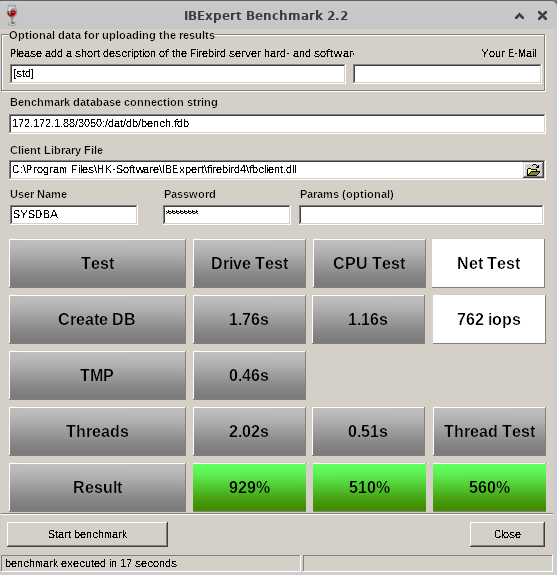
Benchmark results on an IFSLR Server using Ubuntu Linux 22 and Firebird 5
Compare your server's performance to our IFS servers!
How do you measure the performance of your own server or your clients'? Have you ever tried to compare the database speed of your Firebird server with new server hardware? Is a XEON Machine better than an Opteron? What improvements can you expect from fast SAS hard disks, RAID controllers or Enterprise SSDs?
This simple but effective tool gives you a reference benchmark, based on our recommended IFS Servers. Using IBExpert Benchmark you can generate and compare a reproducible speed index for your Firebird Server hardware. On average, our IFS servers with Firebird are 5 to 10 times faster than the server or virtual machines that our customers have previously used.
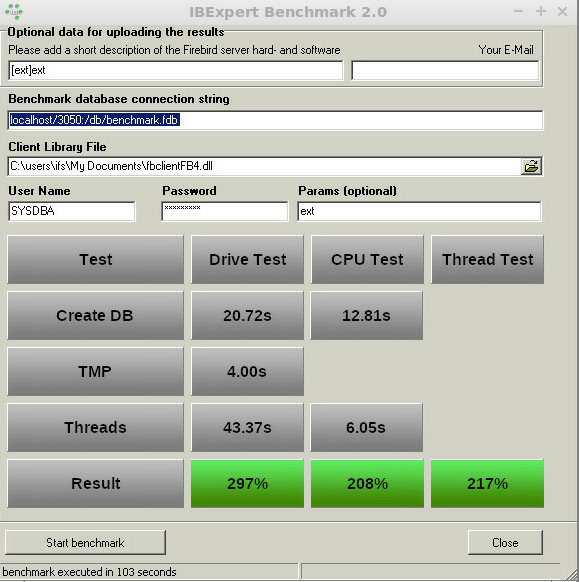
Benchmark (extended) results using Firebird 4.0 on an IFSML Server
To perform the IBExpert Benchmark at your customers and also take advantage of the extended and XXL benchmarks, you can use either the IBExpert Developer Studio customer version or the IBExpert Day Edition. To perform standard benchmarks locally, you may use our Free IBExpert Benchmark Tool.
Free IBExpert Benchmark Tool
You can use the IBExpert Benchmark Tool free of charge on any Windows computer. This limited special version allows standard benchmarks to be performed locally and includes Firebird 2.5, 3.0, 4.0 and 5.0 versions, executed in application mode, so you do not need to install Firebird on the server to be tested.
The Benchmark Tool is quick and easy to use: download it here: https://ibexpert.net/benchmark/setup_benchmark.exe, install it on the drive that you want to test.
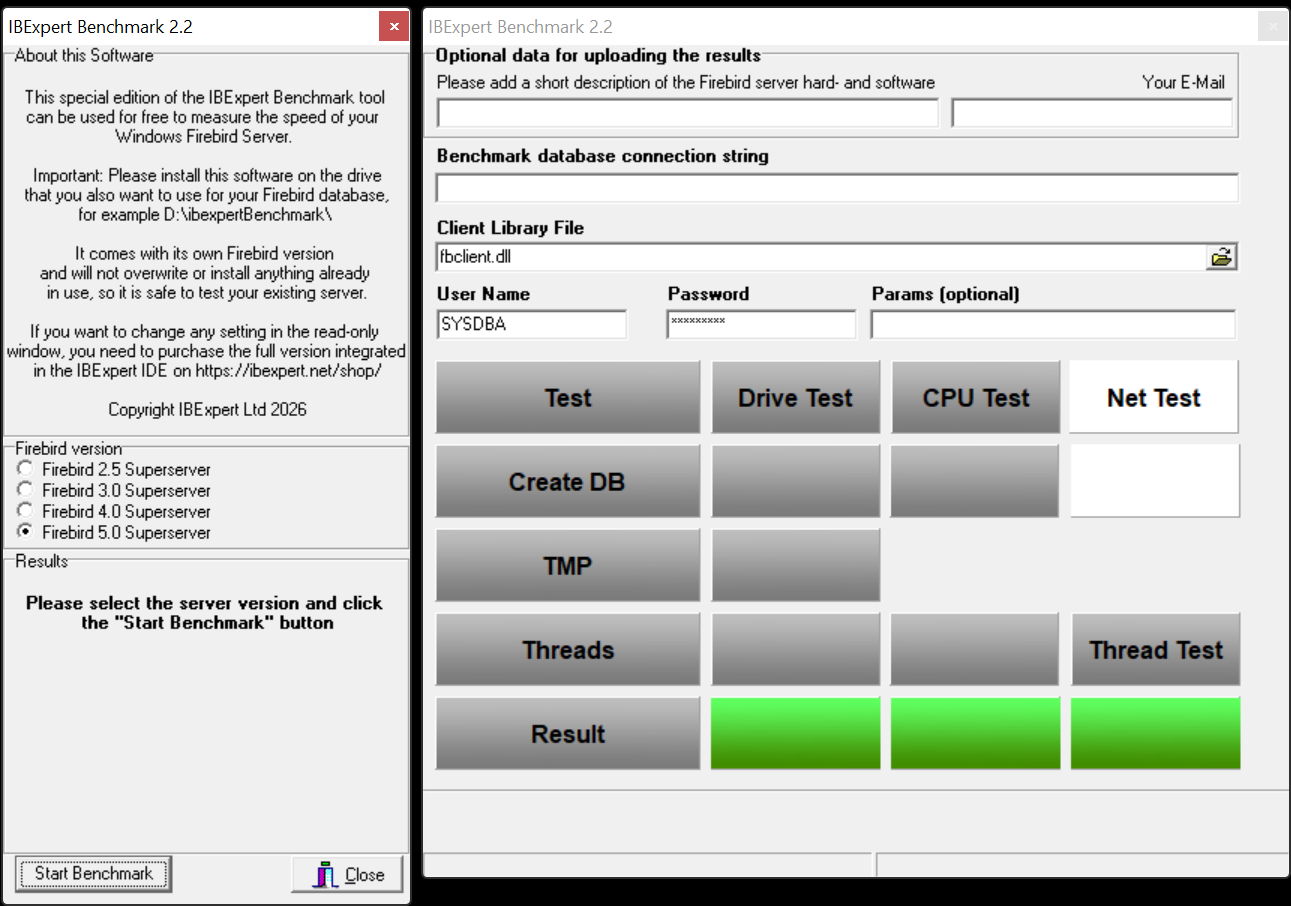
The Benchmark Tool tests 10 parallel running threads.
Running the benchmark will not overwrite any programs already in use, nor does it install anything, so you can safely run the benchmark on your server. The IBExpert Benchmark Tool does not use an existing Firebird installation and will only test the drive on which it is installed.
Select the Firebird version you wish to use for your benchmark in the left-hand panel: Firebird 2.5 Superserver, Firebird 3.0 Superserver or Firebird 4.0 Superserver. The selection in this free version has been limited so that even users with no Firebird knowledge or experience can easily perform this quick benchmark test.
The right-hand window in this free version is read-only. (In the paid version you can enter any and all of this information, e.g. define your own connection string and client library file).
Start the benchmark by clicking Start Benchmark in the bottom left-hand corner.
Important: you will need to install and run this as Admin.
Note: Should you receive an error message, please download and install the current version.
The benchmark process and results are explained below under How does it work?
If you would like a more flexible version of our Benchmark, which allows you to change various test options, test multiple drives, various Firebird instances or even perform a benchmark on a Linux operating system or remote servers, you should use the following Benchmark, included in all IBExpert customer version IDEs.
IBExpert Developer Studio Benchmark
This version offers standard, extended and XXL benchmarks, which can be performed on the Firebird 2.5 Superserver, Classic server, Superclassic server or Firebird 3.0 and Firebird 4.0 32- or 64-bit, Windows, Linux etc. either locally or remote. The Benchmark software is implemented as a 32-bit Windows software, but it can connect to any remote Firebird installation.
If you wish to collect the results for comparison with different hard and software combinations, enter a brief description of the configuration to be tested, along with the recipient email address for the statistic report.
Benchmark (extended) results using Firebird 4.0 on an IFSML Server
Then add the required database connection information - you need to set a new path for the newly generated database; if you specify the path of an existing database, you will receive a warning message:
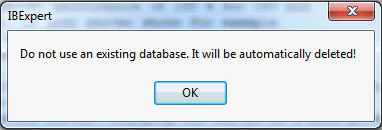
Specify the Firebird client, as well as the user name and password (the standard SYSDBA and masterkey). Finally click Start benchmark to run the benchmark test.
IBExpert now creates the demo database, which always follows the same guidelines. It then executes the INITALL procedure in this database. Following this parallel threads are created, which attempt to input further orders into the database. Following the Drive Test, the CPU Test test then is executed.
The results are displayed in the lower window: the drive and the CPU index are percentage index values comparing to our our IFS Server v. 6.0 series, which we rated at the time at 100%.
If you have specified an email address, you will receive the results by mail, with the heading as specified in the Please add a short description of the Firebird server hard- and software field.
How does it work?
Based on a demo database, which is created automatically, the standard benchmark, which is also included in the Free IBExpert Benchmark Tool, runs approximately 8 million operations (individual insert/update/delete/select statements) using 10 simultaneous processes in 2 runs on databases created with different parameters to demonstrate the impact of the physical drive speed.
The extended benchmark uses 50 parallel processes (simulating 50 concurrent users) and the XXL benchmark simulates 250 concurrent users with its 250 simultaneous processes.
Drive Test
The Drive Test is simply creating a benchmark database from a script. Within the Drive Test we changed the value of the so-called cache buffers (DefaultDBCachePages in firebird.conf) to 50, the smallest value possible. Then a stored procedure is executed inside the database to generate a lot of test data. In the Drive Test approximately 850,000 operations (i.e. INSERT, UPDATE, DELETE, SELECT statements) are carried out. This really measures the speed of the drive, because of the low-level of cache that is being used, is responsible for making a lot of I/O operations on the external drive.
- Create DB - shows the time in seconds that it takes to create the Demo database.
- TMP - Temporary file management that is used when for example, Firebird does not have any indices, which it can use, or it needs to perform some GROUP BY, HAVING or similar instructions.
- Thread test - this is the multi-threaded test. If you have for example a test on this machine, and you have 1 thread or 10 threads running, you will also see this running in the Task Manager. This can result in huge differences on different machines.
- Result - the basic value that is calculated here displays the combined results of the drive test, and we compare this value to a server that was distributed by ourselves around 2010 which had 100% speed. In reality, when you test on typical customer machines, especially in virtual environments, you will often see values of as little as 30%. Typical values are often in the range of 100%-150%.
CPU Test
This category calculates the percentage value for multi-threaded CPU tests with 5000 pages cache result to better see the advantages when using Firebird 3. This means that it no longer needs any operations on the disk. You will see a much faster result. The Thread Test, the multi-threaded line - with this one 10 parallel threads are always executed, which means it generates several thousand new orders inside the Demo database simultaneously. The Threads value here is the most important value, when you later have to check whether the server is really fast. Only this Threads value is recalculated to the Thread Test.
Thread Test
The Thread Test simply we take the CPU Test / Threads value and recalculate it. Thread Test simply means that we take the CPU Test / Threads value and compare it to the original machine. This machine is compared to our original machine as an index value.
How do your results compare?
Compare your server's performance to our IFS servers! This simple but effective tool gives you a reference benchmark, based on our recommended IFS Servers.
Our servers will show you a typical Firebird 2.5 Superserver performance of at least 200% for the CPU and at least 200% for the HDD Test with our IFS server series), und using Firebird 3.0 at least 230% for the CPU and at least 500% for the HDD Test. Results under 100% indicate an outdated server performance.
Important: This benchmark gives you a value to compare several hardware or software configurations running the Firebird server.
You will notice a huge performance increase, when comparing a Windows environment mit a Linux environment on the same hardware. This is partially due to the Windows NTFS file system, which is standard on Windows.
If, for example, you want to restart the Benchmark, especially on virtual machines, we always recommend executing this Benchmark several times, because sometimes when you execute it again, you can achieve better or worse values. This can happen because other jobs are being executed by the virtual machine host.
If the results are poor, click in the results window. You will be automatically redirected to our homepage. Here you can view our current offers for our really fast IFS Firebird servers.
Changing the server to a more powerful hardware might improve the speed by 100%. Additionally optimizing your software and database operations can often improve the speed by more than 1000%. Ask register@ibexpert.net for further support.
IBExpert Server Tools
(German-language version below)
The IBExpert Server Tools include IBEScript exe and dll, hkSCC.exe, the IBExpert Backup/Restore Scheduler and the IBExpert Encryption Plugin on Win32/Win64. The IBExpert Server Tools can also be deployed on virtual machines or in a cloud infrastructure.
- Hardware-independent activation, i.e. if the virtual machine is transferred to another host, the script engine will continue to run without re-registration.
- An unlimited right to use the software activation on the registered machine.
- Includes: IBEScript.exe, IBEScript.dll, hkSCC.exe, the IBExpert Backup/Restore Scheduler and the IBExpert Encryption Plugin on Win32/Win64.
- The Server Tools are available as a one-time download and must be downloaded and installed within 12 months from the date of purchase. Please pay attention to this period, especially if you have purchased a Server Tools package with multiple activations.
- Transfer to another (physical or virtual) machine is not possible.
- In virtual environments only 1 instance may be active per IBExpert Server Tools activation.
- 1 IBExpert Server Tools activation is required for each copy of the virtual machine on which the Script engine is to be used.
- The Server Tools include a single one-time download. Further unlock codes are not available following installation of the Server Tools.
- You may also purchase the IBExpert Server Tools from us and resell them on to your end customer or pass them on free of charge, if they are to be used on your customer's hardware. All the above rules remain applicable.
Please note that we cannot offer any software subscription services as the Server Tools include only a singular activation.
The IBExpert Server Tools do not include the IBExpert IDE.
All functionalities of the IBEBlock scripting language, for example, metadata and data comparison, multiple database access, etc. are also available. Details of the individual tools can be found here.
Please always use the current IBExpert Server Tools version, which is available in the IBExpert Download Center.
IBExpert Server Tools
Die IBExpert Server Tools enthalten die IBEScript exe und dll, hkSCC.exe, den IBExpert Backup/Restore Scheduler, und das IBExpert Encryption Plugin auf Win32/Win64. Die IBExpert Server Tools können auch auf virtuelle Maschinen oder in einer Cloud-Infrastruktur eingesetzt werden.
- Hardware-unabhängige Freischaltung, d.h. wenn die virtuelle Maschine auf einen anderen Host übertragen wird, läuft die Script Engine ohne erneute Registrierung weiter.
- Ein zeitlich unbegrenztes Nutzungsrecht der Software Installation auf der registrierten Maschine.
- Beinhaltet: IBEScript.exe, IBEScript.dll, hkSCC.exe, den IBExpert Backup/Restore Scheduler und das IBExpert Encryption Plugin für für Win32/Win64.
- Nachdem wir die IBExpert Server Tools auf Ihrem Kundenkonto im IBExpert Download Center freigeschaltet haben, stehen die Server Tools als einmaliger Download zur Verfügung und müssen innerhalb von 12 Monaten ab Kaufdatum heruntergeladen und installiert werden. Bitte achten Sie auf diesen Zeitraum, insbesondere, wenn Sie ein Server Tools Paket mit mehreren Freischaltungen erworben haben.
- Eine Übertragung auf eine andere (physische oder virtuelle) Maschine ist nicht möglich.
- In virtuellen Umgebungen darf pro Aktivierung der IBExpert Server Tools nur 1 Instanz aktiv sein.
- Für alle Kopien der virtuellen Maschine, auf der die Script Engine benutzt werden soll, ist jeweils 1 IBExpert Server Tools Installation erforderlich.
- Die Server Tools beinhalten je 1 einmaligen Download. Weitere Freischaltcodes stehen nach Installation der Server Tools nicht zur Verfügung.
- Sie dürfen auch die IBExpert Server Tools bei uns einkaufen und an Ihren Endkunden weiterverkaufen oder kostenlos weitergeben, wenn diese auf der Hardware Ihres Kunden eingesetzt werden soll. Alle oben aufgeführten Regeln gelten weiterhin.
Bitte beachten Sie, dass wir Ihnen keinen Software Subscriptionsservice anbieten können, da die Server Tools eine einmalige Installation beinhalten.
Die IBExpert Server Tools enthalten keine IBExpert IDE.
Alle Funktionalitäten in der IBEBlock Skriptsprache, wie beispielsweise der Metadaten- oder Datenvergleich, mehrfacher Datenbankzugriff, etc. sind verfügbar. Weitere Details zu den Server Tools Features finden Sie hier.
Verwenden Sie bitte immer die aktuelle IBExpert Server Tools Version, die Ihnen im IBExpert Download Center zur Verfügung steht.