IBExpert Benchmark
The current version was released in January 2026.
The Net Test executes 2000 inserts to a table with 100 columns and sends all params from client to the server in individual params, so this function will create a few hundred thousand very small TCP IP packages over the network and the total time is measured by how many operations were done within each second.
A good value on fast networks should have around >=400 IOPs. If it is much slower, you should ask your network support to check the speed of components used.
It is not part of the calculated percentage result values, and also the time it takes is not used there, since these result values use minimal network traffic to measure the server speed and not the network speed.
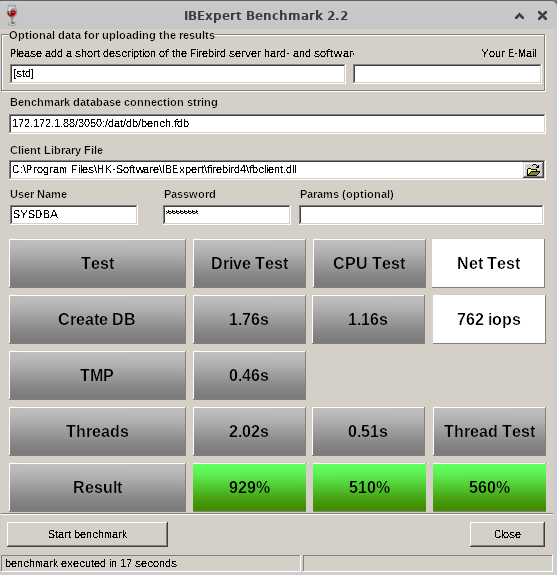
Benchmark results on an IFSLR Server using Ubuntu Linux 22 and Firebird 5
Compare your server's performance to our IFS servers!
How do you measure the performance of your own server or your clients'? Have you ever tried to compare the database speed of your Firebird server with new server hardware? Is a XEON Machine better than an Opteron? What improvements can you expect from fast SAS hard disks, RAID controllers or Enterprise SSDs?
This simple but effective tool gives you a reference benchmark, based on our recommended IFS Servers. Using IBExpert Benchmark you can generate and compare a reproducible speed index for your Firebird Server hardware. On average, our IFS servers with Firebird are 5 to 10 times faster than the server or virtual machines that our customers have previously used.
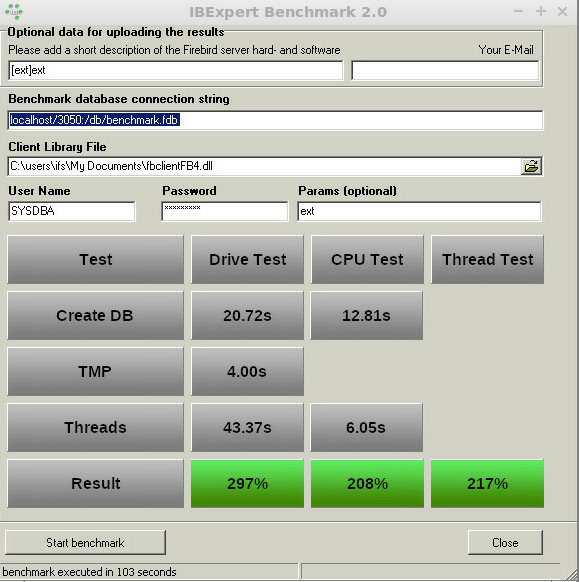
Benchmark (extended) results using Firebird 4.0 on an IFSML Server
To perform the IBExpert Benchmark at your customers and also take advantage of the extended and XXL benchmarks, you can use either the IBExpert Developer Studio customer version or the IBExpert Day Edition. To perform standard benchmarks locally, you may use our Free IBExpert Benchmark Tool.

Free IBExpert Benchmark Tool
You can use the IBExpert Benchmark Tool free of charge on any Windows computer. This limited special version allows standard benchmarks to be performed locally and includes Firebird 2.5, 3.0 and 4.0 versions, executed in application mode, so you do not need to install Firebird on the server to be tested.
The Benchmark Tool is quick and easy to use: download it here: https://ibexpert.net/benchmark/setup_benchmark.exe, install it on the drive that you want to test.
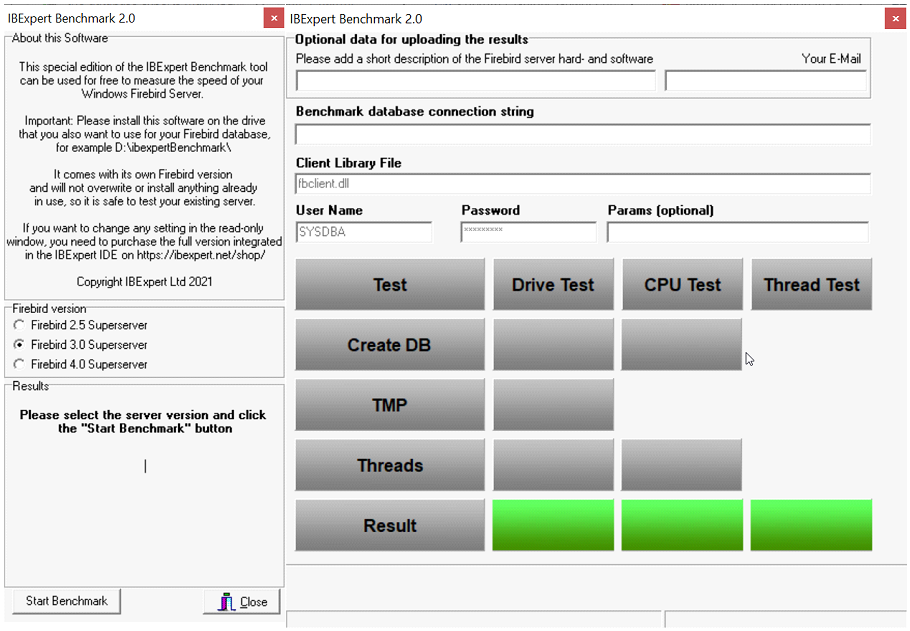
Since September 2021 the benchmark now uses the latest Firebird versions 2.5.9 and 3.0.7, and can also use Firebird 4.0.0 with the 32K page size. IBExpert Benchmark 2.0 was released on 17th November 2021.
The Benchmark Tool tests 10 parallel running threads.
Running the benchmark will not overwrite any programs already in use, nor does it install anything, so you can safely run the benchmark on your server. The IBExpert Benchmark Tool does not use an existing Firebird installation and will only test the drive on which it is installed.
Select the Firebird version you wish to use for your benchmark in the left-hand panel: Firebird 2.5 Superserver, Firebird 3.0 Superserver or Firebird 4.0 Superserver. The selection in this free version has been limited so that even users with no Firebird knowledge or experience can easily perform this quick benchmark test.
The right-hand window in this free version is read-only. (In the paid version you can enter any and all of this information, e.g. define your own connection string and client library file).
Start the benchmark by clicking Start Benchmark in the bottom left-hand corner.
Important: you will need to install and run this as Admin.
Note: Should you receive an error message, please download and install the current version.
The benchmark process and results are explained below under How does it work?
If you would like a more flexible version of our Benchmark, which allows you to change various test options, test multiple drives, various Firebird instances or even perform a benchmark on a Linux operating system or remote servers, you should use the following Benchmark, included in all IBExpert customer version IDEs.
IBExpert Developer Studio Benchmark
This version offers standard, extended and XXL benchmarks, which can be performed on the Firebird 2.5 Superserver, Classic server, Superclassic server or Firebird 3.0 and Firebird 4.0 32- or 64-bit, Windows, Linux etc. either locally or remote. The Benchmark software is implemented as a 32-bit Windows software, but it can connect to any remote Firebird installation.
If you wish to collect the results for comparison with different hard and software combinations, enter a brief description of the configuration to be tested, along with the recipient email address for the statistic report.
Benchmark (extended) results using Firebird 4.0 on an IFSML Server
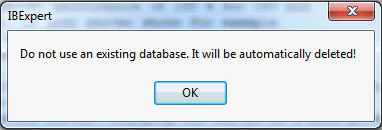
Then add the required database connection information - you need to set a new path for the newly generated database; if you specify the path of an existing database, you will receive a warning message:
Specify the Firebird client, as well as the user name and password (the standard SYSDBA and masterkey). Finally click Start benchmark to run the benchmark test.
IBExpert now creates the demo database, which always follows the same guidelines. It then executes the INITALL procedure in this database. Following this parallel threads are created, which attempt to input further orders into the database. Following the Drive Test, the CPU Test test then is executed.
The results are displayed in the lower window: the drive and the CPU index are percentage index values comparing to our our IFS Server v. 6.0 series, which we rated at the time at 100%.
If you have specified an email address, you will receive the results by mail, with the heading as specified in the Please add a short description of the Firebird server hard- and software field.
How does it work?
Based on a demo database, which is created automatically, the standard benchmark, which is also included in the Free IBExpert Benchmark Tool, runs approximately 8 million operations (individual insert/update/delete/select statements) using 10 simultaneous processes in 2 runs on databases created with different parameters to demonstrate the impact of the physical drive speed.
The extended benchmark uses 50 parallel processes (simulating 50 concurrent users) and the XXL benchmark simulates 250 concurrent users with its 250 simultaneous processes.
Drive Test
The Drive Test is simply creating a benchmark database from a script. Within the Drive Test we changed the value of the so-called cache buffers (DefaultDBCachePages in firebird.conf) to 50, the smallest value possible. Then a stored procedure is executed inside the database to generate a lot of test data. In the Drive Test approximately 850,000 operations (i.e. INSERT, UPDATE, DELETE, SELECT statements) are carried out. This really measures the speed of the drive, because of the low-level of cache that is being used, is responsible for making a lot of I/O operations on the external drive.
- Create DB - shows the time in seconds that it takes to create the Demo database.
- TMP - Temporary file management that is used when for example, Firebird does not have any indices, which it can use, or it needs to perform some GROUP BY, HAVING or similar instructions.
- Thread test - this is the multi-threaded test. If you have for example a test on this machine, and you have 1 thread or 10 threads running, you will also see this running in the Task Manager. This can result in huge differences on different machines.
- Result - the basic value that is calculated here displays the combined results of the drive test, and we compare this value to a server that was distributed by ourselves around 2010 which had 100% speed. In reality, when you test on typical customer machines, especially in virtual environments, you will often see values of as little as 30%. Typical values are often in the range of 100%-150%.
CPU Test
This category calculates the percentage value for multi-threaded CPU tests with 5000 pages cache result to better see the advantages when using Firebird 3. This means that it no longer needs any operations on the disk. You will see a much faster result. The Thread Test, the multi-threaded line - with this one 10 parallel threads are always executed, which means it generates several thousand new orders inside the Demo database simultaneously. The Threads value here is the most important value, when you later have to check whether the server is really fast. Only this Threads value is recalculated to the Thread Test.
Thread Test
The Thread Test simply we take the CPU Test / Threads value and recalculate it. Thread Test simply means that we take the CPU Test / Threads value and compare it to the original machine. This machine is compared to our original machine as an index value.
How do your results compare?
Compare your server's performance to our IFS servers! This simple but effective tool gives you a reference benchmark, based on our recommended IFS Servers.
Our servers will show you a typical Firebird 2.5 Superserver performance of at least 200% for the CPU and at least 200% for the HDD Test with our IFS server series), und using Firebird 3.0 at least 230% for the CPU and at least 500% for the HDD Test. Results under 100% indicate an outdated server performance.
Important: This benchmark gives you a value to compare several hardware or software configurations running the Firebird server.
You will notice a huge performance increase, when comparing a Windows environment mit a Linux environment on the same hardware. This is partially due to the Windows NTFS file system, which is standard on Windows.
If, for example, you want to restart the Benchmark, especially on virtual machines, we always recommend executing this Benchmark several times, because sometimes when you execute it again, you can achieve better or worse values. This can happen because other jobs are being executed by the virtual machine host.
If the results are poor, click in the results window. You will be automatically redirected to our homepage. Here you can view our current offers for our really fast IFS Firebird servers.
Changing the server to a more powerful hardware might improve the speed by 100%. Additionally optimizing your software and database operations can often improve the speed by more than 1000%. Ask register@ibexpert.net for further support.
IBExpert Replicator Enterprise IBER
The new IBExpert Replicator Enterprise is now ready!
The new IBER solution will be installed in a remote session by an IBExpert engineer on a Windows or Linux machine (virtual or physical) in your network while your employees are working on the database.
What do you need for this? We recommend installing the IBER on a virtual machine, so that in the event of a unrecoverable failure of your existing production server, making it impossible to use the database on that machine, you or our engineer can activate the replicated database as a new production database by running a single batch file.
The existing replication master server can be any Linux or Windows machine in your local network. We recommend a server, which will execute the IBExpert Benchmark with a least 100% in each category. If faster servers are needed, please consider our IFS Server Hardware.
The replication target server can be any physical or virtual machine also running Windows or Linux.
It should be preinstalled with the same Firebird installation that is already used on your existing master server. If our help is needed and you are not sure how to copy such a configuration, our engineers can evaluate your master server installation and transfer the Firebird server to a second machine following a very brief out time.
The IBER virtual machine can run on a separate machine or also on your replication target server as a virtual machine. If you do not have any preferred VM system, we will deploy the free VirtualBox software.
The IBER basic price includes up to one hour of remote session work for the setup. This requires that we get the above setup already preinstalled and the customer can give us the connection strings/SYSDBA or Owner and password of the Firebird databases used. Also, we expect to have the above-mentioned IBER VM and target server with a similar Firebird server already preinstalled. The basic price covers up to 2 databases to be replicated.
If the customer is unable to carry out these preparations, we can perform additional configuration work based on our IBExpert Hotline package rates. This basically means: If you do not have your own IT manager, who is able to implement and document all above steps for us, and also your software manufacturer does not want to help you on this task, you can be confident that our IBExpert engineers will make it work.
The IBER Product also includes 12-month emergency service in case of unrecoverable errors on our master server up to 4 times per year. If this happens more often, you should consider changing your server hardware. A IBExpert hotline package will still allow you to use our service, also when issues are to be solved that are not connected to the IBER replication. If such an emergency case is reported to us, but we see that a simple server restart solves the problem or the problem has nothing to do with Firebird, we will charge the time on the customer’s hotline account.
At the end of the initial 12-month period, we will charge you for a further 12 months with the IBER Subscription package, if our help and software updates are still required. Without the continued subscription, the software will not cease working, but in case of an emergency, our remote support then requires a prepaid hotline package.
What do you get?
After the basic installation carried out by our engineers remotely, which is typically done using our GoTo Meeting conference system, you will see a number of separate batch files on the IBER virtual machine which will perform the following tasks:
a) Create and init a new replication target for a specific master database
b) Drop any replication technology from a specific master database
c) Execute the replication based on Firebird events
d) Convert a target database to be a 100% replacement for the master database
If your software manufacturer does not want any alterations made in the database or does not directly support our technology, you can always execute script b) whenever the software manufacture applies, for example, his updates on the database, since this script will completely remove any IBER object from the database.
After the updates have been applied, you only need to run the script a) again to recreate any necessary IBER objects and init the new replication target again.
After init has been run, script c) will start and execute all operations (insert/update/deletes) performed in the master database, almost in real time, onto the replicated target database. If script c) cannot connect to master or target database, for example because of a temporary server reboot, it will ignore the errors for a few seconds and, after the reconnection is made, will process all records that were logged while the connection was not possible.
If a backup and restore of the existing database is performed, a new init process using script a) is mandatory. A backup alone does not need such a new init.
The IBER replication can be interrupted at any time, due to a local power cut or whatever other reason. Once the systems are back online, there is no manual work required to reactivate the replication again and no new sync is necessary. Everything that is done on the master database will be immediately replicated to the target database right after the IBER VM and the target server can be reached again.
Important: If your software manufacturer claims that any manipulation of the database structure will result in a loss of warranty, you should request the manufacturer get in touch with us, since we can guarantee that our system has no negative impact on any Firebird 2.5-Firebird 5.0 databases except for a very low level of additional server performance which the IBER system will operate via one additionally connected database user.
Zero maintenance and full real-time replication.
Pricing
IBExpert Replicator Enterprise IBER Starter Package including init and 12 months support 1020 €.
Firebird Training and Workshops
(German-language version below)
Our training sessions using online video transmission combine personal training with physical independence: promptly and flexibly and tailored to your requirements
Perhaps your team is also located at different sites?
All employees can take part in our training courses, even from their home office.
The number of participants does not affect the cost.
The coaching days can be scheduled at relatively short notice and you and your team will not be absent from productive work for too long during the course.
The course can take place in a much shorter period of time. We train in blocks of 2-4 hours at a time.
We tailor all topics individually to your company and the requirements of your team, taking into account the level of knowledge of the participants and also look at tackling current projects.
The training courses can thus be structured in blocks and/or key topics can be scheduled for different employees, and can of course also be adjusted during an ongoing training session.
Our workshops are complemented by video recordings, which we capture during the workshops and make them available to you in digital form.
Workshops are much more effective when you structure them interactively. We offer our courses as interactive workshops and not in a classic lecture format.
You can send your training enquiry to register@ibexpert.net.
We coordinate the agenda, the dates and the technical implementation together with yourselves.
Topics
Upgrading from Firebird to Firebird 5.0/6.0
Setting up a permanent SQL monitoring on your own database
Applying the Trace API and results for optimization
Setting up and understanding basic master-slave replication
Working with multiple databases and transparent external blob storage
IBExpert is the ideal partner for training and workshops in your company
Our standard courses:
IBExpert und Firebird Power Workshop
IBExpert Firebird 3 Bootcamp
Bootcamp database web applications using Firebird
Firebird Developer Days
Lazarus training for Delphi programmers
IBExpert und Firebird Training und Schulungen
Unsere Schulungen per Online-Videoübertragung kombinieren ein persönliches Training mit räumlicher Unabhängigkeit: Zeitnah und flexibel und auf Ihre Anforderungen zugeschnitten
Vielleicht befindet sich Ihr Team auch an verschiedenen Standorten?
An unseren Schulungen können alle Mitarbeiter teilnehmen, auch aus dem Home-Office.
Die Anzahl der teilnehmenden Personen wirkt sich nicht auf die Kosten aus.
Die Schulungstage können vergleichsweise kurzfristig eingeplant werden und Sie und Ihr Team fehlen während der Schulung nicht so lange im produktiven Einsatz.
Die Schulung kann in zeitlich deutlich kürzerem Umfang stattfinden. Wir schulen in Blöcken zu je 2-4 Stunden.
Alle Themen stimmen wir individuell auf Ihr Unternehmen und die Anforderungen Ihres Teams ab, berücksichtigen dabei den Kenntnisstand der teilnehmenden Personen und gehen auch auf aktuelle Projekte ein.
Die Schulungen können so blockweise darauf aufgebaut und/oder Themenschwerpunkte für verschiedene Mitarbeiter eingeplant werden, natürlich auch während einer laufenden Schulungsphase.
Ergänzt werden unsere Schulungen durch Videoaufnahmen, die wir mitschneiden und Ihnen digital zur Verfügung stellen.
Workshops sind viel effektiver, wenn man sie interaktiv gestaltet. Unsere Schulungen bieten wir als interaktive Workshops an und nicht als klassisches Frontal-Format
Sie stellen Ihre Schulungsanfrage an register@ibexpert.net.
Wir stimmen gemeinsam mit Ihnen die Agenda, die Termine und die technische Durchführung ab.
Themen
Upgrade von Firebird auf 5.0/6.0
SQL Monitoring auf der eigenen Datenbank dauerhaft einrichten
Trace API anwenden und Ergebnisse zur Optimierung nutzen
Basis Master Slave Replikation einrichten und verstehen
Arbeiten mit mehreren Datenbanken und transparentes Auslagern von Blobs
IBExpert ist der ideale Partner für Schulungen und Workshops in Ihrem Unternehmen
Unsere Standardschulungen:
IBExpert und Firebird Power Workshop
IBExpert Firebird 3 Bootcamp
Bootcamp Datenbankwebapplikationen mit Firebird
IBExpert Firebird Entwicklertage
Lazarus Schulung für Delphi Programmierer
IBExpert Developer Studio
(German-language version below)
The only tools you'll ever need
You develop SQL databases professionally and need an efficient and powerful tool? With IBExpert you have made the right choice. It enables you in just a short space of time to become acquainted with, and achieve a command of the open source database, Firebird, as well as its commercial relative, InterBase®. There are powerful and yet easy-to-learn editors for all essential functions.
Whether you enjoy the control of hand-coding DML or DDL statements or working in a visual editing environment, IBExpert makes it easy to get started and provides you with vital tools to speed and enhance your work.
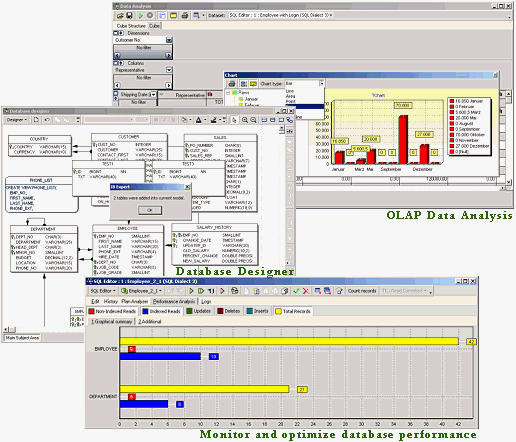
IBExpert includes many coding tools and features: visual editors for all database objects, an SQL Editor and Script Executive, a Debugger for stored procedures and triggers, a Query Builder, a powerful Database Designer and even its own scripting language, IBEBlock. A list of further IBExpert features can be found below.
IBExpert is the most comprehensive GUI tool for Firebird and InterBase® on the market today.
IBExpert Developer Studio includes the following components:
Documentation & support
All our products are accompanied by a comprehensive online documentation as well as online tutorials in our Learning Center.
Purchase
You can find a summary of all IBExpert software products and prices under IBExpert products, services & prices.
If you have any further questions please mail register@ibexpert.net.
IBExpert Features
- Monitor and optimize database performance with the Plan Analyzer, Performance Analysis, SQL Monitor, Database Statistics, Recompute Selectivity of all Indices, Recompile Procedures and Triggers, global Stored Procedure/Trigger Operations Index analysis etc.
- For advanced queries use the IBExpert Script Executive, which also offers a wide range of useful script extensions, only available in IBExpert; or the Visual Query Builder, ideal for those gaining their first experience with SQL.
- Create your own database from a model, or a model from your existing database with the Database Designer, including layers, subject areas, autoroute, notation format, and much more.
- Comprehensive Data Analysis / OLAP for cross-classified tables, statistics and graphics – all exportable in a number of formats.
- Copy, move or compare data and even join tables – all from different databases in a single script using IBEBlock.
- With IBEBlock you have a powerful set of DDL, DML and other statements executed on both the server and client side, and which include some specific constructs applicable only in IBExpert or IBEScript, regardless of the database server version.
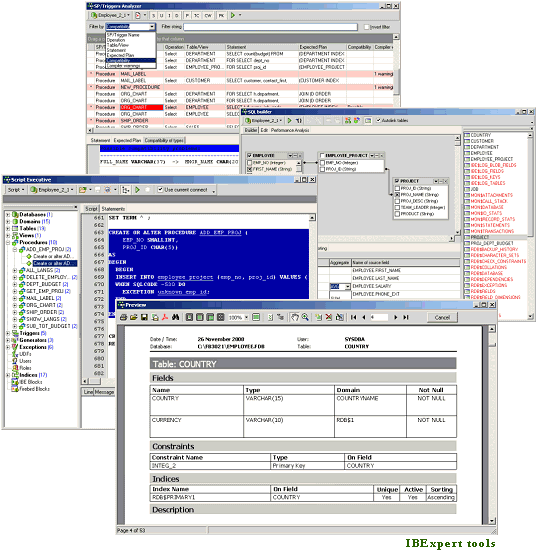
- Speed up and optimize your procedure and trigger programming with the Stored Procedure and Trigger Debugger; use the Assistant for their creation from any SQL statements; analyze using the Stored Procedure, Trigger and View Analyzer.
- User-defined or ready-made reports for database documentation, which can be stored in the database or as a file (PDF, Word etc.). Quick and simple HTML database documentation can be produced with just a few simple mouse clicks!
- Extract Metadata to create a copy of your database, with or without data content.
- Integrated Communications Diagnostic.
- Export of results in several formats; direct CSV file and ODBC data import.
- User and Grant Manager, with Autogrant function for automatic assignment of privileges for new database objects.
- See what's really happening in your database using IBExpert's Log Manager or the Trace and Audit Services (since Firebird 2.5).
- Hyperlinks, Code Completion, Assistants and many other features to speed up your development.
- Flexible user-definable interface – customize your screen, projects, code templates etc.
- Numerous product constellations to meet your requirements: Single and mutli-user software packages, Day Edition and free Personal and Educational versions.
- Regular fully-documented updates. Quick support of new Firebird features.
- Comprehensive documentation (context-sensitive, online and in printed form), online tutorial videos and active forum support.
- Multilingual.
- With full Unicode support.
- … and much, much more!
IBEScript.exe
All registered IBExpert Developer Studio versions (except the IBExpert Day Edition and the free IBExpert Developer Studio Educational Edition) include IBEScript.exe for your own script and IBEBlock development. This is also offered as part of the IBExpert Server Tools, for scripts and IBEBlock deployment on customer computers.
IBExpertDemoDB
Another component included in the Developer Studio is the IBExpertDemoDB database, which can be used for benchmark and performance testing.
Documentation & support
All our products are accompanied by a comprehensive online documentation as well as online tutorials in our Learning Center.
Purchase
You can find a summary of all IBExpert software products and prices under IBExpert products, services & prices.
If you have any further questions please mail register@ibexpert.net.
Das einzige Werkzeug, das Sie brauchen werden
Sie entwickeln SQL-Datenbanken professionell und benötigen ein effizientes und leistungsstarkes Werkzeug? Mit IBExpert haben Sie die richtige Wahl getroffen. Sie werden sich in kürzester Zeit mit seinen Funktionen vertraut machen können und so Ihre Open-Source-Datenbank Firebird und das kommerzielle Gegenstück InterBase® beherrschen. Ob Sie die Kontrolle handcodierter DML oder DDL Anweisungen oder das Arbeiten in einer optischen Entwicklungsumgebung bevorzugen, IBExpert macht Ihnen den Anfang leicht und bietet Ihnen hervorragende Werkzeuge zur Beschleunigung und Erweiterung Ihrer Arbeit.
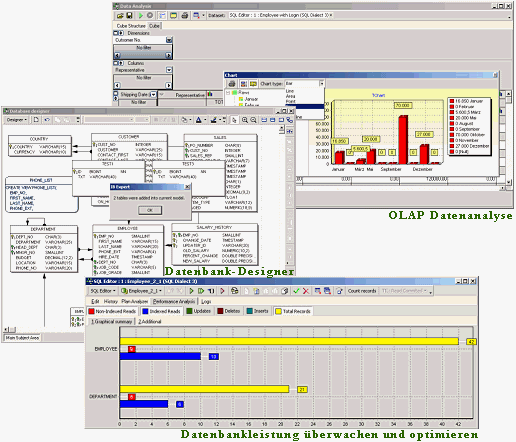
IBExpert enthält viele Codierwerkzeuge und Features: optische Editoren für alle Datenbankobjekte, ein SQL Editor und Skriptausführung, ein Debugger für Stored Procedures und Trigger, ein Abfragegenerator, einen leistungsstarken Datenbank-Designer und sogar die eigene Skriptsprache IBEBlock. Einen Überblick über alle IBExpert Features finden Sie hier.
IBExpert ist das umfassendste GUI Tool für Firebird und InterBase® auf dem heutigen Markt.
IBExpert Developer Studio beinhaltet folgende Komponenten:
Dokumentation & Support
IBExpert stellt eine umfassende Online Dokumentation sowie Online-Tutorials in unserem Learning Center zur Verfügung.
Bestellen
Eine Übersicht aller IBExpert Produkte und Diensteistungen finden Sie unter Alle Produkte & Preise.
Wenn Sie weitere Fragen haben, senden Sie bitte eine Mail an register@ibexpert.net.
IBExpert Features
- Überwachen und optimieren Sie die Datenbankgeschwindikeit mit der Plananalyse, Leistungsanalyse, SQL Monitor, Datenbankstatistik, Neuberechnung der Selektivität aller Indizes, Rekompilierung von Prozeduren und Triggern, globale Stored Procedure/Triggeroperationen, Indexanalyse etc.
- Verwenden Sie für komplexere Abfragen die IBExpert Skriptausführung, die über eine große Bandbreite an nützlichen Skripten verfügt, die nur in IBExpert erhältlich sind; oder der visuelle Abfragegenerator, ideal für diejenigen, die Ihre ersten Erfahrungen mit SQL machen.
- Erzeugen Sie Ihre eigene Datenbank von einem Modell, oder mit dem Datenbankdesigner ein Modell von Ihrer vorhandenen Datenbank, inklusive Layers, Themenbereiche, Autoroute, Benachrichtigungformat und vieles mehr.
- Umfassende Datenanalyse / OLAP für Kreuztabellen, Statistiken und Graphiken – alles exportierbar in viele Formate.
- Kopieren, verschieben oder vergleichen Sie Daten und verbinden Sie Tabellen – alles von verschiedenen Datenbanken in einem einzigen Skript mit IBEBlock.
- Mit IBEBlock haben Sie ein leistungsstarker Satz von DDL-, DML- und anderen Anweisungen, die auf der Server- und auf der Clientseite ausgeführt werden und die einige spezifische Konstruktionen enthalten, die nur in IBExpert oder IBEScript anwendbar sind, unabhängig von der Datenbankserverversion.
- Beschleunigen und optimieren Sie Ihre Prozeduren und Trigger durch Programmierung mit Stored Procedure und Trigger Debugger; verwenden Sie den Assistenten für deren Erzeugung aus einer SQL-Anweisung; analysieren Sie mit der Stored Procedure-, Trigger- und Viewanalyse.
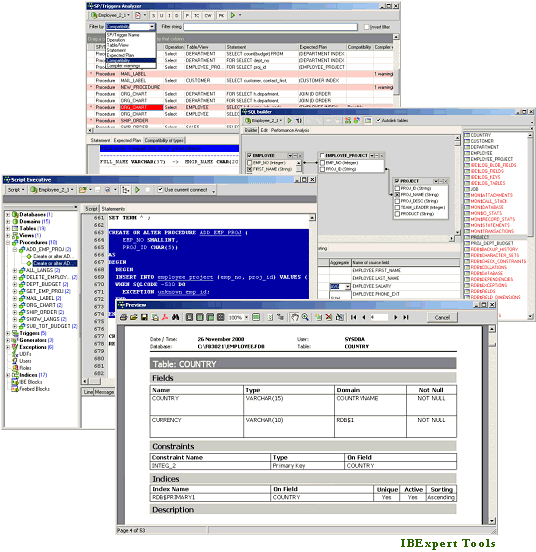
- Benutzerdefinierte oder vorgefertigte Berichte zur Datenbankdokumentation, die in der Datenbank oder als Datei (PDF, Word etc.). gespeichert werden können. Schnelle und einfache HTML-Datenbankdokumentation kann mit wenigen Mausklicks hergestellt werden!
- Extrahieren Sie Metadaten, um eine Kopie Ihrer Datenbank mit oder ohne Inhalt zu erstellen.
- Integrierte Kommunikationsdiagnose.
- Exportieren der Ergebnisse in verschiedene Formate; direkter CSV-Datei und ODBC-Datenimport.
- Benutzer- und Rechtemanager, mit Autogrant-Funktion zur automatischen Zuweisung von Rechten für neue Datenbankobjekte.
- Überwachen Sie Ihrer Datenbank mit Hilfe von den IBExpert Trace und Audit Services (seit Firebird 2.5).
- Hyperlinks, Codeergänzung, Assistenten und viele andere Features zur Beschleunigung Ihrer Entwicklung.
- Flexible benutzerdefiniertes Interface – passen Sie Ihren Bildschirm, Ihre Projekte, Code-Templates an etc.
- Zahlreiche Produktvarianten auf Ihre Bedürfnisse zugeschnitten: Einzel- und Multi-User Software Pakete, Day Editions, die IBExpert Developer Studio Company Year Edition und IBExpert Enterprise Server Year Edition für das Arbeiten in virtuellen Umgebungen, eine kostenlose Personal Edition und Schul-/Bildungsversion.
- Regelmäßige voll-dokumentierte Updates. Schnelle Unterstützung von neuen Firebird Features.
- Umfassende Online-Dokumentation, Online Lernvideos und aktiven Forum Support.
- mehrsprachig
- mit vollständigem Unicode-Support
- … und vieles, vieles mehr!
IBEScript.exe
Alle registrierten IBExpert Developer Studio Versionen (ausgenommen die IBExpert Day Edition und die kostenlose IBExpert Developer Studio Educational Edition) beinhalten die IBEScript.exe für die eigene Entwicklung von Skripten und IBEBlocks. Dies wird auch als Teil der IBExpert Server Tools angeboten, für den Einsatz Ihrer Skripte und IBEBlocks auf Kundenrechnern.
IBExpertDemoDB
Eine weitere Komponente, die im Developer Studio enthalten ist, ist die IBExpertDemoDB Datenbank, die als Benchmark und Leistungstest verwendet werden kann.
Dokumentation & Support
IBExpert stellt eine umfassende Online Dokumentation sowie Online-Tutorials in unserem Learning Center zur Verfügung.
Bestellen
Eine Übersicht aller IBExpert Produkte und Diensteistungen finden Sie unter Alle Produkte & Preise.
Wenn Sie weitere Fragen haben, senden Sie bitte eine Mail an register@ibexpert.net.
IBExpert Distribution OEM Edition
The IBExpert Distribution OEM Edition allows unlimited distribution of the purchased IBExpert IDE software file or IBExpert scripts with your application for a period of 5 years.
You will receive an IBExpert.exe, IBEScript.exe and/or IBEScript.dll file created exclusively for your company, which you may use on any of your customers' computers on which your software is running, but also on any computer belonging to your group of companies (purchase, rental, leasing). However, distribution beyond this is explicitly prohibited. Employees who no longer work in your company may no longer use this software and may not continue to use it. You are responsible for ensuring that the OEM is only used in accordance with the conditions agreed between IBExpert and you (IBExpert contractual partner) and you must ensure that no arbitrarily available tool is distributed for activation. The OEM Edition may continue to be used on computers, where it has already been installed, for an unlimited period of time. For new installations however, a new IBExpert Distribution OEM must be purchased for the respective module after 5 years.
Updates are not included and must be commissioned additionally.
The OEM Update Subscription provides you access to all updates for 60 months (12 months on request).
The OEM Update Subscription cannot be ordered retrospectively, but only as an extension when directly ordering an IBExpert Distribution OEM Edition and is charged in advance.
Prices/Modules
IBExpert Distribution OEM Edition IDE
Software file: IBExpert.exe EUR 14,095
OEM Update Subscription 60 months: EUR 17,635
OEM Update Subscription per 12 months prepaid: EUR 4,645
IBExpert Distribution OEM Edition Script
Software file: IBEScript.exe: EUR 14,095
OEM Update Subscription 60 months: EUR 17,635
OEM Update Subscription per 12 months prepaid: EUR 4,645
IBExpert Distribution OEM Edition DLL
Software file: IBEScript.dll: EUR 14,095
OEM Update Subscription 60 months: EUR 17,635
OEM Update Subscription per 12 months prepaid: EUR 4,645
If no OEM Update Subscription is ordered as an extension to the IBExpert Distribution OEM Edition or the annual subscription period has been interrupted, the OEM Update Subscription cannot be ordered retrospectively.
We then charge a flat-rate service fee of currently EUR 4,645 per update for the respective OEM module.
The registration code (a character string to be calculated on the basis of the computer) does not require any internet access, portal access or access from third parties.
The IBExpert Distribution OEM Edition includes an individualised DLL or EXE with the name of the IBExpert contract partner.
On each computer on which an OEM DLL or EXE is to be used, the OEM licensee must calculate a registry entry in accordance with our specifications and save it in the HKCU area before using the OEM EXE or DLL.
Before using the OEM EXE or DLL, the OEM licensee must save it in the registry in the HKCU area.
The registration entry is calculated and checked individually, based on the local computer name.
Hardware changes or deployment on virtual machines do not change the code if the selected computer name does not change in the process.
The registration entry must be generated by the end customer's licensed software and not by separate software that can also be used without the correct licensing.
You will receive a source code sample as an example for this procedure as part of the OEM package.
IBExpert Firebird Bootcamps:
(German-language version below)
What our customers are saying

"Thanks for a very enlightening bootcamp in Orlando, Florida. I certainly learned a lot and look forward to putting at least some of into effect with my own systems. I also now realize that I need to spend more time with ibeblock so as to be more productive."
Bruce Eglington
"The Bootcamp was a valuable learning experience for my staff and I. We have been using Firebird and IBExpert for many years, but the presenter was extremely knowledgeable and was able to offer a fresh perspective to several issues we have. Overall, it was two days and $$ well spent."
Rick Long, Spectrum Software, Inc.
"I found the IBExpert Bootcamp in Orlando to be quite elucidating, our company has been using Firebird for years and I learned that we are not using Firebird to its full potential. We have been hesitant to move from Firebird 2.5 to 3, but the techniques I was able to observe at the class convinced me to move ahead with beginning the upgrade process with the assistance of IBExpert Developer Studio. I also learned methods that will greatly enhance our ability to support our clients across the globe. Thanks for the great experience!"
Roark Sheehan
"I found the 2-day IBExpert Bootcamp to be very helpful and informative. The built-in IBExpert benchmark tool will be very useful in evaluating our client’s hardware ability to efficiently host a Firebird database. The information presented during the Bootcamp will also help us during our transition from Firebird 1.5/2.5 to Firebird 3.0. Holger and Christian are very knowledgeable in Firebird techniques and optimization strategies and I would highly recommend their services."
Kenneth Severud, BuilderMT
"The Firebird Admin Bootcamp was very informative, being able to sit down to better understand the behind-the-scenes of Firebird and IBExpert is well worth the investment. I can now better utilize the software and tools to help with managing and providing recommendations to our clients."
Roger Long, BuilderMT
"This being my first IBE event I did not know what to expect, but it did exceed expectation as compared to other in-depth trainings I’ve attended. ... I absolutely would recommend the HK software team!"
Dustin Waling, BuilderMT
"In the Bootcamp I received a lot of important information to improve the performance of our applications and the replication between servers in Firebird, I'm sure our customers will receive the benefits of these new tips and information. It is definitely a worthwhile investment.”
Ing. Pedro Fernando Pardo R., Software y Servicios Informáticos Ltda
"I wanted to thank you for the past 2 days training. It was been a pleasure meeting you and really really educational training. It was a lot of material covered and I look forward we can work together soon."
Eduardo Rocha, Avatar Solutions
"Three days pure Firebird: Firebird internals, Firebird replication, Firebird configuration, repairing Firebird, optimizing Firebird, basically: all things Firebird. It's not possible to pack more Firebird theory and practice into three days!
"The very next day, following the recommendations, we set about configuring a new PC as a Firebird server, initially without any software optimization: a LIKE search across all data by customer name previously took about 15 seconds, with the new server 2 seconds. Price of the previous server: 3,500 €, price of the new FB-Server PC: 1,000 €.
"We will need a few months to digest it all, and implement other parts of our newly gained knowledge. Thanks for the video recordings; they help enormously!"
Chris Hölzemann, Jürgen Medart, Ingenieurbüro Medart
"We would like to thank you for an excellent workshop. We've really learnt a lot about Firebird and IBExpert. The following topics were particularly important for ourselves: transaction control und error detection; Firebird database replication; shadows; developing Client/Server apps; hardware recommendations and Firebird server configuration; upgrade to Firebird 3.0 and the advantages compared to Firebird 2.5.
"PS: This was by far the best workshop I've ever participated in!"
Jakob Töws, Tele-Trac Kommunikations GmbH
"The Bootcamp was, as was my previous participation in several IBExpert courses or workshops, very informative. Customer projects that I have implemented and which have been in use for a long time (replication, archive database, log triggers, etc. ...), can now be extended and optimized even further on the basis of the newly acquired knowledge.
"Working with IBExpert is continually improved, thus I can develop much faster in the database and integrate these improvements in customer projects and also in our ERP software.
"Holger Klemt also constantly offers tips, advice and guidance based on his very long experience, among other things: what should be taken into consideration when implementing customer requirements, so that you can avoid a variety of "beginner mistakes" from the outset, which would otherwise make life very difficult later.
"Participation in IBExpert workshops is firmly fixed in my schedule every 1-2 years."
Michael Clemens, Line Software GmbH
Further information: IBExpert Firebird 3 Bootcamp
Interested? Please mail register@ibexpert.net and we will send you our written offer.
Should you prefer a different selection of topics, that is not a problem: Just ask us - Anything that is possible, we are happy to do!
Request our written quotation: register@ibexpert.net.
IBExpert Firebird Bootcamps:
Was unsere Kunden sagen

"Gefallen hat uns der Praxisbezug und Beispiele aus dem echten Leben. Dass man hinterher noch die Filmaufnahmen in Händen hält, ist extrem hilfreich."
Name der Redaktion bekannt
"Ohne überflüssigen Ballast hat Holger Klemt mal wieder in leicht verständlicher Form aus der Praxis für die Praxis referiert. Die zuvor angekündigten Themen wurden vollständig abgearbeitet. Das Beste ist aber -wie eigentlich immer bei Schulungen des Hauses IBExpert-, dass uns die Werkzeuge und deren Handhabung in schnell fasslicher Form erläutert wurden, so dass wir alle angesprochenen Themen in Ruhe selbst noch einmal durcharbeiten können. Der Referent hat die Fachtermini in leicht verständliche Formen gebracht, Zusammenhänge, Widersprüche und Schlussfolgerungen für die Praxis aufbereitet. Besonders hilfreich hierbei auch, wie der Bogen von der Datenbankprogrammierung und -administration über Betriebssystemfragen bis hin zu Fragen der Hardware gespannt wurde.
"Mag der Vergleich auch hinken, aber m.E. glich das Bootcamp dem von uns verwendeten Datenbankserver: kurz, knackig und hochperformant. Preis-Leistungs-Verhältnis: Ausgezeichnet! Man geht definitiv mit mehr nach Hause als man investiert hat."
Jürgen Henze, Ingenieurbüro Höhnsch
"Da dies mein erstes IBEEvent war, wusste ich nicht genau, was ich zu erwarten hatte, aber es übertraf alle Erwartungen im Vergleich zu anderen eingehenden Trainings, die ich bisher besucht habe. ... Ich würde das HK-Softwareteam jederzeit weiterempfehlen!"
Dustin Waling, BuilderMT
"Beim Bootcamp erhielt ich eine Menge wichtiger Informationen, um die Leistung unserer Anwendungen und die Replikation zwischen Servern in Firebird zu verbessern, ich bin sicher, dass unsere Kunden die Vorteile dieser neuen Tipps und Informationen schätzen werden. Es ist definitiv eine lohnenswerte Investition."
Ing. Pedro Fernando Pardo R., Software y Servicios Informáticos Ltda
"Ich möchte mich für die letzten 2 Tage Training herzlich bedanken. Es war ein Vergnügen, Euch kennen zu lernen und es war wirklich ein pädagogisch wertvolles Training. Viel Material wurde umfassend behandelt, und ich freue mich darauf, dass wir bald zusammenarbeiten können."
Eduardo Rocha, Avatar Solutions
"Drei Tage Firebird pur. Firebird intern, Firebird replizieren, Firebird konfigurieren, Firebird reparieren, Firebird optimieren, einfach alles rund um Firebird. Das waren 3 Tage voller Theorie und Praxis rund um Firebird, mehr geht nicht!
"Direkt am nächsten Tag haben wir uns entsprechend der Empfehlungen einen neuen PC als Firebird-Server konfiguriert. Ergebnis, noch ohne jede Software-Optimierung: Like-Suche nach Kundennamen über alle Daten dauerte bisher ca. 15 Sekunden, mit dem neuen Server 2 Sekunden. Preis bisheriger Server: ca. 3500 €, Preis neuer Firebird Server-PC: ca. 1000 €.
"Wir haben noch einige Monate zu tun, um das alles zu verdauen – sprich weitere Teile davon umzusetzen. Danke für die Aufzeichnungen, die dabei enorm helfen!"
Chris Hölzemann, Jürgen Medart, Ingenieurbüro Medart
"Wir möchten uns für die sehr gute Schulung bedanken. Wir haben viel neues über Firebird und IBExpert gelernt. Für uns waren folgende Themen besonders wichtig: Transaction Kontrolle und Fehlersuche; Replizierung von Firebird Datenbanken; Shadows; Entwicklung von Client/Server Anwendungen; Hardware Empfehlung und Konfiguration eines Firebird Servers; Umstellung auf Firebird 3.0 und seine Vorteile gegenüber Firebird 2.5.
"PS: Das war mit Abstand die beste Schulung an der wir bis jetzt teilgenommen haben!"
Jakob Töws, Tele-Trac Kommunikations GmbH
"Das Bootcamp war, wie meine bisherige Teilnahme an diversen IBExpert Schulungen oder Workshops auch, sehr aufschlussreich. Lösungen, die ich beim Kunden schon sehr lange im Einsatz habe (Replikation, Archivdatenbank, Logtrigger, usw. …), kann ich nun anhand der neuen Informationen noch erweitern und optimieren.
"Das Arbeiten mit IBExpert wird immer weiter verbessert, dadurch kann ich sehr viel schneller in der Datenbank entwickeln und diese Verbesserungen bei Kundenprojekten und auch in unsere ERP Software einbinden.
"Holger Klemt gibt auch immer wieder Tipps, Ratschläge und Hinweise aus seiner sehr langen Erfahrung, u.a. was bei Kundenanforderungen beachtet werden sollte, damit man von vorneherein nicht diverse „Anfängerfehler“ macht, die einem nachher das Leben sehr schwer machen.
"Die Teilnahme an IBExpert Workshops ist alle 1-2 Jahre fest in meinem Terminplan enthalten."
Michael Clemens, Line Software GmbH
Weitere Information: IBExpert Firebird 3 Bootcamp
Bei Interesse mailen Sie bitte register@ibexpert.net und wir senden Ihnen gerne unser schriftliches Angebot.
Sollte die von ihnen gewünschte Themenauswahl nicht dabei sein, kein Problem: Fragen Sie uns einfach - Alles was möglich ist, machen wir!
Angebot anfragen: register@ibexpert.net.