IBExpert OEM
Our optimal solution for all businesses for flexible and independent working with IBExpert on all physical or virtual computers without activation codes and without an active internet connection.
Looking for a component or an external interface that can be used to install update packages for your software product?
Read here IBExpert OEM
Hardware Unlockcode
If you are re-installing and activating IBExpert on a machine, where IBExpert has already been used, you may be asked to enter a Hardware Unlockcode to free up the license.dat.
Please mail register@ibexpert.net a screenshot of the corresponding window showing the request for the Hardware Unlockcode, and we will generate and mail you a code, which you can use to start IBExpert within the next 24 hours.
When re-registering IBExpert on this computer, as long as the machine code has not changed, you should be able to activate your IBExpert software registration in the usual way (i.e. enter email address, password and click Get Code) without any further problems.
If a new machine code is displayed in the IBExpert Start window, please mail a screenshot of this information to register@ibexpert.net. Following validation, we will notify you that a further software activation has been made available on your IBExpert Download Center user account.
Read the full documentation here: Hardware Unlockcode
When should I remove the IBExpert registration
If you are planning to make any alterations to your hardware, or perform a major OS update, or transfer IBExpert to another user (even if on the same machine), we recommend first generating and mailing the Remove Activation string to register@ibexpert.net.
Can't format message 13:98 ... firebird.msg not found
This error message has nothing to do with IBExpert itself, but with the client configuration.
Change the default value in the IBExpert database registration to the file fbclient.dll in the Firebird 3 subdirectory, then this message should no longer be displayed, as a suitable firebird.msg is also located there (see here under item 15 https://www.ibexpert.net/ibe/index.php?n=Doc.RegisterDatabase#ClientLib.
However, the second message is based on the user name/password combination, which does not correspond to the setting in your database server. One question: Which Firebird server version are you using?
If you require further assistance, we can support you with our IBExpert & Firebird Hotline
IBExpertDemoDB
Use the IBExpertDemoDB for benchmark testing. The UDFs and SQLs necessary to generate the demo database can be found in the IBExpert Developer Studio's /IBExpertDemoDB directory. The documentation lists the simple steps needed to generate a demo database to the size of your choice.
The IBExpert Benchmarks article illustrates in detail how to utilize this valuable function as a sample web shop.
In the subdirectory, \IBExpertDemoDB, you will find a script, db1_30.sql, which you an use to create a Firebird 3.0 database. Among other things this includes a Soundex function as a stored procedure, as a stored function and as a package. By these means you can create your own functions in Firebird 3.0 or using your own UDF, and use them in SQL as if they were an internal function.
Furthermore there is a basic implementation for a materialized view alternative in this script, which can also be used with older Firebird versions.
By combining a view with a static table it is possible to avoid calculating complex result sets each and every time, and only recalculate them following expiry of specified time intervals.
IBExpert User Database
The complete IBExpert configuration and work is stored in the IBExpert User Database. The user database should always be used for your main storage for security reasons. It is also possible to store SQL scripts in the IBExpert User Database. These scripts can then be viewed and opened using the Scripts/Blocks page in the DB Explorer.
If you have not specified and registered your IBExpert User database, you will receive the following error message, the first time you start IBExpert:
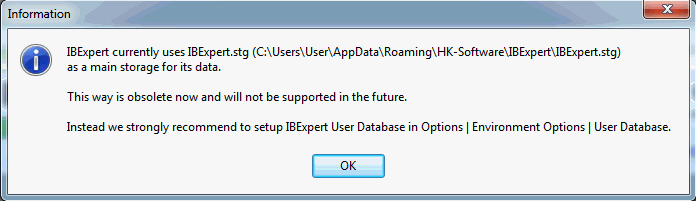
By starting IBExpert for a second time, IBExpert automatically creates a User Database in the user\app directory.
If you do not specify the name and location of the IBExpert user database yourself, the default ibexpert.udb will be used for storage of all settings, which can be found here: \HK-Software\IBExpert\ibexpert.udb. Please note, this area is user-dependent and even if several users work on one machine, each user has their own file.
You can of course specify the location of the User Database yourself. The simplest and quickest way to do this is using the supplied Firebird embedded server, and specifying the client library and database paths in Options / Environment Options / User Database.
See also:
IBExpert currently uses ibexpert.stg
'00-2' is not a valid integer value