IBExpert Company Year Edition
(German-language version below)
Software rental: IBExpert Developer Studio Company Year Edition
License Conditions for the IBExpert Developer Studio Company Year Edition:
A license is site-specific, i.e. the IBExpert software may only be used at a single site.
For companies with several locations, 1 license for each location is required.
Installation and operation of the IBExpert software is not permitted on any customer hardware.
IBExpert software may only be used on hardware owned, rented or leased by the Licensee.
The IBExpert software may only be used by employees of the Licensee on hardware, which is the property of the Licensee.
The installation and running of the IBExpert software only applies to the company's registered locations.
The installation and operation of the IBExpert software is permitted for a maximum number of employees at this location in accordance with the license model (S-XL).
The license is valid for 12 months from the date of purchase. At the end of the 12 month period, the license expires automatically and requires a completely new activation of the software product.
License IBExpert for a group of companies:
The IBExpert Company Year Edition cannot be licensed for a company group, but can be licensed for each company in that group.
Please let us know which companies belong to this corporate group and which companies would like to install and run IBExpert.
Please send your enquiry with all details by e-mail to register@ibexpert.net.
| License models (for each location) | Months |
|---|---|
| IBExpert Company Year Edition M: up to 25 employees | 12 |
| IBExpert Company Year Edition L: up to 100 employees | 12 |
| IBExpert Company Year Edition SL: up to 250 employees | 12 |
| IBExpert Company Year Edition XL: up to 500 employees | 12 |
Please note the following:
If, as a licensee, you violate any of the IBExpert license conditions, we are entitled to inspect the start log of all servers on which IBExpert software is in use.
By purchasing this software product, the customer/user explicitly permits IBExpert to view the IBExpert log files used via remote service.
Softwaremiete: Die IBExpert Developer Studio Company Year Edition
Lizenzbedingungen für die IBExpert Developer Studio Company Year Edition:
Eine Lizenz ist standortgebunden, d.h. die IBExpert Software darf nur an einem einzelnen Standort eingesetzt werden.
Für Unternehmen mit mehreren Standorten gilt, 1 Lizenz je Standort.
Das Installieren und Ausführen von IBExpert Software ist auf keiner Kundenhardware erlaubt.
IBExpert Software darf lediglich auf der Hardware, die Eigentum des Lizenznehmers ist oder von ihm gemietet oder geleast ist, eingesetzt werden.
Die IBExpert Software darf ausschließlich nur von Mitarbeitern des Lizenznehmers auf dessen Hardware, die Eigentum des Lizenznehmers ist, eingesetzt werden.
Das Installieren und Ausführen von IBExpert Software gilt nur für die jeweils registrierten Standorte des Unternehmens.
Das Installieren und Ausführen der IBExpert Software ist gemäß Lizenzmodell (S-XL) maximal für die Anzahl an Mitarbeitern an diesem Standort erlaubt.
Die Lizenz gilt für 12 Monate ab Kaufdatum. Nach Ablauf von 12 Monaten erlischt die Lizenz automatisch und erfordert eine komplett neue Aktivierung des Softwareprodukts.
IBExpert für eine Unternehmensgruppe lizenzieren:
Die IBExpert Company Year Edition kann nicht für eine Unternehmensgruppe lizenziert werden, jedoch je Firma dieser Unternehmensgruppe.
Bitte teilen Sie uns mit, welche Firmen dieser Unternehmensgruppe angehören und welche Firmen IBExpert installieren und ausführen möchten.
Ihre Anfrage mit allen Angaben senden Sie bitte per E-Mail an register@ibexpert.net.
| Lizenzmodelle (je Einzelstandort) | Monate |
|---|---|
| IBExpert Company Year Edition M: bis 25 Mitarbeiter | 12 |
| IBExpert Company Year Edition L: bis 100 Mitarbeiter | 12 |
| IBExpert Company Year Edition SL: bis 250 Mitarbeiter | 12 |
| IBExpert Company Year Edition XL: bis 500 Mitarbeiter | 12 |
Bitte beachten Sie folgendes:
Wenn Sie als Lizenznehmer gegen eine der IBExpert Lizenzbedingungen verstoßen, sind wir berechtigt, das Startprotokoll sämtlicher Server, auf denen IBExpert Software im Einsatz ist, einzusehen.
Durch den Kauf dieses Software-Produktes erteilt der Kunde/Nutzer IBExpert explizit die Erlaubnis, die verwendeten IBExpert Protokolldateien per Fernwartung einzusehen.
IBEScript.exe 64 Bit for Windows and Linux - Beta testers wanted!
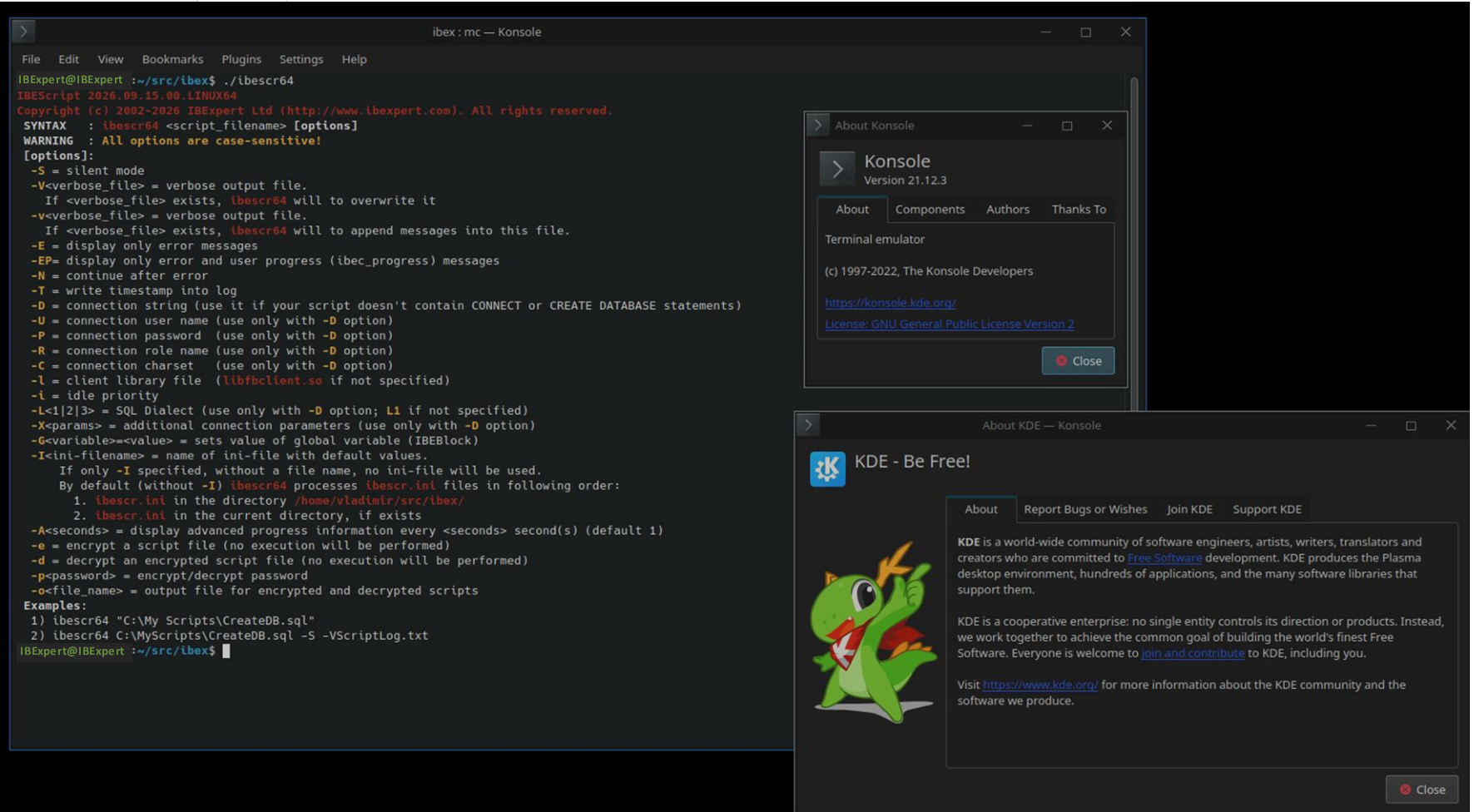
We are nearing completion of our project “IBEScript.exe 64 Bit for Windows and Linux” and are now looking for beta testers to help us with the final testing phase.
The current beta version has already been ported to native 64-bit versions for Windows and Linux. Since many of the same functions are also used in the IBExpert IDE, the project has evolved into a broader effort that will ultimately provide a replacement for the existing ibexpert.exe for these platforms as well.
Here is a preview of the current non-public beta version:
Interested in becoming a beta tester?
If you would like to test the current beta version, please register here:
https://signal.me/#eu/lM3apdmvOoskLavQ965m9R0lXk8XRww0nfUwB6lrVP56oaKX619Is4D0yFxYhvTL
Please include a brief description of who you are, how you plan to test the software, and which platforms and environments you intend to use.
Your feedback will help us identify and resolve any remaining issues before the public release.
We are planning to publish the new IBEScript version later this year, with the new ibexpert.exe IDE hopefully following in the first half of 2027.
We look forward to hearing from you and welcoming you to our beta testing team!
Sales tax/VAT
The sales tax applicable for your country of residence is calculated once you have entered your full details for the invoice.
Important for members of EU countries: You must enter your EU VAT ID in the correct field when placing your order. Otherwise you will be charged VAT at the current rate applicable for your country.
Software
You can find a summary and prices of all our software products and services here.
IBExpert Developer Studio Software
IBExpert Developer Studio is the most comprehensive GUI tool for Firebird and InterBase on the market today. It includes the following components: IBExpert IDE, IBEScript.exe, and IBExpertDemoDB.
IBExpert Developer Studio Edition
If you want to run IBExpert on a physical computer, then the IBExpert Developer Studio Edition is the right choice. Depending upon the number of users, you can select the appropriate package. Details
The IBExpert Day Edition is the ideal supplement to all IBExpert full versions, ready for use on all computers at any time. Details
IBExpert Year Editions
Use the IBExpert IDE, IBEScript.dll, IBEScript.exe, and the BackupRestore Scheduler modules on your company machines, in virtual environments and/or in the cloud, without hardware-related unlock codes. There are two year editions:
Software rental: IBExpert Company Year Edition
Software rental: IBExpert Enterprise Server Year Edition
Important: Before purchasing a Year Edition we kindly ask you to fill in the IBExpert Year Edition Corporate Information in the IBExpert Download Center. Enter all information about your company / group of companies in full, as well as all locations with addresses, and do not forget to check the box I confirm the accuracy of the above information and agree to immediately notify IBExpert of any changes before saving. Please update your data regularly, preferably once a year. Further information can be found in our online documentation.
The IBExpert Server Tools include IBEScript exe and dll, hkSCC.exe, the IBExpert Backup/Restore Scheduler and the IBExpert Encryption Plugin on Win32/Win64. The IBExpert Server Tools can also be deployed on virtual machines or in a cloud infrastructure. Details
IBExpert Distribution OEM Edition
The IBExpert Distribution OEM Edition allows unlimited distribution of the IBExpert IDE software file or IBExpert scripts with your application for a period of 5 years.
Our optimal solution for all businesses for flexible and independent working with IBExpert on all physical or virtual computers without activation codes and without an active internet connection. Details
IBExpert Encryption OEM Edition
The IBExpert Encryption Plugin for Firebird enables you to securely encrypt your Firebird 3 - 5 databases (also embedded). Details
New! IBExpert Replicator Enterprise IBER
Add real-time replication to any Firebird database without any downtime. Details
This new library basically covers almost all of the UDF functions currently available in FreeAdhocUDF and rFunc, adapted for Firebird 3 onwards. Details
IBExpert Developer Studio Full Educational Edition
The IBExpert Developer Studio Full Educational Edition is a full IBExpert Developer Studio version. Details
You can find a summary and prices of all our software products and services here.
Database Repair & Analysis
(German-language version below)
IBExpert Database analysis/database repair
If you are confronted with a damaged or corrupt database we can often offer a rapid solution without even having to come out and analyze the corrupt database on site. Before we can provide you with our database repair estimate, we must first analyse your database.
For the database analysis we charge a prepayment fee of EUR 150.00. Should you require a prompt database analysis, e.g. due to an emergency, we charge a prepayment fee of EUR 300.00.
If a database repair is possible following the analysis, you will receive our written cost estimate. Experience shows that we can repair most databases.
After you have contacted us and outlined your database problem, send a copy of your database (postal address here) compressed as a ZIP or 7Z file, ideally on a USB stick or USB drive. Please ensure as far as possible that individual ZIP files are no larger than 10MB (most ZIP applications allow you to pack into multiple files).
Please don't forget to mention which software you are using and which Firebird version is in use.
If the database is smaller than 50MB, you can mail it to us at: register@ibexpert.net.
Alternatively we can provide an FTP upload address for larger databases.
Any data media supplied will be returned and charged separately if wished.
IBExpert Datenbankanalyse/Datenbankreparatur
Wenn Ihre Datenbank beschädigt ist, können wir eine schnelle Lösung anbieten, ohne dass wir bei Ihnen vor Ort die defekte Datenbank analysieren müssen. Bevor wir Ihnen unseren Kostenvoranschlag zur Datenbankreparatur unterbreiten können, müssen wir zunächst einmal ihre Datenbank analysieren.
Für die Datenbankanalyse berechnen wir eine Aufwandsentschädigung von 150,00 Euro per Vorauskasse. Sollten Sie eine zeitnahe Datenbankanalyse wünschen, z.B. wegen eines Notfalls, berechnen wir eine Aufwandsentschädigung in Höhe von 300,00 Euro per Vorauskasse.
Wenn nach erfolgter Analyse eine Datenbankreparatur möglich ist, erhalten Sie unseren Kostenvoranschlag. Erfahrungswerte zeigen, dass wir die meisten Datenbanken reparieren können.
Nachdem Sie uns kontaktiert und Ihre Datenbankproblematik geschildert haben, senden Sie uns (unsere Postanschrift finden Sie hier) eine Kopie Ihrer Datenbank, gepackt als ZIP oder 7Z Datei vorzugsweise auf einem USB Stick oder USB-Laufwerk. Die einzelnen ZIP-Dateien sollten möglichst nicht größer als 10MB sein (die meisten ZIP Anwendungen ermöglichen die Komprimierung in mehrere Dateien).
Bitte vergessen Sie nicht, uns die eingesetzte Software- und Firebird Version mitzuteilen.
Wenn die Datenbank kleiner als 50MB ist, können Sie diese auch per E-Mail senden: register@ibexpert.net.
Für große Datenbanken erhalten Sie eine FTP Upload Adresse.
Gelieferte Medien erhalten Sie auf Wunsch mit separater Rechnung zurück.
IBExpert und Firebird Power Workshop
(German-language version below)
 Firebird Administrator intensive training with emphasis on speed, security and interfaces.
In our Firebird Power Workshop, we focus on the tasks that an administrator needs to perform to effectively run a Firebird server. The aim is to achieve the optimum speed of the hardware and software used, to guarantee maximum operational reliability, and to be optimally prepared for a breakdown by means of a suitable worst-case scenario. We will also concentrate on the independent implementation of simple requirements in the areas of import, export and reporting.
Overview of topics
1. Basics
After an introduction to the basic Firebird technology, the most important files and installation versions for Windows and Linux with Firebird version 5 will be explained.
2. Hardware
- Using suitable tools, the Firebird performance with the hardware/software combination used is measured and compared with other systems
- Effects of Firebird versions and configurations for processors, memory, I/O load, and process priority
- Comparison of the different I/O subsystem techniques HDD, SSD, SATA, M.2, NVME, RAID, SAN, IOPS, Bandwidth, Reads, Writes, etc.
- Comparison of different CPU types, clock cycle, L1/L2/L3 cache, cores, Xeon E3/E5/E7
- Expedient use of memory, RAM disk, temporary memory, ECC, DDR, clock cycle
- Locate the bottleneck in your own server
- Supplementary hardware for performance optimization
- Recommendations for optimal hardware
3. Operating system
- What optimizations can I make in Windows and Linux operating systems?
- Comparison of a Firebird server running on a virtual machine or without virtualization
- Check relevant drivers and adjust configuration settings
- DLL version check and effects
- Effects and adjustments Antivirus, backup and image software
- Trojan-safe configuration
- Operating systems recommendations for Firebird and dependencies
4. Backup/Restore
- Data backup with gbak and other solutions
- The most important backup/restore parameters
- Partial backup of the database
- IBExpert tools for backup, restore, e-mail message in case of errors, database dump
- IBExpert tools for automating database comparisons, data and metadata using scripts
- Shadow copy as a turbo backup
- Suitable measures to prevent errors from the outset
- Concurrent incremental backup
- Basic replication knowledge
5. Troubleshooting
- Detect errors in the database
- Troubleshooting strategies and tools
- Correct errors using transaction counter limit
- Detect and correct incorrect metadata
- Recognize and correct faulty data
- Combine databases from different scripts
- Errors opening the database and gfix
- Errors after opening the database when accessing certain table data
- IBExpert repair tools, Database Inside, if nothing else helps
- IBExpert services and Hotline support for repairs
6. Interfaces
- Automatically generate reports with IBExpert Scripting and store them as PDF files or send them by e-mail
- Set up data interfaces for ODBC
- Data export to ODBC, CSV, Excel, HTML, etc. using IBExpert Scripting
- Data import from ODBC, CSV, Excel, HTML, etc. using IBExpert Scripting
- Read or write access to SMTP, POP3 and IMAP e-mail
- Automate data synchronization with script directly to MSSQL, Oracle, MySQL, etc.
- Convert data tables from or to other platforms
- Direct connection using additional tools to PayPal, Sharepoint, SAP, Salesforce, Magento, Dropbox, Google Calendar, Google Contacts, JSON, REST, XML etc.
7. Users and groups
- Create, change and delete users with password
- Create, change and delete roles
- Differences users, roles and permissions in Firebird 5
- Transfering the user database when updating Firebird
8. Database performance
- System tables and tools to detect long-running SQL queries
- Identify and eliminate the impact of long-running transactions
- Trace API and MON$ tables
- Detect and create missing indices
- Comprehending and using Expression Indices
- Understanding and updating index statistics
- Optimize index structures and avoid duplicates
9. Monitoring and Audit
- Log database changes with IBExpert log tools
- Log slow SQLs around the clock
- What's it doing now? External tools at operating system level for file system and process logging
10. Tips and tricks

IBExpert und Firebird Power Workshop

Firebird Administrator intensiv-Training mit Schwerpunkt auf Geschwindigkeit, Sicherheit und Schnittstellen.
In unserem Firebird Power Workshop konzentrieren wir uns auf die Aufgaben, die ein Administrator für den effektiven Betrieb eines Firebird-Servers erfüllen muss. Ziel ist es, die optimale Geschwindigkeit der eingesetzten Hardware und Software zu erreichen, eine maximale Betriebssicherheit zu gewährleisten, sowie durch ein geeignetes Worst-Case-Szenario für einen Ausfall optimal vorbereitet zu sein. Auch auf die selbstständige Umsetzung einfacher Anforderungen im Bereich Import, Export und Reporting werden wir uns konzentrieren.
Inhalt
1. Grundlagen
Nach einer Einführung über die Basistechnologie werden die wichtigsten Dateien und Installationsversionen für Windows und Linux mit Firebird Version 5 vermittelt.
2. Hardware
- Durch geeignete Werkzeuge wird die Firebird Geschwindigkeit der eingesetzten Hardware/Software-Kombination gemessen und mit anderen Systemen verglichen
- Auswirkungen der Firebird Versionen und Einstellungen für Prozessoren, Arbeitsspeicher, I/O-Last und Prozesspriorität
- Vergleich der verschiedenen I/O-Subsystem-Techniken HDD, SSD, SATA, M.2, NVME, RAID, SAN, IOPS, Bandbreite, Reads, Writes, etc.
- Vergleich der verschiedenen CPU-Typen, Takt, L1/L2/L3 Cache, Cores, Xeon E3/E5/E7
- Sinnvoller Einsatz des Arbeitsspeichers, RAM Disk, Temporärspeicher, ECC, DDR, Takt
- Den Flaschenhals im eigenen Server lokalisieren
- Ergänzende Hardware für Performance-Optimierung
- Empfehlungen optimaler Hardware
3. Betriebssystem
- Welche Optimierungen kann ich im Betriebssystem Windows bzw. Linux vornehmen
- Vergleich eines Firebird Servers beim Betrieb auf einer virtuellen Maschine oder ohne Virtualisierung
- Relevante Treiber prüfen und Einstellungen anpassen
- DLL Versionsprüfung und Auswirkungen
- Auswirkungen und Anpassungen Antiviren-, Backup- und Image-Software
- Trojaner-sichere Konfiguration
- Empfehlungen Betriebssysteme für Firebird und Abhängigkeiten
4. Backup/Restore
- Datensicherung mit gbak und anderen Lösungen
- Die wichtigsten Backup/Restore Parameter
- partielle Sicherung der Datenbank
- IBExpert Werkzeuge für Backup, Restore, E-Mail Nachricht bei Fehlern, Datenbank Dump
- IBExpert Werkzeuge für Datenbankvergleiche Daten und Metadaten über Scripte automatisieren
- Shadowcopy als Turbobackup
- Geeignete Maßnahmen, um Fehler von vornherein zu vermeiden
- Mitlaufende inkrementelle Sicherung
- Basiswissen Replikation
5. Fehler beheben
- Fehler in der Datenbank erkennen
- Strategien und Tools zur Fehlerbehebung
- Fehler durch Transaktionszählergrenze beheben
- Fehlerhafte Metadaten erkennen und beheben
- Fehlerhafte Daten erkennen und beheben
- Datenbanken aus verschiedenen Scripten zusammensetzen
- Fehler beim Öffnen der Datenbank und gfix
- Fehler nach dem Öffnen der Datenbank bei Zugriff auf bestimmte Tabellendaten
- IBExpert Reparaturwerkzeuge, Database Inside, wenn nichts anderes hilft
- IBExpert Dienstleistungen und Hotline Support für Reparaturen
6. Schnittstellen
- Mit IBExpert Scripting automatisiert Berichte erzeugen und als PDF ablegen oder per E-Mail versenden
- Datenschnittstellen für ODBC einrichten
- Datenexport nach ODBC, CSV, Excel, HTML, etc. über IBExpert Scripting
- Datenimport von ODBC, CSV, Excel, HTML, etc. über IBExpert Scripting
- Lese- bzw. Schreibzugriff auf SMTP, POP3 und IMAP E-Mail
- Datenabgleich mit Script direkt automatisieren an MSSQL, Oracle, MySQL, etc.
- Datentabellen von oder in andere Plattformen konvertieren
- Direkte Anbindung über Zusatztools auf PayPal, Sharepoint, SAP, Salesforce, Magento, Dropbox, Google Kalender, Google Kontakte, JSON, REST, XML etc.
7. Benutzer und Gruppen
- Anlegen, ändern und löschen von Benutzern mit Kennwort
- Anlegen, ändern und löschen von Roles
- Unterschiede Benutzer, Roles und Rechte in Firebird 5
- Übernahme der Benutzerdatenbank beim Firebird Update
8. Datenbank Performance
- Systemtabellen und Werkzeuge, um langlaufende SQL Abfragen zu erkennen
- Auswirkungen langlaufender Transaktionen erkennen und beheben
- Trace API und MON$ Tabellen
- Fehlende Indizes erkennen und erstellen
- Expression Indizes verstehen und benutzen
- Indexstatistik verstehen und aktualisieren
- Indexstrukturen optimieren und Dubletten vermeiden
9. Monitoring und Audit
- Datenbankänderungen protokollieren mit IBExpert Log Werkzeugen
- langsame SQLs rund um die Uhr protokollieren
- Was macht er denn jetzt schon wieder? Externe Werkzeuge auf Betriebssystemebene für Filesystem und Prozessprotokollierung