Software
You can find a summary and prices of all our software products and services here.
IBExpert Developer Studio Software
IBExpert Developer Studio is the most comprehensive GUI tool for Firebird and InterBase on the market today. It includes the following components: IBExpert IDE, IBEScript.exe, and IBExpertDemoDB.
IBExpert Developer Studio Edition
If you want to run IBExpert on a physical computer, then the IBExpert Developer Studio Edition is the right choice. Depending upon the number of users, you can select the appropriate package. Details
The IBExpert Day Edition is the ideal supplement to all IBExpert full versions, ready for use on all computers at any time. Details
IBExpert Year Editions
Use the IBExpert IDE, IBEScript.dll, IBEScript.exe, and the BackupRestore Scheduler modules on your company machines, in virtual environments and/or in the cloud, without hardware-related unlock codes. There are two year editions:
Software rental: IBExpert Company Year Edition
Software rental: IBExpert Enterprise Server Year Edition
Important: Before purchasing a Year Edition we kindly ask you to fill in the IBExpert Year Edition Corporate Information in the IBExpert Download Center. Enter all information about your company / group of companies in full, as well as all locations with addresses, and do not forget to check the box I confirm the accuracy of the above information and agree to immediately notify IBExpert of any changes before saving. Please update your data regularly, preferably once a year. Further information can be found in our online documentation.
The IBExpert Server Tools include IBEScript exe and dll, hkSCC.exe, the IBExpert Backup/Restore Scheduler and the IBExpert Encryption Plugin on Win32/Win64. The IBExpert Server Tools can also be deployed on virtual machines or in a cloud infrastructure. Details
IBExpert Distribution OEM Edition
The IBExpert Distribution OEM Edition allows unlimited distribution of the IBExpert IDE software file or IBExpert scripts with your application for a period of 5 years.
Our optimal solution for all businesses for flexible and independent working with IBExpert on all physical or virtual computers without activation codes and without an active internet connection. Details
IBExpert Encryption OEM Edition
The IBExpert Encryption Plugin for Firebird enables you to securely encrypt your Firebird 3 - 5 databases (also embedded). Details
New! IBExpert Replicator Enterprise IBER
Add real-time replication to any Firebird database without any downtime. Details
This new library basically covers almost all of the UDF functions currently available in FreeAdhocUDF and rFunc, adapted for Firebird 3 onwards. Details
IBExpert Developer Studio Full Educational Edition
The IBExpert Developer Studio Full Educational Edition is a full IBExpert Developer Studio version. Details
You can find a summary and prices of all our software products and services here.
Bootcamp database web applications using Firebird
(German-language version below)
From the initial idea to deployment

The networked world today requires a powerful and flexible integration of mobile data acquisition devices in most commercial areas. While the apps in the Apple world hardly allow any really long-term application development without Xcode, in the Android world it is also difficult to be competitive without Android Studio. Alternative concepts such as the FMX implementation in more recent Delphi versions as well as Xamarin or similar frameworks promise multi-platform capability, the reality however is somewhat different. The first rollout of a native app requires a lot of know-how, and even seemingly trivial problems can cause long waiting times until the full version can be used by the customer.
If you are a software manufacturer and want to expand your ERP or business software by offering a flexible module for mobile devices, you will find several man-months or even man-years of development work, which can hardly be refinanced. Your customers expect such a feature on their own smartphones; however they are not willing to pay additional costs.
A decision to use only Android as a platform will not be acceptable for customers with Apple devices, so that the iOS platform for Apple also needs to be implemented. The development costs thus double and even a mundane task, such as mobile time tracking for field service technicians must also be implemented on these two platforms, in addition to the back-office solution for the office employees or on laptops, for which the source code cannot be used across multiple platforms.
Let’s stay with the example of mobile time tracking and consider alternative methods. Certainly, there are places where mobile phone reception is not always available or poor, but generally it can be assumes in most areas of Western Europe that a sufficiently good connection can be ensured. This is certainly a different matter in the Australian outback, but in such a case we would use a fully-fledged replicated database on a laptop, to enable access to even large amounts of data at any time.
In our 2-day training course Bootcamp database web applications using Firebird, you will learn all knowledge necessary to visualize data from a Firebird database via an Apache web server on Windows or Linux with minimal PHP knowledge.
A registration of the mobile device can be permanently assigned by URL or an individual view of the assigned data is displayed interactively using the Username and Password. In this way the sample application "Mobile Time Tracking" can display instructions for selection directly assigned to the user of the mobile device, minimizing errors such as booking time to the wrong jobs.
Simple control elements, known in the Delphi world as TLabel, TEdit, TMemo, TCombobox, TButton, TListbox, etc., are recorded on the website by the logic instructions, which are implemented in Firebird stored procedures, and filled with data from the database. The user can now enter numbers or strings depending upon the task, or simply trigger a Start- or Stop-booking with a simple click.
The resulting data is written back into the Firebird database by the Apache/PHP script. These can create messages at any time via triggers and events in the back office, and can alert the person responsible to new mobile data, or can be fully automated in collective bills.
You have no PHP experience? No problem, the PHP script used contains only around 30 lines and these will only altered in very few places during the whole training.
Do you lack basic knowledge of HTML controls? During the course, we will provide you with all the necessary basic knowledge, enabling you to extend this knowledge yourself at any time in the future.
You have never set up an Apache web server on Windows or Linux with PHP, or set up PHP access to Firebird? This is also part of our training. We’ll set up a virtual Windows server together. This server with the exact same configuration is offered by Hosteurope for EUR 9.90 a month.
How do you get the data rapidly from the local database to the Firebird database on the virtual server, without having to store all data there, and to make it publicly available in case of a faulty configuration? We explain the most important security aspects of such a Firebird configuration and show how to exchange data between the customer server and the server on the VM in near real-time using the push-pull principle.
Does this work even if the data is not stored locally in Firebird databases? Yes, we use IBEScript to show you basic IBEBlock scripts, which allow you to connect to any ODBC-compliant database to write the local data into your Firebird database vice versa.
How can the server-side application be used to send e-mails and generate PDFs, for example, to automatically generate order confirmations around the clock? We will show you how it is possible to use the IBEBlock Script on the server side. In addition to Windows for IBEscript.exe, we can also use Linux with Wine.

Bootcamp Datenbankwebapplikationen mit Firebird
Von der Idee zur Umsetzung

Die vernetzte Welt erfordert mittlerweile für nahezu sämtliche Geschäftsbereiche eine leistungsfähige und flexible Integration von mobilen Datenerfassungsgeräten. Während jedoch die Apps in der Applewelt kaum ohne Xcode wirklich langfristige Applikationsentwicklungen ermöglichen, ist man in der Android Welt ohne Android Studio ebenfalls kaum wettbewerbsfähig. Alternative Konzepte, wie die FMX Implementation in neueren Delphi Version ebenso wie Xamarin oder ähnliche Frameworks versprechen Multiplattformfähigkeit, aber die Realität sieht anders aus. Das erste Rollout einer nativen App bedarf einer Unmenge an Know-how und selbst scheinbar banale Probleme sorgen für lange Wartezeiten bis zur Nutzung der vollständigen Version durch den Kunden.
Wenn Sie als Softwarehersteller nun Ihre ERP- oder Branchensoftware um ein flexibles Modul für Mobilegeräte erweitern möchten, kommen auch bei einfachen Anwendungen mehrere Mannmonate oder sogar Mannjahre Entwicklungsarbeit zusammen, die sich kaum refinanzieren lassen. Ihre Kunden erwarten zwar eine derartige Funktion auf dem eigenen Smartphone, sind aber nicht bereit, dafür zusätzliche Kosten zu tragen. Eine Entscheidung für Android als Plattform wird von den Kunden mit Apple Geräten nicht akzeptiert und die iOS Plattform für Apple muss zusätzlich umgesetzt werden. Der Entwicklungsaufwand verdoppelt sich und selbst eine banale Aufgabe, wie zum Beispiel eine mobile Arbeitszeiterfassung für den Außendiensttechniker muss neben der Back Office Lösung für Mitarbeiter im Büro oder auf Laptops zusätzlich noch in 2 anderen Plattformen implementiert werden, bei denen der Quellcode auch nicht plattformübergreifend eingesetzt werden kann.
Bleiben wir beim Beispiel einer mobilen Arbeitszeiterfassung und denken wir über alternative Verfahren nach. Sicherlich gibt es Orte, an denen eine mobile Funkverbindung per Handy nicht immer gewährleistet ist, aber generell kann man in den meisten relevanten Gebieten Westeuropas davon ausgehen, dass eine ausreichend gute Verbindung gewährleistet ist. Im australischen Outback ist das sicherlich anders, aber hier würden wir eine vollwertige replizierte Datenbank auf einem Laptop einsetzen, um auch sehr große Datenmengen jederzeit vor Ort im Zugriff zu haben.
Im Rahmen unseres Bootcamps "Datenbankwebapplikationen mit Firebird" zeigen wir Ihnen innerhalb von 2 Tagen das gesamte Know-how, um Daten aus einer Firebird Datenbank über einen Apache Webserver auf Windows- oder Linux Basis mit minimalen PHP Kenntnissen zu visualisieren.
Eine Anmeldung des Mobilgeräts kann per URL fest vergeben werden oder die individuelle Sicht auf die zugeordneten Daten erfolgt interaktiv per Username und Password. So kann die Beispielanwendung "Mobile Zeiterfassung" direkt dem Benutzer des Mobilgeräts zugeordnete Aufträge zur Auswahl anzeigen und Fehleingaben wie Buchungen auf falsche Aufträge minimieren.
Einfache Kontrollelemente, in der Delphi Welt als TLabel, TEdit, TMemo, TCombobox, TButton, TListbox, etc. bekannt, werden durch die in Firebird Stored Procedures implementierten Logikanweisungen entsprechend der Anforderungen in der Webseite aufgenommen und durch Daten aus der Datenbank gefüllt. Der Anwender kann entsprechend der Aufgabe nun Zahlen oder Zeichenfolgen erfassen oder einfach eine Start oder Stop Buchung durch einen einfachen Klick auslösen.
Die Daten, die sich daraus ergeben, werden vom Apache/PHP Script wieder zurück in die Firebird Datenbank geschrieben. Diese können jederzeit via Trigger und Events im Backoffice Nachrichten erstellen und den Sachbearbeiter auf neue, mobil erfasste Daten hinweisen oder vollautomatisiert in Sammelrechnungen übernommen werden.
Sie haben keine PHP Erfahrung? Kein Problem, das benutzte PHP Script hat nur ca. 30 Zeilen und wird während der gesamten Schulung nur an ganz wenigen Stellen geändert.
Ihnen fehlen die Basiskenntnisse für die HTML Kontrollelemente? Wir vermitteln Ihnen im Rahmen des Bootcamps alle erforderlichen Basiskenntnisse, so dass Sie, sofern erforderlich, jederzeit durch eine spätere Recherche im Internet diese Kenntnisse erweitern können.
Sie haben noch nie einen Apache Webserver auf Windows oder Linux mit PHP oder den Zugriff von PHP auf Firebird eingerichtet? Auch dieser Punkt ist ein Bestandteil unseres Bootcamps. Wir richten gemeinsam einen virtuellen Windows Server ein. Dieser Server kann bei Hosteurope in genau dieser Konfiguration für 9,90 im Monat gemietet werden.
Wie bekommt man zeitnah die Daten von der lokalen Datenbank auf die Firebird Datenbank auf dem virtuellen Server, ohne sämtliche Daten dort zu lagern und im Fall einer fehlerhaften Konfiguration öffentlich verfügbar zu haben? Wir erklären die wichtigsten Sicherheitsaspekte einer solchen Firebird Konfiguration und zeigen, wie man im Push/Pull Prinzip Daten in nahezu Echtzeit zwischen einem Kundenserver und dem Server auf der VM austauscht.
Funktioniert das auch, wenn meine Daten lokal gar nicht in Firebird Datenbanken gespeichert werden? Ja, wir zeigen mit IBEScript grundlegende IBEBlock Scripte, mit denen Sie sich mit jeder ODBC-fähigen Datenbank verbinden können um die Daten von dort in die Firebird Datenbank oder aus der Firebird Datenbank zurück in Ihre Plattform zu schreiben.
Wie kann ich mit der Anwendung serverseitig E-Mails versenden und PDFs erzeugen, um zum Beispiel Auftragsbestätigungen automatisch rund um die Uhr zu erzeugen? Wir zeigen wir Ihnen, wie es mit Hilfe der IBEBlock Script serverseitig machbar ist. Wir setzen für IBEscript.exe neben Windows auch Linux mit Wine ein.
Firebird Server Health Check & Backup Monitoring
(German-language version below)
Professional baseline assessment and ongoing monitoring for Firebird 2.x-5.x – now also available for in-house or externally sourced hardware
Reliable Firebird server operation does not depend solely on the hardware used. It is also crucial to have properly configured backups, effective restore processes, a clear server configuration, and regular monitoring of key system parameters.
Until now, this service package was only available if the server hardware was purchased directly from us. It is now also available to customers who already own their hardware or purchase it from another supplier.
For a flat fee of EUR 1,750 / USD 1,990 you will receive a service package valid for 3 years.
Initial session: Assessment of the current situation
Once the order has been placed, we will hold an initial remote session together with you. During this kick-off session, we will assess your existing server and Firebird environment and review the current technical situation.
The focus is primarily on the following points:
- Review of the existing backup automation
- Monitoring of automatic restore processes
- Identification of existing errors or vulnerabilities
- Review of existing changes to firebird.conf
- Implementation of a benchmark to assess server performance
The aim is to ensure, right from the start, that the key foundations for reliable Firebird operation are in place.
Backup monitoring using an automated IBEBlock script 
A backup is only genuinely useful if it is created regularly and also checked for technical issues. That is why we implement an automated IBEBlock script to monitor the ongoing backups.
The results are recorded centrally in a log. This allows errors to be identified at an early stage, before they become a real problem in an emergency. Monitoring therefore serves not only as a means of control, but above all for the early detection of errors.

Benchmarking and evaluation of server speed
As part of the initial analysis, we also carry out a benchmark test. This provides you with a practical assessment of the server’s overall performance, enabling you to better judge whether your existing hardware is adequately configured for your Firebird installation.
Analysis of existing Firebird configurations
If your software vendor has already made adjustments to the firebird.conf file, we will assess these as well. In doing so, we will check whether the changes are justifiable and sensible, or whether they could pose potential risks to stability, performance or maintainability.
Quarterly basic checks via remote session

We carry out quarterly baseline checks throughout the three-year period. These are conducted via remote access.
We will send you an email before each check. You can then invite us to a session using the remote access software of your choice. This means you retain control over access at all times and can decide for yourself when and which tool to use to establish the connection.
Price and duration
EUR 1,750 / USD 1,990 for 3 years
This includes the initial kick-off session, the setup of backup monitoring, an assessment of the existing Firebird environment, a server benchmark, and quarterly remote health checks throughout the project duration.
Response times and optional emergency service
The IBExpert RemoteDBA Standard Service is designed as a preventive health check and monitoring service and does not include a 24/7 emergency service.
In the event of a malfunction, our standard service offers a response time on the next working day during our regular business hours from Monday–Thursday 8.00 am - 4.00 pm and Friday 8.00 am - 2.00 pm (Central European Time).
An extended 24/7/365 emergency service can be added as an option for an additional charge (100%). Alerts are sent via Signal Messenger. For this additional service, we guarantee a maximum response time of 4 hours.
The response time refers to the point at which we begin to respond to or investigate the issue, not a guarantee that the problem will be fully resolved within that timeframe.
You can place an order by email to register@ibexpert.net.
Firebird Server Health Check & Backup Monitoring
Professionelle Basisprüfung und laufende Kontrolle für Firebird 2.x-5.x – jetzt auch für eigene oder fremdbeschaffte Hardware
Ein stabiler Firebird-Serverbetrieb hängt nicht nur von der eingesetzten Hardware ab. Entscheidend sind auch korrekt eingerichtete Backups, funktionierende Restore-Prozesse, eine nachvollziehbare Serverkonfiguration und eine regelmäßige Kontrolle der wichtigsten Systemparameter.
Bisher wurde dieses Servicepaket nur angeboten, wenn die Server-Hardware direkt über uns bezogen wurde. Ab sofort steht es auch Kunden zur Verfügung, die ihre Hardware bereits besitzen oder diese bei einem anderen Anbieter kaufen.
Für einen Pauschalbetrag von 1.750 € / 1.990 USD erhalten Sie ein Servicepaket mit einer Laufzeit von 3 Jahren.
Startsession: Aufnahme der Ist-Situation
Nach Auftragserteilung führen wir gemeinsam mit Ihnen eine erste Remote-Sitzung durch. In dieser Startsession erfassen wir die vorhandene Server- und Firebird-Umgebung und prüfen die aktuelle technische Ausgangssituation.
Dabei liegt der Schwerpunkt insbesondere auf folgenden Punkten:
- Prüfung der bestehenden Backup-Automatisierung
- Kontrolle der automatischen Restore-Prozesse
- Erkennung bereits sichtbarer Fehler oder Schwachstellen
- Bewertung vorhandener Änderungen an der firebird.conf
- Durchführung eines Benchmarks zur Einschätzung der Serverleistung
Ziel ist es, schon zu Beginn sicherzustellen, dass die wichtigsten Grundlagen für einen zuverlässigen Firebird-Betrieb vorhanden sind.
Backup-Überwachung mit automatisiertem IBEBlock-Script
Ein funktionierendes Backup ist nur dann wirklich hilfreich, wenn es regelmäßig erstellt und auch technisch überprüft wird. Deshalb richten wir ein automatisiertes IBEBlock-Script ein, mit dem die laufenden Backups überwacht werden.
Die Ergebnisse werden zentral als Log erfasst. So lassen sich Fehler frühzeitig erkennen, bevor sie im Ernstfall zu einem echten Problem werden. Die Überwachung dient damit nicht nur der Kontrolle, sondern vor allem der präventiven Fehlererkennung.
Benchmark und Bewertung der Servergeschwindigkeit
Im Rahmen der Startanalyse führen wir außerdem einen Benchmark durch. Dadurch erhalten Sie eine praxisnahe Einschätzung der generellen Servergeschwindigkeit und können besser beurteilen, ob die vorhandene Hardware für Ihre Firebird-Installation angemessen dimensioniert ist.
Prüfung vorhandener Firebird-Konfigurationen
Falls Ihr Softwarehersteller bereits Anpassungen an der firebird.conf vorgenommen hat, bewerten wir diese ebenfalls. Dabei prüfen wir, ob die Änderungen nachvollziehbar und sinnvoll sind oder ob daraus mögliche Risiken für Stabilität, Performance oder Wartbarkeit entstehen können.
Vierteljährliche Basischecks per Remote-Sitzung
Während der gesamten Laufzeit von 3 Jahren führen wir vierteljährliche Basischecks durch. Diese erfolgen per Remote-Einwahl.
Vor jedem Check senden wir Ihnen eine E-Mail. Anschließend laden Sie uns mit einer Remote-Zugangssoftware Ihrer Wahl zu einer Sitzung ein. Sie behalten damit jederzeit die Kontrolle über den Zugriff und entscheiden selbst, wann und mit welchem Tool die Verbindung hergestellt wird.
Preis und Laufzeit
Der Pauschalpreis für das komplette Servicepaket beträgt:
1.750 € / 1.990 USD für 3 Jahre
Enthalten sind die initiale Startsession, die Einrichtung der Backup-Überwachung, die Bewertung der vorhandenen Firebird-Umgebung, ein Server-Benchmark sowie die vierteljährlichen Remote-Basischecks während der Laufzeit.
Reaktionszeiten und optionaler Emergency-Service
Der IBExpert RemoteDBA Standard Service ist als präventiver Health-Check- und Monitoring-Service ausgelegt und beinhaltet keinen 24/7-Emergency-Service.
Im Fehlerfall gilt für den Standardservice eine Reaktionszeit am nächsten Arbeitstag während unserer regulären Geschäftszeiten Montag-Donnerstag 8:00 - 16:00 und Freitag 8:00 - 14:00 (Mitteleuropäische Zeit).
Optional kann ein erweiterter 24/7/365 Emergency-Service gegen Aufpreis (100%) hinzugebucht werden. Die Alarmierung erfolgt dabei über den Signal Messenger. Für diesen Zusatzservice stellen wir eine maximale Reaktionszeit von 4 Stunden sicher.
Die Reaktionszeit beschreibt den Beginn der Kontaktaufnahme bzw. Analyse, nicht eine garantierte vollständige Fehlerbehebung innerhalb dieses Zeitraums.
Bestellen können Sie formlos per E-Mail an register@ibexpert.net.
Newsletter 2026/07
You can find a German-language copy of the newsletter online here
Current IBExpert version 2026.07.26
This version includes further adaptations and optimisations to new Firebird 6 features, along with minor bugfixes and improvements.
Download here: https://ibexpert.net/dlc
New: RemoteDBA Service is also available for third-party hardware!
Boost the performance of your existing Firebird server hardware or VM with the IBExpert RemoteDBA Service – find out more here. This service is available worldwide.
Just how powerful is a Firebird server really?
Before the first users start complaining about slow response times:
Test your server with the IBExpert Benchmark – you’ll see the result at a glance.
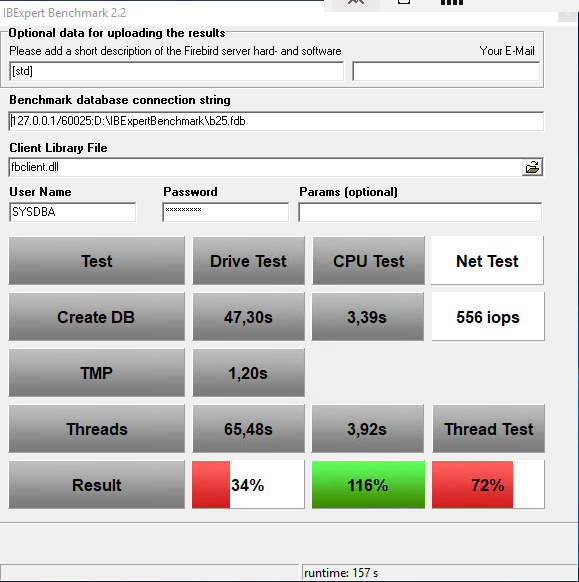 A typical Firebird server in a customer environment |
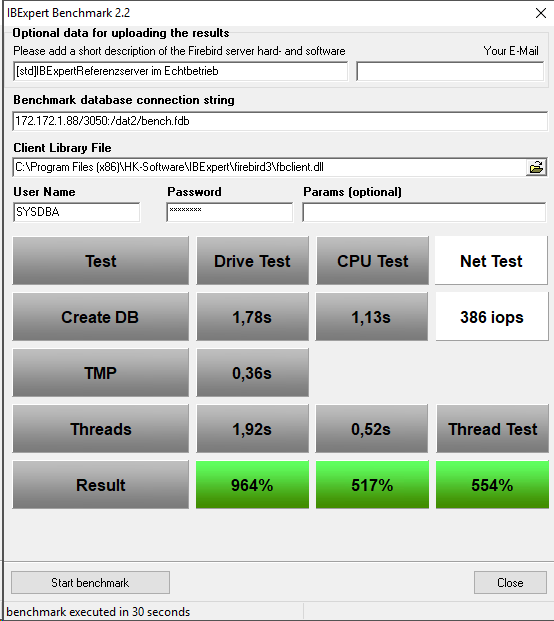 IBExpert Firebird IFS Reference Server |
The IBExpert Benchmark is particularly valuable for software vendors and support teams who need to analyse performance issues reported by customers and objectively determine whether bottlenecks are caused by the server hardware.
Try it for free
Download the free IBExpert Benchmark and test your server in just a few minutes:
https://ibexpert.net/benchmark/setup_benchmark.exe
With a current IBExpert Developer Studio subscription or the IBExpert Day Edition, the Extended and XXL benchmarks are also available.
Up to 30 times better performance for Firebird databases
The IBExpert Benchmark highlights the significant difference: depending on the system being compared, our specially developed Firebird IFS servers achieve up to 30 times higher overall performance than typical standard servers.
Ideal for large databases, large numbers of users and demanding applications – without the need for any changes to your software.
High-performance Firebird IFS servers
Optimise the performance, reliability and security of your Firebird databases with our dedicated Firebird IFS servers. Our solution is complemented by a 4-year hardware maintenance and RemoteDBA service, which includes proactive monitoring, regular backups and competent support.
Find out more about technical specifications, configuration options and support services: https://ibexpert.net/cms/firebird-ifslr-server
Further information about our servers: IFS Firebird Server – consistently designed for database performance
Boost the performance of your existing Firebird server hardware or VM with the IBExpert RemoteDBA service
Would you like to use IBExpert RemoteDBA but already have your own server? It is often not necessary to replace all your hardware. Following an analysis and a practical benchmark, we will, if required, recommend specific additional hardware that you can then purchase yourself.
This allows you to optimise your existing server cost-effectively and significantly speed it up.
This service is available worldwide.
Find out more about IBExpert RemoteDBA here: https://ibexpert.net/cms/ibexpertremotedba
Newsletter 2026/07 D
Aktuelle IBExpert Version 2026.07.26
Diese Version enthält weitere Anpassungen und Optimierungen an die neuen Funktionen von Firebird 6 sowie kleinere Bugfixes und Verbesserungen.
Hier downloaden: https://ibexpert.net/dlc
Neu: RemoteDBA-Service auch für Fremdhardware!
Mehr Leistung für Ihre vorhandene Firebird-Server-Hardware oder VM durch IBExpert RemoteDBA-Service, weitere Infos hier. Dieser Service ist weltweit verfügbar.
Wie leistungsfähig ist ein Firebird-Server wirklich?
Bevor die ersten Anwender über langsame Reaktionszeiten klagen:
Prüfen Sie Ihren Server mit dem IBExpert Benchmark – das Ergebnis sehen Sie auf einen Blick.
| Typischer Firebird-Server im Kundeneinsatz |
IBExpert Firebird IFS Referenzserver |
Besonders wertvoll ist der IBExpert Benchmark für Softwarehersteller und Support-Teams, die von Kunden gemeldete Performanceprobleme analysieren und objektiv feststellen müssen, ob Engpässe durch die Serverhardware verursacht werden.
Kostenlos testen
Laden Sie den kostenlosen IBExpert Benchmark herunter und testen Sie Ihren Server innerhalb weniger Minuten:
https://ibexpert.net/benchmark/setup_benchmark.exe
Mit einer aktuellen IBExpert Developer Studio Subscription oder der IBExpert Day Edition stehen zusätzlich die erweiterten Extended- und XXL-Benchmarks zur Verfügung.
Bis zu 30-fache Performance für Firebird-Datenbanken
Der IBExpert Benchmark zeigt den deutlichen Unterschied: Unsere speziell entwickelten Firebird IFS Server erreichen – je nach Vergleichssystem – eine bis zu 30-fach höhere Gesamtleistung gegenüber typischen Standardservern.
Ideal für große Datenbanken, viele Benutzer und anspruchsvolle Anwendungen – ohne Änderungen an Ihrer Software.
Leistungsstarke Firebird IFS Server
Optimieren Sie die Leistung, Zuverlässigkeit und Sicherheit Ihrer Firebird Datenbanken mit unseren dedizierten Firebird IFS Servern. Unsere Lösung wird durch einen 4-jährigen Hardware-Wartungs- und RemoteDBA-Service ergänzt, der eine proaktive Überwachung, regelmäßige Backups und kompetenten Support umfasst.
Erfahren Sie mehr über technische Daten, Konfigurationsoptionen und Supportleistungen:
Weitere Information zu unseren Servern: IFS Firebird Server – konsequent für Datenbankleistung entwickelt
Mehr Leistung für Ihre vorhandene Firebird-Server-Hardware oder VM durch IBExpert RemoteDBA-Service
Sie möchten IBExpert RemoteDBA nutzen, besitzen aber bereits einen eigenen Server? Ein kompletter Hardwareaustausch ist häufig nicht erforderlich. Nach einer Analyse und einem praxisnahen Benchmark empfehlen wir Ihnen bei Bedarf gezielte Zusatzhardware, die Sie selbst beschaffen können.
So lässt sich Ihr vorhandener Server wirtschaftlich optimieren und deutlich beschleunigen.
Dieser Service ist weltweit verfügbar.
Mehr über IBExpert RemoteDBA erfahren Sie hier: https://ibexpert.net/cms/ibexpertremotedba#German
Error: too many registrations for the Personal Edition
After clicking “Get code” I received the following error message: Error: too many registrations for personal edition from your network…
This is not an error. If you check the IBExpert Personal Edition conditions, you will see that you have exceeded the number of legal downloads allowed for this free edition: free IBExpert Personal Edition.
Due to the vast amounts of downloads the free IBExpert Personal Edition registration procedure is fully automated. We can therefore provide neither support nor service for this software edition. Please do not write to us, or request manual activations.
By activating the IBExpert Personal Edition registration you are also agreeing to the terms stated in the Activation Code email:
1. The Personal Edition is certainly not intended for commercial use on multiple computers in a company, nor to be passed on or sold to others.
2. The Personal Edition may not be activated for other users.
3. Use of the IBExpert Personal Edition is only allowed by the person who has conducted the download from his/her account in the IBExpert Download Center.
4. A developer may use the Personal Edition commercially at his employer's (according to the terms in 3.).
Any use by any other person or any form of distribution is strictly prohibited without prior written permission and will be prosecuted.
You will need to agree to these usage terms before you enter the unlock code.
If you need or intend to use IBExpert for any other purpose than personal use, you must purchase a full IBExpert Developer Studio Edition incl. 12 month software subscription. If you only use IBExpert occasionally (for example, for customer support), the IBExpert Day Edition may be suitable for your needs.
You can view all IBExpert software and fees on our website: IBExpert products, services & prices.