IBExpertRemoteDBA
(German-language version below)
Firebird Server Health Check & Backup Monitoring
Professional baseline assessment and ongoing monitoring for Firebird 2.x-5.x – now also available for in-house or externally sourced hardware
Reliable Firebird server operation does not depend solely on the hardware used. It is also crucial to have properly configured backups, effective restore processes, a clear server configuration, and regular monitoring of key system parameters.
Until now, this service package was only available if the server hardware was purchased directly from us. It is now also available to customers who already own their hardware or purchase it from another supplier.
For a flat fee of EUR 1,750 / USD 1,990 you will receive a service package valid for 3 years.
Initial session: Assessment of the current situation
Once the order has been placed, we will hold an initial remote session together with you. During this kick-off session, we will assess your existing server and Firebird environment and review the current technical situation.
The focus is primarily on the following points:
- Review of the existing backup automation
- Monitoring of automatic restore processes
- Identification of existing errors or vulnerabilities
- Review of existing changes to firebird.conf
- Implementation of a benchmark to assess server performance
The aim is to ensure, right from the start, that the key foundations for reliable Firebird operation are in place.
Backup monitoring using an automated IBEBlock script 
A backup is only genuinely useful if it is created regularly and also checked for technical issues. That is why we implement an automated IBEBlock script to monitor the ongoing backups.
The results are recorded centrally in a log. This allows errors to be identified at an early stage, before they become a real problem in an emergency. Monitoring therefore serves not only as a means of control, but above all for the early detection of errors.

Benchmarking and evaluation of server speed
As part of the initial analysis, we also carry out a benchmark test. This provides you with a practical assessment of the server’s overall performance, enabling you to better judge whether your existing hardware is adequately configured for your Firebird installation.
Analysis of existing Firebird configurations
If your software vendor has already made adjustments to the firebird.conf file, we will assess these as well. In doing so, we will check whether the changes are justifiable and sensible, or whether they could pose potential risks to stability, performance or maintainability.
Quarterly basic checks via remote session

We carry out quarterly baseline checks throughout the three-year period. These are conducted via remote access.
We will send you an email before each check. You can then invite us to a session using the remote access software of your choice. This means you retain control over access at all times and can decide for yourself when and which tool to use to establish the connection.
Price and duration
EUR 1,750 / USD 1,990 for 3 years
This includes the initial kick-off session, the setup of backup monitoring, an assessment of the existing Firebird environment, a server benchmark, and quarterly remote health checks throughout the project duration.
Response times and optional emergency service
The IBExpert RemoteDBA Standard Service is designed as a preventive health check and monitoring service and does not include a 24/7 emergency service.
In the event of a malfunction, our standard service offers a response time on the next working day during our regular business hours from Monday–Thursday 8.00 am - 4.00 pm and Friday 8.00 am - 2.00 pm (Central European Time).
An extended 24/7/365 emergency service can be added as an option for an additional charge (100%). Alerts are sent via Signal Messenger. For this additional service, we guarantee a maximum response time of 4 hours.
The response time refers to the point at which we begin to respond to or investigate the issue, not a guarantee that the problem will be fully resolved within that timeframe.
You can place an order by email to register@ibexpert.net.

Firebird Server Health Check & Backup Monitoring
Professionelle Basisprüfung und laufende Kontrolle für Firebird 2.x-5.x – jetzt auch für eigene oder fremdbeschaffte Hardware
Ein stabiler Firebird-Serverbetrieb hängt nicht nur von der eingesetzten Hardware ab. Entscheidend sind auch korrekt eingerichtete Backups, funktionierende Restore-Prozesse, eine nachvollziehbare Serverkonfiguration und eine regelmäßige Kontrolle der wichtigsten Systemparameter.
Bisher wurde dieses Servicepaket nur angeboten, wenn die Server-Hardware direkt über uns bezogen wurde. Ab sofort steht es auch Kunden zur Verfügung, die ihre Hardware bereits besitzen oder diese bei einem anderen Anbieter kaufen.
Für einen Pauschalbetrag von 1.750 € / 1.990 USD erhalten Sie ein Servicepaket mit einer Laufzeit von 3 Jahren.
Startsession: Aufnahme der Ist-Situation
Nach Auftragserteilung führen wir gemeinsam mit Ihnen eine erste Remote-Sitzung durch. In dieser Startsession erfassen wir die vorhandene Server- und Firebird-Umgebung und prüfen die aktuelle technische Ausgangssituation.
Dabei liegt der Schwerpunkt insbesondere auf folgenden Punkten:
- Prüfung der bestehenden Backup-Automatisierung
- Kontrolle der automatischen Restore-Prozesse
- Erkennung bereits sichtbarer Fehler oder Schwachstellen
- Bewertung vorhandener Änderungen an der firebird.conf
- Durchführung eines Benchmarks zur Einschätzung der Serverleistung
Ziel ist es, schon zu Beginn sicherzustellen, dass die wichtigsten Grundlagen für einen zuverlässigen Firebird-Betrieb vorhanden sind.
Backup-Überwachung mit automatisiertem IBEBlock-Script
Ein funktionierendes Backup ist nur dann wirklich hilfreich, wenn es regelmäßig erstellt und auch technisch überprüft wird. Deshalb richten wir ein automatisiertes IBEBlock-Script ein, mit dem die laufenden Backups überwacht werden.
Die Ergebnisse werden zentral als Log erfasst. So lassen sich Fehler frühzeitig erkennen, bevor sie im Ernstfall zu einem echten Problem werden. Die Überwachung dient damit nicht nur der Kontrolle, sondern vor allem der präventiven Fehlererkennung.
Benchmark und Bewertung der Servergeschwindigkeit
Im Rahmen der Startanalyse führen wir außerdem einen Benchmark durch. Dadurch erhalten Sie eine praxisnahe Einschätzung der generellen Servergeschwindigkeit und können besser beurteilen, ob die vorhandene Hardware für Ihre Firebird-Installation angemessen dimensioniert ist.
Prüfung vorhandener Firebird-Konfigurationen
Falls Ihr Softwarehersteller bereits Anpassungen an der firebird.conf vorgenommen hat, bewerten wir diese ebenfalls. Dabei prüfen wir, ob die Änderungen nachvollziehbar und sinnvoll sind oder ob daraus mögliche Risiken für Stabilität, Performance oder Wartbarkeit entstehen können.
Vierteljährliche Basischecks per Remote-Sitzung
Während der gesamten Laufzeit von 3 Jahren führen wir vierteljährliche Basischecks durch. Diese erfolgen per Remote-Einwahl.
Vor jedem Check senden wir Ihnen eine E-Mail. Anschließend laden Sie uns mit einer Remote-Zugangssoftware Ihrer Wahl zu einer Sitzung ein. Sie behalten damit jederzeit die Kontrolle über den Zugriff und entscheiden selbst, wann und mit welchem Tool die Verbindung hergestellt wird.
Preis und Laufzeit
Der Pauschalpreis für das komplette Servicepaket beträgt:
1.750 € / 1.990 USD für 3 Jahre
Enthalten sind die initiale Startsession, die Einrichtung der Backup-Überwachung, die Bewertung der vorhandenen Firebird-Umgebung, ein Server-Benchmark sowie die vierteljährlichen Remote-Basischecks während der Laufzeit.
Reaktionszeiten und optionaler Emergency-Service
Der IBExpert RemoteDBA Standard Service ist als präventiver Health-Check- und Monitoring-Service ausgelegt und beinhaltet keinen 24/7-Emergency-Service.
Im Fehlerfall gilt für den Standardservice eine Reaktionszeit am nächsten Arbeitstag während unserer regulären Geschäftszeiten Montag-Donnerstag 8:00 - 16:00 und Freitag 8:00 - 14:00 (Mitteleuropäische Zeit).
Optional kann ein erweiterter 24/7/365 Emergency-Service gegen Aufpreis (100%) hinzugebucht werden. Die Alarmierung erfolgt dabei über den Signal Messenger. Für diesen Zusatzservice stellen wir eine maximale Reaktionszeit von 4 Stunden sicher.
Die Reaktionszeit beschreibt den Beginn der Kontaktaufnahme bzw. Analyse, nicht eine garantierte vollständige Fehlerbehebung innerhalb dieses Zeitraums.
Bestellen können Sie formlos per E-Mail an register@ibexpert.net.
IBExpert Server Tools
(German-language version below)
The IBExpert Server Tools include IBEScript exe and dll, hkSCC.exe, the IBExpert Backup/Restore Scheduler and the IBExpert Encryption Plugin on Win32/Win64. The IBExpert Server Tools can also be deployed on virtual machines or in a cloud infrastructure.
- Hardware-independent activation, i.e. if the virtual machine is transferred to another host, the script engine will continue to run without re-registration.
- An unlimited right to use the software activation on the registered machine.
- Includes: IBEScript.exe, IBEScript.dll, hkSCC.exe, the IBExpert Backup/Restore Scheduler and the IBExpert Encryption Plugin on Win32/Win64.
- The Server Tools are available as a one-time download and must be downloaded and installed within 12 months from the date of purchase. Please pay attention to this period, especially if you have purchased a Server Tools package with multiple activations.
- Transfer to another (physical or virtual) machine is not possible.
- In virtual environments only 1 instance may be active per IBExpert Server Tools activation.
- 1 IBExpert Server Tools activation is required for each copy of the virtual machine on which the Script engine is to be used.
- The Server Tools include a single one-time download. Further unlock codes are not available following installation of the Server Tools.
- You may also purchase the IBExpert Server Tools from us and resell them on to your end customer or pass them on free of charge, if they are to be used on your customer's hardware. All the above rules remain applicable.
Please note that we cannot offer any software subscription services as the Server Tools include only a singular activation.
The IBExpert Server Tools do not include the IBExpert IDE.
All functionalities of the IBEBlock scripting language, for example, metadata and data comparison, multiple database access, etc. are also available. Details of the individual tools can be found here.
Please always use the current IBExpert Server Tools version, which is available in the IBExpert Download Center.
IBExpert Server Tools
Die IBExpert Server Tools enthalten die IBEScript exe und dll, hkSCC.exe, den IBExpert Backup/Restore Scheduler, und das IBExpert Encryption Plugin auf Win32/Win64. Die IBExpert Server Tools können auch auf virtuelle Maschinen oder in einer Cloud-Infrastruktur eingesetzt werden.
- Hardware-unabhängige Freischaltung, d.h. wenn die virtuelle Maschine auf einen anderen Host übertragen wird, läuft die Script Engine ohne erneute Registrierung weiter.
- Ein zeitlich unbegrenztes Nutzungsrecht der Software Installation auf der registrierten Maschine.
- Beinhaltet: IBEScript.exe, IBEScript.dll, hkSCC.exe, den IBExpert Backup/Restore Scheduler und das IBExpert Encryption Plugin für für Win32/Win64.
- Nachdem wir die IBExpert Server Tools auf Ihrem Kundenkonto im IBExpert Download Center freigeschaltet haben, stehen die Server Tools als einmaliger Download zur Verfügung und müssen innerhalb von 12 Monaten ab Kaufdatum heruntergeladen und installiert werden. Bitte achten Sie auf diesen Zeitraum, insbesondere, wenn Sie ein Server Tools Paket mit mehreren Freischaltungen erworben haben.
- Eine Übertragung auf eine andere (physische oder virtuelle) Maschine ist nicht möglich.
- In virtuellen Umgebungen darf pro Aktivierung der IBExpert Server Tools nur 1 Instanz aktiv sein.
- Für alle Kopien der virtuellen Maschine, auf der die Script Engine benutzt werden soll, ist jeweils 1 IBExpert Server Tools Installation erforderlich.
- Die Server Tools beinhalten je 1 einmaligen Download. Weitere Freischaltcodes stehen nach Installation der Server Tools nicht zur Verfügung.
- Sie dürfen auch die IBExpert Server Tools bei uns einkaufen und an Ihren Endkunden weiterverkaufen oder kostenlos weitergeben, wenn diese auf der Hardware Ihres Kunden eingesetzt werden soll. Alle oben aufgeführten Regeln gelten weiterhin.
Bitte beachten Sie, dass wir Ihnen keinen Software Subscriptionsservice anbieten können, da die Server Tools eine einmalige Installation beinhalten.
Die IBExpert Server Tools enthalten keine IBExpert IDE.
Alle Funktionalitäten in der IBEBlock Skriptsprache, wie beispielsweise der Metadaten- oder Datenvergleich, mehrfacher Datenbankzugriff, etc. sind verfügbar. Weitere Details zu den Server Tools Features finden Sie hier.
Verwenden Sie bitte immer die aktuelle IBExpert Server Tools Version, die Ihnen im IBExpert Download Center zur Verfügung steht.
IBExpert User Database
The complete IBExpert configuration and work is stored in the IBExpert User Database. The user database should always be used for your main storage for security reasons. It is also possible to store SQL scripts in the IBExpert User Database. These scripts can then be viewed and opened using the Scripts/Blocks page in the DB Explorer.
If you have not specified and registered your IBExpert User database, you will receive the following error message, the first time you start IBExpert:
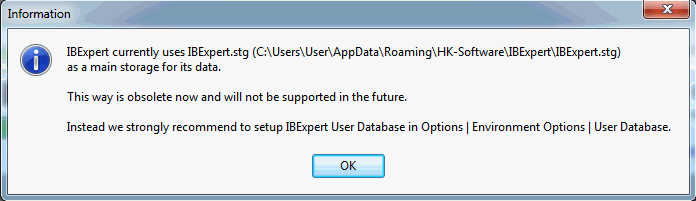
By starting IBExpert for a second time, IBExpert automatically creates a User Database in the user\app directory.
If you do not specify the name and location of the IBExpert user database yourself, the default ibexpert.udb will be used for storage of all settings, which can be found here: \HK-Software\IBExpert\ibexpert.udb. Please note, this area is user-dependent and even if several users work on one machine, each user has their own file.
You can of course specify the location of the User Database yourself. The simplest and quickest way to do this is using the supplied Firebird embedded server, and specifying the client library and database paths in Options / Environment Options / User Database.
See also:
IBExpert currently uses ibexpert.stg
'00-2' is not a valid integer value
IBExpert Developer Studio
(German-language version below)
The only tools you'll ever need
You develop SQL databases professionally and need an efficient and powerful tool? With IBExpert you have made the right choice. It enables you in just a short space of time to become acquainted with, and achieve a command of the open source database, Firebird, as well as its commercial relative, InterBase®. There are powerful and yet easy-to-learn editors for all essential functions.
Whether you enjoy the control of hand-coding DML or DDL statements or working in a visual editing environment, IBExpert makes it easy to get started and provides you with vital tools to speed and enhance your work.
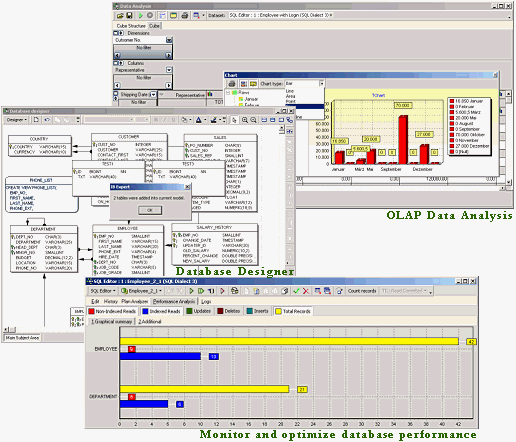
IBExpert includes many coding tools and features: visual editors for all database objects, an SQL Editor and Script Executive, a Debugger for stored procedures and triggers, a Query Builder, a powerful Database Designer and even its own scripting language, IBEBlock. A list of further IBExpert features can be found below.
IBExpert is the most comprehensive GUI tool for Firebird and InterBase® on the market today.
IBExpert Developer Studio includes the following components:
Documentation & support
All our products are accompanied by a comprehensive online documentation as well as online tutorials in our Learning Center.
Purchase
You can find a summary of all IBExpert software products and prices under IBExpert products, services & prices.
If you have any further questions please mail register@ibexpert.net.
IBExpert Features
- Monitor and optimize database performance with the Plan Analyzer, Performance Analysis, SQL Monitor, Database Statistics, Recompute Selectivity of all Indices, Recompile Procedures and Triggers, global Stored Procedure/Trigger Operations Index analysis etc.
- For advanced queries use the IBExpert Script Executive, which also offers a wide range of useful script extensions, only available in IBExpert; or the Visual Query Builder, ideal for those gaining their first experience with SQL.
- Create your own database from a model, or a model from your existing database with the Database Designer, including layers, subject areas, autoroute, notation format, and much more.
- Comprehensive Data Analysis / OLAP for cross-classified tables, statistics and graphics – all exportable in a number of formats.
- Copy, move or compare data and even join tables – all from different databases in a single script using IBEBlock.
- With IBEBlock you have a powerful set of DDL, DML and other statements executed on both the server and client side, and which include some specific constructs applicable only in IBExpert or IBEScript, regardless of the database server version.
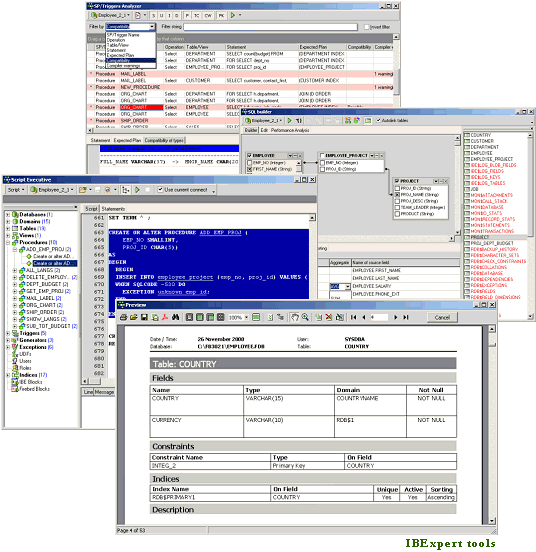
- Speed up and optimize your procedure and trigger programming with the Stored Procedure and Trigger Debugger; use the Assistant for their creation from any SQL statements; analyze using the Stored Procedure, Trigger and View Analyzer.
- User-defined or ready-made reports for database documentation, which can be stored in the database or as a file (PDF, Word etc.). Quick and simple HTML database documentation can be produced with just a few simple mouse clicks!
- Extract Metadata to create a copy of your database, with or without data content.
- Integrated Communications Diagnostic.
- Export of results in several formats; direct CSV file and ODBC data import.
- User and Grant Manager, with Autogrant function for automatic assignment of privileges for new database objects.
- See what's really happening in your database using IBExpert's Log Manager or the Trace and Audit Services (since Firebird 2.5).
- Hyperlinks, Code Completion, Assistants and many other features to speed up your development.
- Flexible user-definable interface – customize your screen, projects, code templates etc.
- Numerous product constellations to meet your requirements: Single and mutli-user software packages, Day Edition and free Personal and Educational versions.
- Regular fully-documented updates. Quick support of new Firebird features.
- Comprehensive documentation (context-sensitive, online and in printed form), online tutorial videos and active forum support.
- Multilingual.
- With full Unicode support.
- … and much, much more!
IBEScript.exe
All registered IBExpert Developer Studio versions (except the IBExpert Day Edition and the free IBExpert Developer Studio Educational Edition) include IBEScript.exe for your own script and IBEBlock development. This is also offered as part of the IBExpert Server Tools, for scripts and IBEBlock deployment on customer computers.
IBExpertDemoDB
Another component included in the Developer Studio is the IBExpertDemoDB database, which can be used for benchmark and performance testing.
Documentation & support
All our products are accompanied by a comprehensive online documentation as well as online tutorials in our Learning Center.
Purchase
You can find a summary of all IBExpert software products and prices under IBExpert products, services & prices.
If you have any further questions please mail register@ibexpert.net.
Das einzige Werkzeug, das Sie brauchen werden
Sie entwickeln SQL-Datenbanken professionell und benötigen ein effizientes und leistungsstarkes Werkzeug? Mit IBExpert haben Sie die richtige Wahl getroffen. Sie werden sich in kürzester Zeit mit seinen Funktionen vertraut machen können und so Ihre Open-Source-Datenbank Firebird und das kommerzielle Gegenstück InterBase® beherrschen. Ob Sie die Kontrolle handcodierter DML oder DDL Anweisungen oder das Arbeiten in einer optischen Entwicklungsumgebung bevorzugen, IBExpert macht Ihnen den Anfang leicht und bietet Ihnen hervorragende Werkzeuge zur Beschleunigung und Erweiterung Ihrer Arbeit.
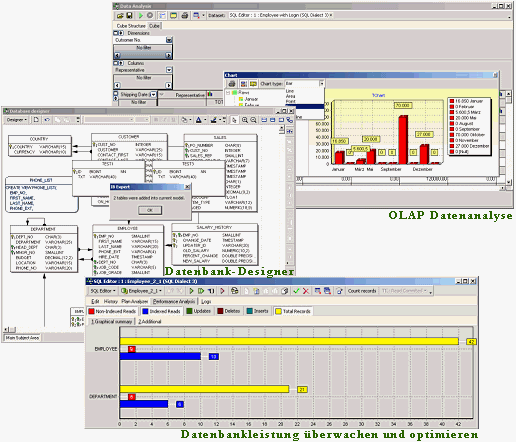
IBExpert enthält viele Codierwerkzeuge und Features: optische Editoren für alle Datenbankobjekte, ein SQL Editor und Skriptausführung, ein Debugger für Stored Procedures und Trigger, ein Abfragegenerator, einen leistungsstarken Datenbank-Designer und sogar die eigene Skriptsprache IBEBlock. Einen Überblick über alle IBExpert Features finden Sie hier.
IBExpert ist das umfassendste GUI Tool für Firebird und InterBase® auf dem heutigen Markt.
IBExpert Developer Studio beinhaltet folgende Komponenten:
Dokumentation & Support
IBExpert stellt eine umfassende Online Dokumentation sowie Online-Tutorials in unserem Learning Center zur Verfügung.
Bestellen
Eine Übersicht aller IBExpert Produkte und Diensteistungen finden Sie unter Alle Produkte & Preise.
Wenn Sie weitere Fragen haben, senden Sie bitte eine Mail an register@ibexpert.net.
IBExpert Features
- Überwachen und optimieren Sie die Datenbankgeschwindikeit mit der Plananalyse, Leistungsanalyse, SQL Monitor, Datenbankstatistik, Neuberechnung der Selektivität aller Indizes, Rekompilierung von Prozeduren und Triggern, globale Stored Procedure/Triggeroperationen, Indexanalyse etc.
- Verwenden Sie für komplexere Abfragen die IBExpert Skriptausführung, die über eine große Bandbreite an nützlichen Skripten verfügt, die nur in IBExpert erhältlich sind; oder der visuelle Abfragegenerator, ideal für diejenigen, die Ihre ersten Erfahrungen mit SQL machen.
- Erzeugen Sie Ihre eigene Datenbank von einem Modell, oder mit dem Datenbankdesigner ein Modell von Ihrer vorhandenen Datenbank, inklusive Layers, Themenbereiche, Autoroute, Benachrichtigungformat und vieles mehr.
- Umfassende Datenanalyse / OLAP für Kreuztabellen, Statistiken und Graphiken – alles exportierbar in viele Formate.
- Kopieren, verschieben oder vergleichen Sie Daten und verbinden Sie Tabellen – alles von verschiedenen Datenbanken in einem einzigen Skript mit IBEBlock.
- Mit IBEBlock haben Sie ein leistungsstarker Satz von DDL-, DML- und anderen Anweisungen, die auf der Server- und auf der Clientseite ausgeführt werden und die einige spezifische Konstruktionen enthalten, die nur in IBExpert oder IBEScript anwendbar sind, unabhängig von der Datenbankserverversion.
- Beschleunigen und optimieren Sie Ihre Prozeduren und Trigger durch Programmierung mit Stored Procedure und Trigger Debugger; verwenden Sie den Assistenten für deren Erzeugung aus einer SQL-Anweisung; analysieren Sie mit der Stored Procedure-, Trigger- und Viewanalyse.
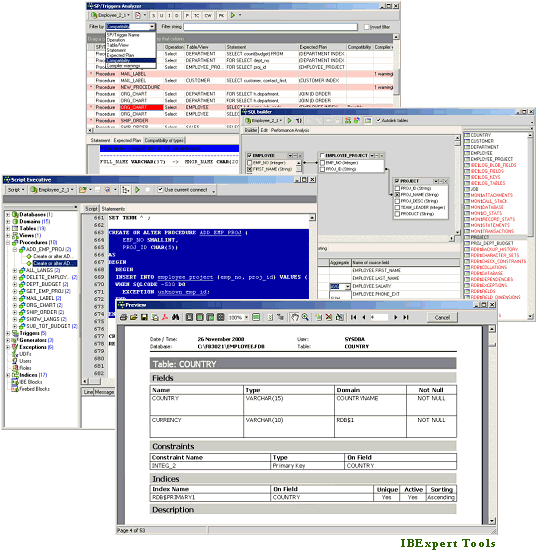
- Benutzerdefinierte oder vorgefertigte Berichte zur Datenbankdokumentation, die in der Datenbank oder als Datei (PDF, Word etc.). gespeichert werden können. Schnelle und einfache HTML-Datenbankdokumentation kann mit wenigen Mausklicks hergestellt werden!
- Extrahieren Sie Metadaten, um eine Kopie Ihrer Datenbank mit oder ohne Inhalt zu erstellen.
- Integrierte Kommunikationsdiagnose.
- Exportieren der Ergebnisse in verschiedene Formate; direkter CSV-Datei und ODBC-Datenimport.
- Benutzer- und Rechtemanager, mit Autogrant-Funktion zur automatischen Zuweisung von Rechten für neue Datenbankobjekte.
- Überwachen Sie Ihrer Datenbank mit Hilfe von den IBExpert Trace und Audit Services (seit Firebird 2.5).
- Hyperlinks, Codeergänzung, Assistenten und viele andere Features zur Beschleunigung Ihrer Entwicklung.
- Flexible benutzerdefiniertes Interface – passen Sie Ihren Bildschirm, Ihre Projekte, Code-Templates an etc.
- Zahlreiche Produktvarianten auf Ihre Bedürfnisse zugeschnitten: Einzel- und Multi-User Software Pakete, Day Editions, die IBExpert Developer Studio Company Year Edition und IBExpert Enterprise Server Year Edition für das Arbeiten in virtuellen Umgebungen, eine kostenlose Personal Edition und Schul-/Bildungsversion.
- Regelmäßige voll-dokumentierte Updates. Schnelle Unterstützung von neuen Firebird Features.
- Umfassende Online-Dokumentation, Online Lernvideos und aktiven Forum Support.
- mehrsprachig
- mit vollständigem Unicode-Support
- … und vieles, vieles mehr!
IBEScript.exe
Alle registrierten IBExpert Developer Studio Versionen (ausgenommen die IBExpert Day Edition und die kostenlose IBExpert Developer Studio Educational Edition) beinhalten die IBEScript.exe für die eigene Entwicklung von Skripten und IBEBlocks. Dies wird auch als Teil der IBExpert Server Tools angeboten, für den Einsatz Ihrer Skripte und IBEBlocks auf Kundenrechnern.
IBExpertDemoDB
Eine weitere Komponente, die im Developer Studio enthalten ist, ist die IBExpertDemoDB Datenbank, die als Benchmark und Leistungstest verwendet werden kann.
Dokumentation & Support
IBExpert stellt eine umfassende Online Dokumentation sowie Online-Tutorials in unserem Learning Center zur Verfügung.
Bestellen
Eine Übersicht aller IBExpert Produkte und Diensteistungen finden Sie unter Alle Produkte & Preise.
Wenn Sie weitere Fragen haben, senden Sie bitte eine Mail an register@ibexpert.net.
IBExpertFunctionLibrary
(German-language version below)
A user-defined function (UDF) is utilized to perform tasks that Firebird can't. It is an external database function written entirely in another language, such as C++ or Pascal, to perform data manipulation tasks that not directly supported by Firebird/InterBase.
As a lot of Firebird-based software developers know, these functions help you to extend the SQL language as required. But on the downside, the binary implementation requires a compiler on the platform where you want to use the Firebird server. A UDF library available for Win64 can neither be used on Win32 nor on Linux.
Up to Firebird 2.5 the UDF was an extremely powerful implementation, but unfortunately also a critical point of failure. If any of your binary code was not as stable as it should be, especially in multi-user environments, it could crash the Firebird server completely. All connected users would be disconnected, and even though the database file itself should not contain a binary error after this happened, any user application had to be restarted. This might not have been such a big problem with the Firebird Classic version, but today, using a binary UDF is no longer recommended.
This was the reason for the Firebird Project to introduce the new and more stable UDR implementation. A UDR appears to be similar to a UDF, but it is loaded in a considerably more stable way on the server process, and an error in the implementation does not typically crash the server.
Since Firebird 3, it is recommended to use a UDR rather than a UDF and, starting with Firebird 4, the use of UDFs is deactivated by default in the firebird.conf file.
A further implementation for the functional extension of Firebird was also introduced with Firebird 3: stored functions. Similar to the UDR/UDF functions, a stored function can be implemented in the same way as it can be when using a stored procedure, but the concept of functions provides only one result based on the specified input params.
As you might know, there are widely-used UDF implementations, which are all too often completely outdated, such as the FreeAdhocUDF library, which has not been changed or improved during the last 12 years. Libraries like rFunc or FreeAdhocUDF often use very high know-how standards but, based on Firebird’s built-in functions such as substring, the parameter structure is not one-to-one compatible. If you want to use your existing Firebird 2.x-based software in a new non-UDF-based Firebird version 3 or 4, you will need a replacement.
For this reason we have developed a complete new set of functions called IBExpertFunctionLibrary.
IBExpertFunctionLibrary Enterprise Maintenance Subscription
Your company licenses the source code of the library as it is, but it is only permitted to use this with databases created by your company for internal or customer use.
This includes access to all new versions of the source code and up to 5 new functional implementations for 12 months.
These functional implementations are limited to the language features already possible in the Firebird language. External software required for the implementation, such as DLLs/SO or other libraries, are not covered by this, but on request, this can also be implemented.
Pricing
IBExpertFunctionLibrary Enterprise Maintenance Subscription: EUR 1,020.00
The current version 1.0 already basically covers almost all of the functions currently available in FreeAdhocUDF and rFunc. Some functions cannot be implemented or it no longer make any sense to implement them, but these will be available as empty non-functional prototypes, so that a call will not result in an error.
IBExpertFunctionLibrary
Wie viele Firebird Softwareentwickler wissen, helfen Ihnen diese Funktionen dabei, die SQL-Sprache nach Bedarf zu erweitern. Der Nachteil ist jedoch, dass die binäre Implementierung einen Compiler auf der Plattform erfordert, auf der Sie den Firebird Server verwenden. Eine UDF-Bibliothek, die für Win64 verfügbar ist, kann weder unter Win32 noch unter Linux verwendet werden.
Bis zu Firebird 2.5 war die UDF eine extrem leistungsfähige Implementierung, aber leider auch ein kritischer Fehlerpunkt. Wenn einer Ihrer Binärcodes nicht so stabil war, wie er sein sollte, insbesondere in Mehrbenutzerumgebungen, konnte er den Firebird Server komplett zum Absturz bringen. Alle Client-Verbindungen wurden getrennt, und obwohl die Datenbankdatei selbst keinen Binärfehler enthalten sollte, musste jeder Client neu verbunden werden. Dies mag in der Firebird Classic Version kein so großes Problem gewesen sein, aber heute wird die Verwendung einer binären UDF nicht mehr empfohlen.
Dies war der Grund für das Firebird Projekt, die neue und stabilere UDR-Implementierung einzuführen. Eine UDR scheint einer UDF ähnlich zu sein, aber sie wird auf eine wesentlich stabilere Art und Weise in den Serverprozess geladen, und ein Fehler in der Implementierung führt normalerweise nicht zum Absturz des Servers.
Seit Firebird 3 wird empfohlen, eine UDR statt einer UDF zu verwenden und ab Firebird 4 ist die Verwendung von UDFs in der Datei firebird.conf standardmäßig deaktiviert.
Eine weitere Implementierung für die funktionale Erweiterung von Firebird wurde ebenfalls mit Firebird 3 eingeführt: Stored Functions. Ähnlich wie die UDR/UDF-Funktionen kann eine Stored Function auf die gleiche Weise wie eine Stored Procedure implementiert werden, aber das Konzept der Funktionen liefert nur ein Ergebnis basierend auf den angegebenen Eingabeparametern.
Wie Sie vielleicht wissen, gibt es weit verbreitete UDF-Implementierungen, die allzu oft völlig veraltet sind, wie z. B. die FreeAdhocUDF-Bibliothek, die in den letzten 12 Jahren weder geändert noch verbessert wurde. Bibliotheken wie rFunc oder FreeAdhocUDF verwenden oft sehr hohe Know-How-Standards, aber, basierend auf Firebirds eingebauten Funktionen wie z.B. substring, ist die Parameterstruktur nicht eins-zu-eins kompatibel. Wenn Sie Ihre bestehende Firebird 2.x-basierte Software in einer neuen, nicht UDF-basierten Firebird Version 3 oder 4 verwenden möchten, benötigen Sie einen Ersatz.
Aus diesem Grund haben wir einen komplett neuen Satz von Funktionen mit dem Namen IBExpertFunctionLibrary entwickelt.
IBExpertFunctionLibrary Enterprise Maintenance Subscription
Ihr Unternehmen lizenziert den Quellcode der Bibliothek, wie er ist, aber es ist nur erlaubt, diesen mit Datenbanken zu verwenden, die von Ihrem Unternehmen für den internen oder Kundengebrauch erstellt wurden.
Dies beinhaltet den Zugriff auf alle neuen Versionen des Quellcodes und bis zu 5 neue Funktionsimplementierungen für 12 Monate.
Diese funktionalen Implementierungen sind auf die Sprachfeatures beschränkt, die bereits in der Firebird-Sprache möglich sind. Externe Software, die für die Implementierung benötigt wird, wie z.B. DLLs/SO oder andere Bibliotheken, sind davon nicht abgedeckt, können aber auf Anfrage ebenfalls implementiert werden.
Preisgestaltung
Die aktuelle Version 1.0 deckt im Grunde bereits fast alle Funktionen ab, die derzeit in FreeAdhocUDF und rFunc verfügbar sind. Einige Funktionen können nicht implementiert werden oder es macht keinen Sinn mehr, sie zu implementieren, aber diese werden als leere nicht-funktionale Prototypen verfügbar sein, so dass ein Aufruf nicht zu einem Fehler führt.
IBExpert Distribution OEM Edition
The IBExpert Distribution OEM Edition allows unlimited distribution of the purchased IBExpert IDE software file or IBExpert scripts with your application for a period of 5 years.
You will receive an IBExpert.exe, IBEScript.exe and/or IBEScript.dll file created exclusively for your company, which you may use on any of your customers' computers on which your software is running, but also on any computer belonging to your group of companies (purchase, rental, leasing). However, distribution beyond this is explicitly prohibited. Employees who no longer work in your company may no longer use this software and may not continue to use it. You are responsible for ensuring that the OEM is only used in accordance with the conditions agreed between IBExpert and you (IBExpert contractual partner) and you must ensure that no arbitrarily available tool is distributed for activation. The OEM Edition may continue to be used on computers, where it has already been installed, for an unlimited period of time. For new installations however, a new IBExpert Distribution OEM must be purchased for the respective module after 5 years.
Updates are not included and must be commissioned additionally.
The OEM Update Subscription provides you access to all updates for 60 months (12 months on request).
The OEM Update Subscription cannot be ordered retrospectively, but only as an extension when directly ordering an IBExpert Distribution OEM Edition and is charged in advance.
Prices/Modules
IBExpert Distribution OEM Edition IDE
Software file: IBExpert.exe EUR 13,050
OEM Update Subscription 60 months: EUR 16,325
OEM Update Subscription per 12 months prepaid: EUR 4,300
IBExpert Distribution OEM Edition Script
Software file: IBEScript.exe: EUR 13,050
OEM Update Subscription 60 months: EUR 16,325
OEM Update Subscription per 12 months prepaid: EUR 4,300
IBExpert Distribution OEM Edition DLL
Software file: IBEScript.dll: EUR 13,050
OEM Update Subscription 60 months: EUR 16,325
OEM Update Subscription per 12 months prepaid: EUR 4,300
If no OEM Update Subscription is ordered as an extension to the IBExpert Distribution OEM Edition or the annual subscription period has been interrupted, the OEM Update Subscription cannot be ordered retrospectively.
We then charge a flat-rate service fee of currently EUR 4,300 per update for the respective OEM module.
The registration code (a character string to be calculated on the basis of the computer) does not require any internet access, portal access or access from third parties.
The IBExpert Distribution OEM Edition includes an individualised DLL or EXE with the name of the IBExpert contract partner.
On each computer on which an OEM DLL or EXE is to be used, the OEM licensee must calculate a registry entry in accordance with our specifications and save it in the HKCU area before using the OEM EXE or DLL.
Before using the OEM EXE or DLL, the OEM licensee must save it in the registry in the HKCU area.
The registration entry is calculated and checked individually, based on the local computer name.
Hardware changes or deployment on virtual machines do not change the code if the selected computer name does not change in the process.
The registration entry must be generated by the end customer's licensed software and not by separate software that can also be used without the correct licensing.
You will receive a source code sample as an example for this procedure as part of the OEM package.