IBEScript.exe

IBEScript.exe can be found in the IBExpert root directory, and needs to be started from DOS. (This feature is unfortunately not included in the free IBExpert Personal Edition.)

For regulations regarding distribution of any of the IBExpert Server Tools modules (hkSCC.exe, ibescript.exe, ibescript.dll and fbcrypt) together with your application, please refer to the IBExpert Server Tools documentation contents page.

Syntax

 IBEScript script_filename [options]

  • -S = silent mode
  • -V<Verbose_file> = verbose output file. If <Verbose_file> exists, IBEScript will overwrite it.
  • -v<verbose_file> = verbose output file. If <verbose_file> exists, IBEScript will append message to this file.
  • -E = display only error messages.
  • -N = continue after error.
  • -A<seconds> = advanced progress: <seconds> specifies the time interval in seconds to display progress messages. If <seconds> is not specified, advanced progress information will be displayed every second. The following information is available:
    • SC - statements count, number of executed statements;
    • POC - percentage of completion;
    • TS - time spent;
    • ETL - estimated time left.
For INPUT scripts the name of the input script file name will also be displayed. Advanced progress information is displayed even if the -S option (silent mode) is specified.
  • -T = write timestamp into log.
  • -D = connections string (use it if your script does not contain CONNECT or CREATE DATABASE statements).
  • -P = connection password (use only with -D option).
  • -R = connection role (use only with -D option).
  • -U = connection user name (use only with -D option).
  • -C = character set (use only with -D option).
  • -l = client library file (gds32.dll if not specified).
  • -L<1|2|3> = SQL dialect (use only with -D option; 1 if not specified).
  • -i = idle priority.
  • -G<variable_name>=<value> = specify global variable values.
  • -I<file_path_and_name> = By default (without the -I option specified). IBEScript.exe processes IBEScript.ini files immediately after starting in the following order:
1. IBEScript.ini in the IBEScript.exe directory, if it exists,
2. IBEScript.ini in the current directory, if it exists. If only -I is specified without a file name, any INI-file will be ignored. If a file name is specified after -I (e.g. -I"C:\my files\myibescript.ini") ONLY this file will be processed if it exists. Parameters specified in the command line will overwrite corresponding ones from an INI file.
  • -A<seconds> = display advanced progress information every <seconds> second(s) (default 1)
  • -e = encrypt a script file (no execution will be performed)
  • -d = decrypt an encrypted script file (no execution will be performed)
  • -p<password> = encrypt/decrypt password
  • -o<file_name> = output file for encrypted and decrypted scripts

WARNING! All options are case-sensitive!

Example 1: IBEScript C:\My Scripts\CreateDB.sql
Example 2: IBEScript C:\MyScripts\CreateDB.sql -S -VScriptLog.txt

The following features are also available: when no password and/or user name are specified in the CONNECT or CREATE DATABASE statements, a login dialog will appear. It is also possible to change the connection character set (SET NAMES) and garbage collection option (SET GARBAGE_COLLECT) before the RECONNECT statement. Any SET commands mentioned which are followed by a RECONNECT statement will affect the new connection.

It is also possible to use environment variables in INPUT, OUTPUT and SET BLOBFILE statements (see example below).

UTF8 BOM is skipped when executing a script from file.
The OUTPUT command also supports the OctetsAsHex option, which allows the extraction of CHAR(n) CHARACTER SET OCTETS values in hexadecimal format.


IBEScript examples

1. IBEBlock technology to create procedures with access to data in different Firebird/InterBase® databases

A simple script to copy data from one Firebird/InterBase® database to another:

 execute ibeblock
 as
 begin
   FBSrc  = ibec_CreateConnection(__ctFirebird,'DBName="localhost:C:\DB1.FDB";
   ClientLib=C:\Program Files\Firebird\Bin\fbclient.dll;
   user=SYSDBA; password=masterkey; names=WIN1252; sqldialect=3');
   FBDest = ibec_CreateConnection(__ctFirebird,'DBName="localhost:C:\DB2.FDB";
   ClientLib=C:\Program Files\Firebird\Bin\fbclient.dll;
   user=SYSDBA; password=masterkey; names=WIN1252; sqldialect=3');
   ibec_UseConnection(FbSrc);
   for select CustNo, Company, Addr1 from customer order by company into :CustNo, :Company,
     :Addr1
   do
   begin
      use FBDest;
      INSERT INTO CUSTOMER (CustNo, Company, Addr1) VALUES (:CustNo, :Company, :Addr1);
      use FBSrc;
   end
   use FBDest;
   COMMIT;
   ibec_CloseConnection(FBSrc);
   ibec_CloseConnection(FBDest);
 end

2. ODBC access to all ODBC data sources for importing or exporting data from a script

The same can also be done with any ODBC data source as the source and/or destination (this functionality has been tested with IBM DB2®, Oracle®, MS Access®, Sybase® etc.):

 execute ibeblock
 as
 begin
   OdbcCon = ibec_CreateConnection(__ctODBC, 'DBQ=C:\demo.mdb; DRIVER=Microsoft Access
   Driver (*.mdb)');
   FBCon = ibec_CreateConnection(__ctFirebird,'DBName="AVX-MAIN:D:\FB2_DATA\IBEHELP.FBA";
   ClientLib=C:\Program Files\Firebird\Bin\fbclient.dll;
   user=SYSDBA; password=masterkey; names=WIN1251; sqldialect=3');
   ibec_UseConnection(OdbcCon);
   for select CustNo, Company, Addr1 from customer order by company into :CustNo, :Company,
   :Addr1
   do
   begin
      use FBCon;
   INSERT INTO CUSTOMER (CustNo, Company, Addr1) VALUES (:CustNo, :Company, :Addr1);
      use OdbcCon;
   end
   use FBCon;
   COMMIT;
   ibec_CloseConnection(OdbcCon);
   ibec_CloseConnection(FBCon);
 end

3. Comparing databases from scripts

The following script compares the structure of two Firebird/InterBase® databases and stores a script that can be used to synchronize the database structure in the destination database: Save the following text as c:\comp.sql:

 execute ibeblock
 as
 begin
   create connection ReferenceDB dbname 'localhost:c:\RefDB.fdb'
   password 'masterkey' user 'SYSDBA'
   clientlib 'C:\Program Files\Firebird\bin\fbclient.dll'; 

   create connection CustomerDB dbname 'localhost:c:\customerDB.fdb'
   password 'masterkey' user 'SYSDBA'
   clientlib 'C:\Program Files\Firebird\bin\fbclient.dll';

   cbb = 'execute ibeblock (LogMessage variant)
          as
          begin
            ibec_progress(LogMessage);
          end';

   ibec_CompareMetadata(ReferenceDB, CustomerDB, 'C:\CompRes.sql', 'OmitDescriptions; OmitGrants', cbb);

   close connection ReferenceDB;
   close connection CustomerDB;
 end

Now run the following command line to create the script and synchronize the databases:

 ibescript.exe c:\comp.sql
 ibescript.exe c:\compres.sql

4. Create automatic reports

ibec_CreateReport prepares a report from a specified source and returns prepared report data. For preparing the initial report please refer to the IBExpert Report Manager.

This feature can be used for executing reports created with the IBExpert Report Manager in command-line mode, for example with batch files. The monthly sales report, invoices or other such reports can be designed in the Report Manager and executed with simple SQL statements. The result can then be saved in the database as a PDF file or other formats and sent by email or exported using ibec_ExportReport.

 execute ibeblock
  as
  begin
    Params['HeaderMemo'] = '';
    Params['MEMO2'] = 2;

    SELECT IBE$REPORT_SOURCE FROM ibe$reports
    where ibe$report_id = 4
    into :RepSrc;

    Report = ibec_CreateReport(RepSrc, Params, null);
    ibec_SaveToFile('D:\reptest.fp3', Report, 0);
            Res = ibec_ExportReport(Report, 'D:\reptest.pdf', __erPDF, 'EmbeddedFonts=TRUE');
    Res = ibec_ExportReport(Report, 'D:\reptest.jpg', __erJPEG, 'CropImages; Quality=90');
 end

5. File import into blob fields from SQL scripts

The following script imports the data from the files into the table TEST:

 SET BLOBFILE 'C:\f1.jpg';
 INSERT INTO TEST(ID,BLOBCOL) VALUES (1, :h00000000_7FFFFFFF);
 SET BLOBFILE 'C:\f2.jpg';
 INSERT INTO TEST(ID,BLOBCOL) VALUES (2, :h00000000_7FFFFFFF);
 SET BLOBFILE 'C:\f3.jpg';
 INSERT INTO TEST(ID,BLOBCOL) VALUES (3, :h00000000_7FFFFFFF);

The same syntax can be used for updating blob data.

6. Using environment variables in INPUT, OUTPUT and SET BLOBFILE statements

 execute ibeblock 
 as
 begin
 ibec_SetEnvironmentVariable('MyScriptDir', 'D:\Scripts\MyScripts');
 ibec_SetEnvironmentVariable('MyDataDir', 'D:\Data');
 ibec_SetEnvironmentVariable('MyBlobData', 'D:\Data\Blobs');
 end;

 SET BLOBFILE '\mytable.lob';

 OUTPUT '\mytable.sql';
 select * from mytable
 asinsert;
 COMMIT;

 INPUT '\ProcessData.sql';

These are just a few examples of the many tasks you can do with IBEScript. The full syntax and parameter list for ibec_CompareMetadata can be found in the online documentation, along with a full list of all current IBEBlock commands.


Encryption & decryption

There are two possible ways to encrypt/decrypt scripts and to execute encrypted scripts:

  1. Encrypting without the password. In this case there is no possibility to decrypt an encrypted script but it is possible to execute this script with IBEScript.
  2. Encrypting with the password. In this case it possible to decrypt the script and execute it with IBExpert if the correct password is specified.

The following options control the encrypting and decrypting:

  • -e = encrypts a script file and creates a file with the extension .esql if the output file is not specified (no execution will be performed).
  • -d = decrypts an encrypted script file if it was encrypted with password (no execution will be performed).
  • -p<password> = encrypt/decrypt password.
  • -o<file_name> = output file name for encrypted and decrypted scripts.

Again: all options are case-sensitive!

Example 1

 IBEScript "C:\MyScripts\CreateDB.sql"

Example 2

 IBEScript C:\MyScripts\CreateDB.sql -S -UScriptLog.txt

This product can be purchased as part of the distribution software listed above.

See also:
Firebird Interactive SQL Utility
IBEBlock
Script Executive


IBExpert Enterprise Server Year Edition

(German-language version below)

Software rental: IBExpert Enterprise Server Year Edition ESYE

Work with IBExpert software in a virtual environment

The ESYE contains the following components: IBExpert IDE, IBEScript.dll, IBEScript.exe and the BackupRestore Scheduler.

License Conditions and product description ESYE:

  • 1 * IBExpert activation for 1 Server, location-independent, valid for 12 months starting from the date of purchase
  • No hardware-related activation
  • Only one active instance of a virtual machine is permitted when the installed IBExpert software is started.
  • The components IBEScript.exe and IBEScript.dll can be started during runtime on the activated virtual server instance as often as required, but not on multiple virtual instances which have been copied or run in parallel by other methods.
  • The IBExpert IDE ibexpert.exe may be started on the activated virtual server instance in the terminal server environment in a maximum of 4 processes concurrently.
  • IMPORTANT!: There is no unlock procedure: If the machine with the activated IBExpert version needs to be replaced by another machine, a new ESYE license must be purchased for this machine.
  • Includes all updates for 12 months

Please note the following:

In the event of justified suspicion of misuse, IBExpert shall be entitled to inspect the start log of all servers on which IBExpert software is used.
By purchasing this software product, the customer/licensee explicitly grants IBExpert permission to view the IBExpert log files by remote service.

Price per activation per year 669 €.
Activation for multiple years is possible and is taken into consideration when activating. 

Please contact register@ibexpert.net for further information.


Softwaremiete: IBExpert Enterprise Server Year Edition ESYE

Um mit IBExpert Software in einer virtuellen Umgebung arbeiten zu können.

Die ESYE enthält die folgenden Komponenten: IBExpert IDE, IBEScript.dll, IBEScript.exe und den BackupRestore Scheduler.

Lizenzbedingungen und Beschreibung ESYE:

  • 1 * IBExpert Aktivierung für 1 Server, standortunabhängig, Laufzeit 12 Monate ab Kaufdatum
  • Keine hardwarebezogene Aktivierung
  • Es ist nur eine laufende Instanz einer virtuellen Maschine beim Start der damit installierten IBExpert Software erlaubt
  • Die Komponenten ibescript.exe und ibescript.dll können während der Laufzeit auf der aktivierten virtuellen Serverinstanz beliebig oft gestartet werden, jedoch nicht auf mehreren virtuellen Instanzen, die kopiert wurden oder durch andere Verfahren parallel laufen.
  • Die IBExpert IDE ibexpert.exe darf auf der aktivierten virtuellen Serverinstanz in Terminalserverumgebung maximal in 4 Prozessen parallel gestartet werden.
  • WICHTIG!: Es gibt kein Unlockverfahren: Wenn die Maschine mit der aktivierten IBExpert Version durch eine andere Maschine ersetzt werden muss, ist ein Neukauf der ESYE für diese Maschine erforderlich.
  • Updates für 12 Monate enthalten.

Bitte beachten Sie folgendes:

Bei begründetem Missbrauchsverdacht ist IBExpert berechtigt, das Startprotokoll sämtlicher Server, auf denen IBExpert Software im Einsatz ist, einzusehen.
Durch den Kauf dieses Software-Produktes erteilt der Kunde/Nutzer IBExpert explizit die Erlaubnis, die verwendeten IBExpert Protokolldateien per Fernwartung einzusehen.

Preis pro Freischaltung pro Jahr 669 €
Eine Freischaltung für mehrere Jahre ist möglich und wird bei der Aktivierung berücksichtigt. 

Kontaktieren Sie register@ibexpert.net für weitere Information.


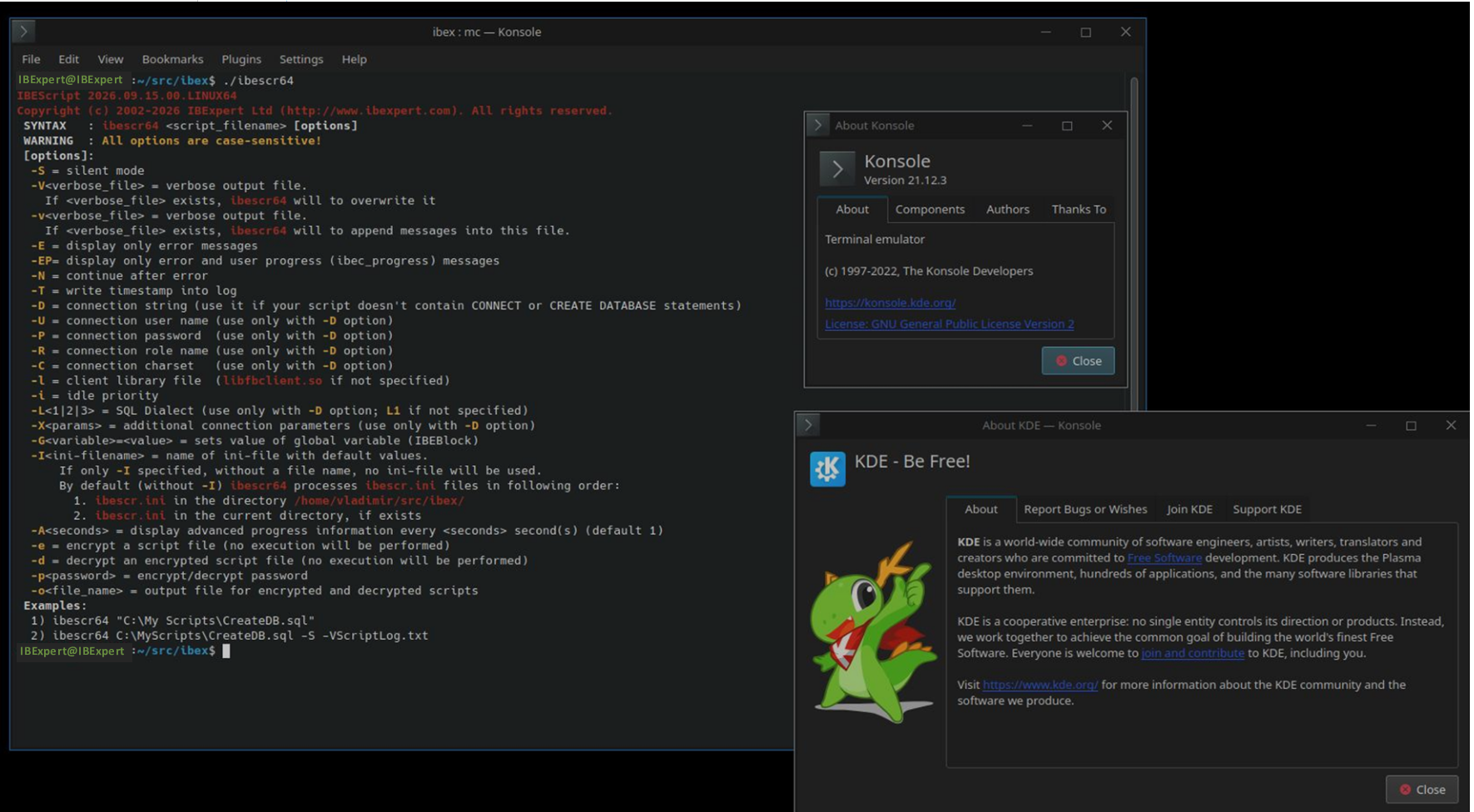
IBEScript.exe 64 Bit for Windows and Linux - Beta testers wanted!

We are nearing completion of our project “IBEScript.exe 64 Bit for Windows and Linux” and are now looking for beta testers to help us with the final testing phase.

The current beta version has already been ported to native 64-bit versions for Windows and Linux. Since many of the same functions are also used in the IBExpert IDE, the project has evolved into a broader effort that will ultimately provide a replacement for the existing ibexpert.exe for these platforms as well.

Here is a preview of the current non-public beta version:

Interested in becoming a beta tester?

If you would like to test the current beta version, please register here:

https://signal.me/#eu/lM3apdmvOoskLavQ965m9R0lXk8XRww0nfUwB6lrVP56oaKX619Is4D0yFxYhvTL

Please include a brief description of who you are, how you plan to test the software, and which platforms and environments you intend to use.

Your feedback will help us identify and resolve any remaining issues before the public release.

We are planning to publish the new IBEScript version later this year, with the new ibexpert.exe IDE hopefully following in the first half of 2027.

We look forward to hearing from you and welcoming you to our beta testing team!


IBExpert Firebird Replication

We implement Firebird technology-based replication for our clients. In our view, the majority of marketed all-in-one replication tools are of limited usefulness and tend to be a waste of time. Only in Firebird 4 is a basic replication integrated, but this still leaves many wishes unfulfilled.

The technology we use has already proven itself in real-world use at hundreds of locations and with databases of up to 500 GB.

Our technology can be used for all Firebird versions from 2.5 onwards and masters partial replication, the rules of which can be determined and adapted by the customer without having to define complicated INI files or GUIs. The implementation is based on Firebird stored procedures and trigger source codes, which allow our customers to extend and adapt them themselves at a later date.

It is important to us that our customers do not have to use software compiled only for this purpose!

We teach the complete process of replication that we implement in such a way that the customer acquires the ability to integrate it into his software, and to initialise and run the corresponding processes (synchronous replication in real time/synchronous replication in near real time/asynchronous replication/master-slave/master-multi-slave/multi-master) himself based on our technology according to his own specifications.

We distinguish whether our system is used, for example, only on one server as a backup, or only at locations in a corporate group, or whether the replication is to be passed on with the customer's own software to hundreds or thousands of end customer installations. Therefore, we always request a brief description of the customer structure and approximate current customer numbers where replication is to be deployed.

Our offer includes not only the replication technology implemented individually by ourselves on the basis of the customer's databases, but also a recommended on-site or remote workshop to impart the complete technology. We grant the right to unlimited distribution to end customers with your own software directly with the order confirmation, without any further complex licensing procedures.

For later extensions or adaptations to newer Firebird versions, we are available as required within the scope of our IBExpert and Firebird Hotline. Unlimited adaptations can also be carried out by the customer.

Enquiries for quotations to register@ibexpert.net.
Please provide us with a brief description of your application and, if possible, a metadata-only backup of your database.

What our customers have to say about our replication:
Database conversion from Firebird 2.1 to Firebird 3.0 and implementation of a database replication
"Our brief was to migrate a database of about 150 GB (which originally emerged from BDE (Paradox), migrated to InterBase 6 and later from Firebird 1.0 to 2.1) to Firebird 3 within a short period of time, and construct a replication over a VPN line.
""We contacted IBExpert GmbH, who made us an offer corresponding to our budget..
"Following a detailed analysis of our database by the IBExpert Team, it unfortunately transpired that the estimated costs could not be maintained.
"However, we quickly agreed to take over the necessary database reconstruction ourselves, so that we were back on budget. We received valuable and practical tips from the IBExpert team which facilitated the implementation.
"In order to improve our knowledge regarding Firebird 3 and replication, we visited their Bootcamp in 2017. A great event, due to Mr. Klemt’s competence and extensive knowledge all participants took a lot of information away with them from this event and no question remained unanswered.
"The database rebuild and replication implementation took place over a weekend. We could fully rely on Mr. Klemt, who was available late into the evening and who made a significant contribution to the success of the project. The replication was remotely set up by him and put into operation in the short frame available, so that on Monday the remodeled Firebird 3 database including replication was in production.
"In conclusion, I would like to say that anyone wishing to replicate Firebird or seeking solutions in the database environment is in the best hands with Mr. Klemt; he does not mince words, he is competent, his training and communication is certainly not boring. He has proved to be a fair partner for us."


Uwe Cramer, Intellekta GmbH

More about replication


IBExpert Developer Studio Full Educational Edition

(German-language version below)

The IBExpert Developer Studio Full Educational Edition is equivalent to the full IBExpert Developer Studio Edition.

To apply for the IBExpert Developer Studio Full Educational Edition please send us an e-mail with the following details:

  • The educational institution (university, school, college …) where IBExpert is to be used
  • A brief description of the course, where you plan to use IBExpert
  • User name
  • User e-mail address
  • Copy of the valid school student identity card
or
  • Copy of the valid university student identity card
or
  • Official order from the school/University

Please send the copies as scanned e-mail attachments to register@ibexpert.net.

We are only be able to process orders following receipt of the complete, above-mentioned information.


Die IBExpert Developer Studio Full Educational Edition

Die IBExpert Developer Studio Full Educational Edition entspricht in vollem Umfang der IBExpert Developer Studio Version.

Um die IBExpert Developer Studio Full Educational Edition zu erwerben, senden Sie uns bitte eine E-Mail mit folgenden Angaben:

  •     Die Bildungseinrichtung, in der Sie IBExpert einsetzen möchten (Universität, Schule,  Kolleg...)
  •     Eine kurze Beschreibung des Kurses, in dem Sie IBExpert einsetzen möchten 
  •     Benutzername
  •     Benutzer E-Mail-Adresse
  •     Kopie eines gültigen Schülerausweises 

oder

  •     Kopie eines gültigen Studentenausweises 

oder

  •     offizielles Bestellformular der Schule/Universität 

Die Kopien senden Sie bitte als gescannte E-Mail-Anhänge an register@ibexpert.net.

Wir können Ihre Bestellung erst nach Erhalt der vollständigen, oben genannten Angaben, bearbeiten. 


Whats New

IBExpert 2026.07.26

(and bugfixes 2026.08.20)

This version includes further adaptations and optimisations to new Firebird 6 features, along with minor bugfixes and improvements.


IBExpert 2026.02.22

(and bugfixes 2026.03.01/2026.03.04/2026.03.15/2026.13.19/2026.03.31/2026.04.02/2026.05.22/2026.05.26/2026.05.28/2026.06.02)

The main improvement in this version is support for schemas in the Extract Metadata engine and everything around it: the Extract metadata feature itself, the ibec_ExtractMetadata function and other places where pFIBExtract is used. 


IBExpert 2025.08.04

(and bugfixes 2025.08.08/2025.10.29/2025.10.31/2025.11.07/2025.11.12/
2025.11.17/2025.12.19/2025.12.23)

1. SQL Editor

  • Support for CALL statement (FB 6).
  • Support for SHOW (WIRE_STATISTICS | WIRE_STATS) command (FB 6).
    The command show values of wire statistics counters, accumulated since the connection start time.

2. Database Inside

  • Initial support for FB 6 databases.

3. New trace session form

  • "Initial view mode" option implemented.

4. Other minor bugfixes and improvements


IBExpert 2025.06.09

(and bugfixes 2025.06.18/2025.06.24)

1. Initial support for Firebird 6 implemented

    2. Blob editor

    • Improvement: Two or more blob editors can now be opened at the same time.
      To start a second, third etc. blob editor use the "New blob editor" button in an already opened blob editor.

    3. SQL Editor

    • Improvement (Firebird 6): EXPLAIN <query> 
      - Prepares <query> and gets its plan in the usual way.
      - Executes "select * from rdb$sql.explain(<query>)" and shows results in the data grid.

    4. DB Explorer

    • Bugfix: Missing colorization of incremental search results if the database connection charset is UTF8.

    5. IBEBlock

    • Bugfix: ibec_CompareMetadata ignored stored functions and packages if Firebird 4.0 or Firebird 5.0 is specified as the server version. 
    • Improvement: FOR loop now supports DOWNTO and BY clauses similar to Firebird 6 syntax.

    6. Minor bugfixes and small improvements


    IBExpert 2024.12.01

    (and bugfixes 2024.12.04/2025.02.05/2025.02.27/2025.03.07/2025.03.28/2025.04.22/2025.05.08)

    1. Event blocks

    • "Before start trace session" event block implemented.
      See \Blocks\Templates\EventBlocks\TAS.BeforeStartTraceSession.ibeblock for an example.
      Also see description of new "Quick start trace session" feature below.

    2. Code editors

    • Support for multilevels in User actions submenu.
      See \Blocks\Templates\EventBlocks\CodeEditorUserActions.ibeblock for a working example.

    3. Database Comparer

    • Fixed the problem with missing stored functions and packages while comparing Firebird 5 databases.

    4. Quick start trace session feature implemented

    • This feature is intended to start a trace session for an active connection with a single click.
    • Default trace config is provided by IBExpert and can be modified in the "Before start trace session" event block which is fired when quick start or regular start (Services | Trace and Audit | Start new trace session) is performed.

      There are several other properties of trace session and trace form which can be customized in the "Before start trace session" event block.

      See \Blocks\Templates\EventBlocks\TAS.BeforeStartTraceSession.ibeblock for complete example.
    • To quick start a trace session, use the corresponding button on the main form tool button. Alternatively it can be done using the [Ctrl] + [Shift] + [T] shortcut.

    5. IBEBlock

    • ibec_psql_PreprocessPSQL function implemented.

      It inserts some placeholders in the form of single line comments into a provided PSQL source (procedures, functions, triggers and package routines) which can be later replaced with additional debug statements (INSERT into a log table etc.). For a complete example see \Blocks\DefaultBlocks\PSQL.PrepareForDebug.ibeblock.

      There is also a working implementation of calling this block from \Blocks\Templates\EventBlocks\ CodeEditorUserActions.ibeblock which performs the preparation of the PSQL source for debugging and removes debug statements and comments from the PSQL source when they are no longer needed.
    • @SysUtils.GetFilePath function implemented.

      The function sequentially checks the specified folders for the presence of the file. If the folder contains the specified file, the function returns the full path to it and exits. Otherwise, it returns NULL.

    Example:

        ...
        sBlockFileName = 'PSQL.PrepareForDebug.ibeblock';
        sBlockFilePath = @SysUtils.GetFilePath(sBlockFileName,
           ibec_GetEnvironmentVariable('IBE_USERBLOCKSDIR'),
         ibec_Coalesce(ibec_GetEnvironmentVariable('IBE_APPDIR'), '') + '\Blocks\DefaultBlocks');

      if (sBlockFilePath is null) then
      begin
        ibec_ShowMessage('Looks like ''' + sBlockFileName + '''is missing...');
        Exit;
        end; 

    6. Minor bugfixes and small improvements


    IBExpert 2024.04.07

    1. Database Registration

    "Show server version mismatch warning" option added (Additional tab). 

    If this option is ON (default) IBExpert will compare the specified and the actual version of the database and warn in case of a mismatch with a choice of possible actions.

    2. PSQL Debugger

    Support for time zones implemented (Firebird 4, 5). 

    3. Data Grids

    The possibility to dump blobs to file without preloading them into the IBExpert GUI has been implemented; it is available from the grid context menu.

    Fixed the issue with incorrect representation of RDB$DB_KEY for tables with >2G records. 

    4. Code Completion

    Fixed the incorrect behaviour when selecting/unselecting items in the list using the mouse. 

    5. Database Inside

    Support for Firebird 5 databases. 

    6. SQL Editor, Statements History List

    Added counters for page operations. 

    7. Database Comparer

    Support for parenthesized SELECTs (Firebird 5) implemented. 

    8. Other minor bugfixes and small improvements


    IBExpert 2024.01.22

    Mainly bug fixes.


    IBExpert 2023.11.22

    Mainly bug fixes.


    IBExpert 2023.10.27

    1. Code Editor, Code Completion

    • Improved performance especially on databases with lot of objects.
    • Suggesting possible joins based on existing relationships by foreign keys - call the Code Completion after JOIN keyword.
    • There was a bug on some configurations in the previous version which caused IBExpert to freeze when the Code Completion is fires. Fixed in this version.

    2. Database Inside

    • Support for Firebird 4 databases.

    3. Partial support for Firebird 5 implemented

    • Support for all known syntax changes/additions in the PSQL parser:
         SKIP LOCKED, WHEN NOT MATCHED BY SOURCE, parenthesized SELECTs etc.

         However, there is NO support yet for parenthesized SELECTs in the Database Comparer.
         Also the PSQL debugger doesn't allow to debug roitines with subroutines which reference variables in a main routine.

    • Support for new built-in functions in the Code Parameters hint.
    • Support for partial indices in the index editors and metadata extract.
    • Support for parallel workers in following IBEBlock functions:
        ibec_BackupDatabase, ibec_RestoreDatabase, @Services.RepairDatabase.

          There is a new option available - ParallelWorkers (or just Parallel) - which allows to specify number of parallel workers (e.g. ParallelWorkers=4)

    4. Other minor bugfixes and small improvements


    IBExpert 2023.09.13

    Mainly bug fixes.


    IBExpert 2023.07.09

    1. DB Explorer

    •   Activating/deactivating database objects from the Project View tree.

    2. Search in Metadata

    •   Possibility to search in scripts/blocks (IBE$SCRIPTS table) has been implemented.

    3. Code Editors

    •  Hyperlinks behaviour for package routines implemented.
    • "Before load from file" event block implemented. This block allows you to perform some actions before the appearance of the "Open file" dialog; for example, change a source directory. See block template for more details.
    • "Init/perform user actions" event block implemented. This block allows you to define user actions with code editor content which will be executed via a shortcut and/or from the code editor context menu (the very first item in the menu, if the block exists and is active). See block template for more details.

    4. Dependencies trees

    •   Solved some issues with the incorrect display of package dependencies.

    5. Copy Database Object

    • Support of SQL role in copy blocks added.

    6. IBEBlock

    • @Services.RepairDatabase and @Services.SetDBProperties functions implemented. 

        Example:

        execute ibeblock
        as
       begin
         -- Both functions return nothing (NULL) if there were no errors,
         -- otherwise they will return an error message 

         sDBName = 'dbserver/3053:D:\databases\db.fdb';
          sConnectParams = 'ClientLib="D:\ClientLibs\fbclient_30.dll"; User=SYSDBA; Password=masterkey;';

        -- Supported repair params: Limbo, CheckDB, IgnoreChecksum,
          -- KillShadows, Mend, Sweep, Validate, ValidateFull

          Res = @Services.RepairDatabase(:sDBName, :sConnectParams || 'Mend');

         if (Res is not null) then
           ibec_ShowMessage(Res); 

          -- All supported params are listed in the example

          Res = @Services.SetDBProperties(:sDBName, :sConnectParams || 'PageBuffers=2048; SQLDialect=3;
               SweepInterval=20000; ForcedWrites=TRUE; ReadOnly=FALSE');

         if (Res is not null) then
            ibec_ShowMessage(Res);

        end;

    • ibec_ExtractMetadata function:
      ExtractPrimaryKeys and ExtractUniques options added to prevent extraction of primary keys and unique constraints. Together with the existing ExtractReferences and ExtractChecks these options allow you to suppress the extraction of all constraints.

      By default all of these options are ON (TRUE). To disable the extraction of primary keys, for example, set the corresponding option to FALSE: ExtractPrimaryKeys=FALSE.

    • Code Editor namespace with set of functions implemented. See example of usage in the "Init/perform user actions" event block template.

    7. Minor bugfixes and small improvements


    IBExpert 2023.04.14

    Minor bugfixes and small improvements.


    IBExpert 2023.03.06

     1. Data Grid

    • Possibility to edit UUID/OCTETS values in the filter criteria tree has been implemented.
    • The mouse wheel can now be used to perform Page Up and Page Down actions.
    • By default the Ctrl key should be held to perform PageUp/PageDown.
    • To change the default modifier put the following piece of code into the After IBExpert starts event block:
        ibec_SetGlobalVar('IBE$DATA_GRID_PAGE_SCROLL_MODIFIER', <value>);

            where <value> is one of following: empty string, null, 'CTRL', 'ALT', 'SHIFT'.

            An empty string or null as a new modifier value makes PageDown/PageUp a default                behaviour of the mouse wheel in the Data Grid.

    2. Code Editor

    • Support of keyboard templates in the Code Completion list.
      There is a new option Show keyboard templates in Code Completion list in the Options | Editor Options | Code Insight.

    3. Automatic restore of a dead connection

    • By default if the database connection is lost IBExpert shows a dialog window and offers to restore a dead connection. To attempt to restore the connection automatically without user confirmation put following line of code into the After IBExpert starts event block:
        ibec_SetGlobalVar('IBE$RESTORE_DEAD_CONNECTION', TRUE);

    4. Database Object Editors

    • Support of object names longer than 31 chars (Firebird 4) where they were not yet supported.

    5. Export Data

    • Export to clipboard in JSON format implemented.

    6. Code Formatter

    • Support of space after opening and before closing bracket options.

    7. Minor bugfixes and small improvements