Where Is Your Database Really Spending Its Time?
Have you ever investigated which SQL statements are unexpectedly slowing down your database?
With the IBExpert Full Version or Day Edition, you can see what is happening directly on the Firebird server. Simply right-click your registered database, select Start trace session, and enable tracing for your current connection. You can then follow statement preparation and execution, stored procedure calls, and trigger activity as they happen.
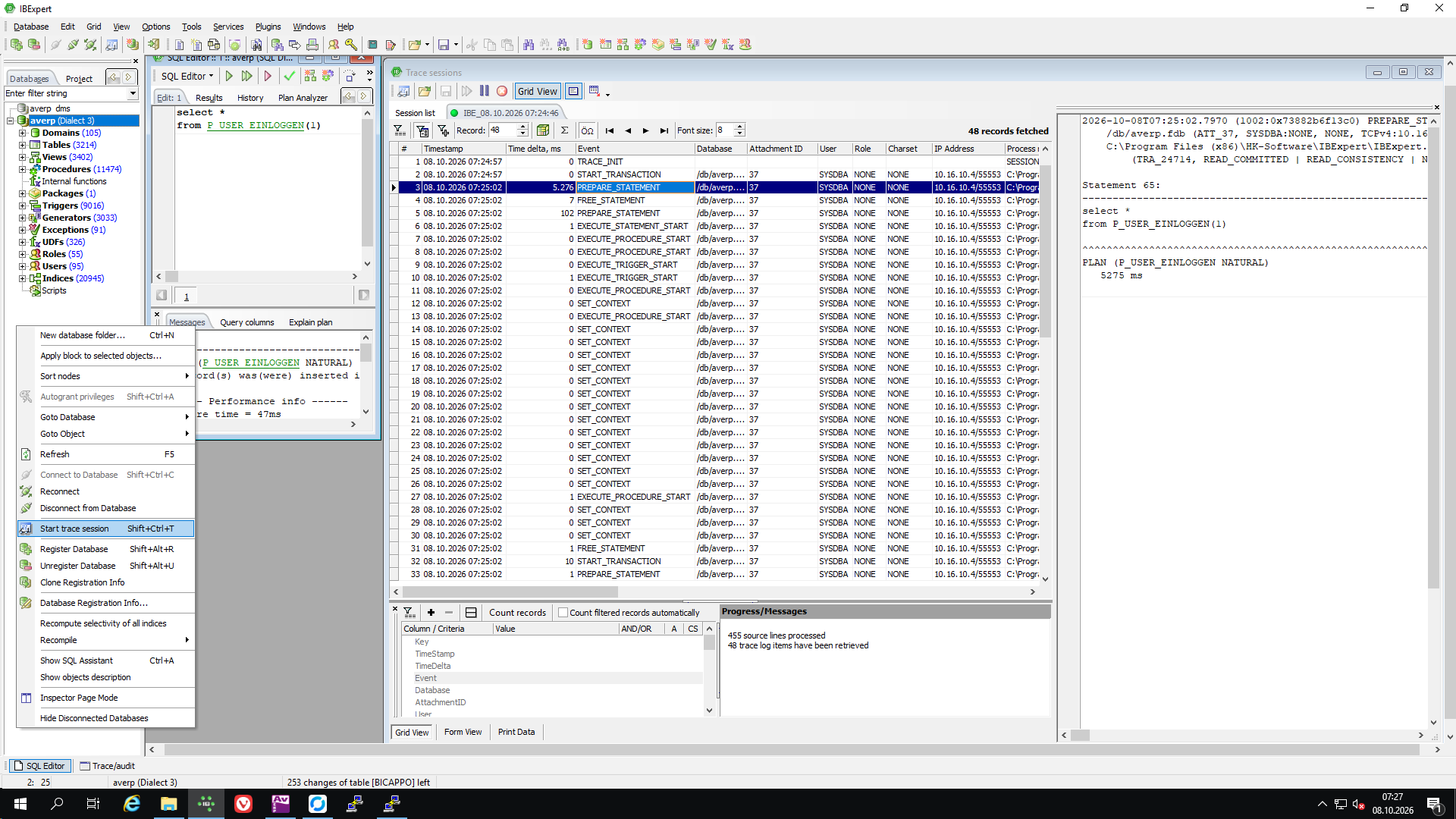
In the example shown, the seemingly unremarkable stored procedure P_USER_EINLOGGEN takes more than five seconds just to prepare the call, before execution even begins. A simple-looking SQL statement can hide a surprising amount of work.
These detailed trace results also give AI platforms the evidence they need to help you investigate performance problems and suggest targeted improvements. Without tools that reveal what the server actually does, even AI-assisted optimisation can quickly reach a dead end: the SQL text alone often does not explain where the time goes.
During our IBExpert Hotline Sessions, we can investigate these delays together, identify unexpected calls and dependency chains, explain why they occur, and work on ways to optimise your database.
Bring your trace results, and let’s find out where the time really goes.
IBEScript.exe
IBEScript.exe can be found in the IBExpert root directory, and needs to be started from DOS. (This feature is unfortunately not included in the free IBExpert Personal Edition.)
For regulations regarding distribution of any of the IBExpert Server Tools modules (hkSCC.exe, ibescript.exe, ibescript.dll and fbcrypt) together with your application, please refer to the IBExpert Server Tools documentation contents page.
Syntax
IBEScript script_filename [options]
- -S = silent mode
- -V<Verbose_file> = verbose output file. If <Verbose_file> exists, IBEScript will overwrite it.
- -v<verbose_file> = verbose output file. If <verbose_file> exists, IBEScript will append message to this file.
- -E = display only error messages.
- -N = continue after error.
- -A<seconds> = advanced progress: <seconds> specifies the time interval in seconds to display progress messages. If <seconds> is not specified, advanced progress information will be displayed every second. The following information is available:
-
- SC - statements count, number of executed statements;
- POC - percentage of completion;
- TS - time spent;
- ETL - estimated time left.
-
- -T = write timestamp into log.
- -D = connections string (use it if your script does not contain CONNECT or CREATE DATABASE statements).
- -P = connection password (use only with -D option).
- -R = connection role (use only with -D option).
- -U = connection user name (use only with -D option).
- -C = character set (use only with -D option).
- -l = client library file (gds32.dll if not specified).
- -L<1|2|3> = SQL dialect (use only with -D option; 1 if not specified).
- -i = idle priority.
- -G<variable_name>=<value> = specify global variable values.
- -I<file_path_and_name> = By default (without the -I option specified). IBEScript.exe processes IBEScript.ini files immediately after starting in the following order:
- -A<seconds> = display advanced progress information every <seconds> second(s) (default 1)
- -e = encrypt a script file (no execution will be performed)
- -d = decrypt an encrypted script file (no execution will be performed)
- -p<password> = encrypt/decrypt password
- -o<file_name> = output file for encrypted and decrypted scripts
WARNING! All options are case-sensitive!
Example 1: IBEScript C:\My Scripts\CreateDB.sql
Example 2: IBEScript C:\MyScripts\CreateDB.sql -S -VScriptLog.txt
The following features are also available: when no password and/or user name are specified in the CONNECT or CREATE DATABASE statements, a login dialog will appear. It is also possible to change the connection character set (SET NAMES) and garbage collection option (SET GARBAGE_COLLECT) before the RECONNECT statement. Any SET commands mentioned which are followed by a RECONNECT statement will affect the new connection.
It is also possible to use environment variables in INPUT, OUTPUT and SET BLOBFILE statements (see example below).
UTF8 BOM is skipped when executing a script from file.
The OUTPUT command also supports the OctetsAsHex option, which allows the extraction of CHAR(n) CHARACTER SET OCTETS values in hexadecimal format.

IBEScript examples
1. IBEBlock technology to create procedures with access to data in different Firebird/InterBase® databases
A simple script to copy data from one Firebird/InterBase® database to another:
 execute ibeblock
 as
 begin
   FBSrc  = ibec_CreateConnection(__ctFirebird,'DBName="localhost:C:\DB1.FDB";
   ClientLib=C:\Program Files\Firebird\Bin\fbclient.dll;
   user=SYSDBA; password=masterkey; names=WIN1252; sqldialect=3');
   FBDest = ibec_CreateConnection(__ctFirebird,'DBName="localhost:C:\DB2.FDB";
   ClientLib=C:\Program Files\Firebird\Bin\fbclient.dll;
   user=SYSDBA; password=masterkey; names=WIN1252; sqldialect=3');
   ibec_UseConnection(FbSrc);
   for select CustNo, Company, Addr1 from customer order by company into :CustNo, :Company,
     :Addr1
   do
   begin
      use FBDest;
      INSERT INTO CUSTOMER (CustNo, Company, Addr1) VALUES (:CustNo, :Company, :Addr1);
      use FBSrc;
   end
   use FBDest;
   COMMIT;
   ibec_CloseConnection(FBSrc);
   ibec_CloseConnection(FBDest);
 end
2. ODBC access to all ODBC data sources for importing or exporting data from a script
The same can also be done with any ODBC data source as the source and/or destination (this functionality has been tested with IBM DB2®, Oracle®, MS Access®, Sybase® etc.):
 execute ibeblock
 as
 begin
   OdbcCon = ibec_CreateConnection(__ctODBC, 'DBQ=C:\demo.mdb; DRIVER=Microsoft Access
   Driver (*.mdb)');
   FBCon = ibec_CreateConnection(__ctFirebird,'DBName="AVX-MAIN:D:\FB2_DATA\IBEHELP.FBA";
   ClientLib=C:\Program Files\Firebird\Bin\fbclient.dll;
   user=SYSDBA; password=masterkey; names=WIN1251; sqldialect=3');
   ibec_UseConnection(OdbcCon);
   for select CustNo, Company, Addr1 from customer order by company into :CustNo, :Company,
   :Addr1
   do
   begin
      use FBCon;
   INSERT INTO CUSTOMER (CustNo, Company, Addr1) VALUES (:CustNo, :Company, :Addr1);
      use OdbcCon;
   end
   use FBCon;
   COMMIT;
   ibec_CloseConnection(OdbcCon);
   ibec_CloseConnection(FBCon);
 end
3. Comparing databases from scripts
The following script compares the structure of two Firebird/InterBase® databases and stores a script that can be used to synchronize the database structure in the destination database: Save the following text as c:\comp.sql:
execute ibeblock as begin create connection ReferenceDB dbname 'localhost:c:\RefDB.fdb' password 'masterkey' user 'SYSDBA' clientlib 'C:\Program Files\Firebird\bin\fbclient.dll';create connection CustomerDB dbname 'localhost:c:\customerDB.fdb' password 'masterkey' user 'SYSDBA' clientlib 'C:\Program Files\Firebird\bin\fbclient.dll';
cbb = 'execute ibeblock (LogMessage variant) as begin ibec_progress(LogMessage); end';
ibec_CompareMetadata(ReferenceDB, CustomerDB, 'C:\CompRes.sql', 'OmitDescriptions; OmitGrants', cbb);
close connection ReferenceDB; close connection CustomerDB; end
Now run the following command line to create the script and synchronize the databases:
 ibescript.exe c:\comp.sql
 ibescript.exe c:\compres.sql
ibec_CreateReport prepares a report from a specified source and returns prepared report data. For preparing the initial report please refer to the IBExpert Report Manager.
This feature can be used for executing reports created with the IBExpert Report Manager in command-line mode, for example with batch files. The monthly sales report, invoices or other such reports can be designed in the Report Manager and executed with simple SQL statements. The result can then be saved in the database as a PDF file or other formats and sent by email or exported using ibec_ExportReport.
 execute ibeblock
  as
  begin
    Params['HeaderMemo'] = '';
    Params['MEMO2'] = 2;
SELECT IBE$REPORT_SOURCE FROM ibe$reports
where ibe$report_id = 4
into :RepSrc;

Report = ibec_CreateReport(RepSrc, Params, null);
ibec_SaveToFile('D:\reptest.fp3', Report, 0);
        Res = ibec_ExportReport(Report, 'D:\reptest.pdf', __erPDF, 'EmbeddedFonts=TRUE');
Res = ibec_ExportReport(Report, 'D:\reptest.jpg', __erJPEG, 'CropImages; Quality=90');
end
5. File import into blob fields from SQL scripts
The following script imports the data from the files into the table TEST:
 SET BLOBFILE 'C:\f1.jpg';
 INSERT INTO TEST(ID,BLOBCOL) VALUES (1, :h00000000_7FFFFFFF);
 SET BLOBFILE 'C:\f2.jpg';
 INSERT INTO TEST(ID,BLOBCOL) VALUES (2, :h00000000_7FFFFFFF);
 SET BLOBFILE 'C:\f3.jpg';
 INSERT INTO TEST(ID,BLOBCOL) VALUES (3, :h00000000_7FFFFFFF);
The same syntax can be used for updating blob data.
6. Using environment variables in INPUT, OUTPUT and SET BLOBFILE statements
 execute ibeblock
 as
 begin
 ibec_SetEnvironmentVariable('MyScriptDir', 'D:\Scripts\MyScripts');
 ibec_SetEnvironmentVariable('MyDataDir', 'D:\Data');
 ibec_SetEnvironmentVariable('MyBlobData', 'D:\Data\Blobs');
 end;
SET BLOBFILE '\mytable.lob';
OUTPUT '\mytable.sql';
select * from mytable
asinsert;
COMMIT;
INPUT '\ProcessData.sql';
These are just a few examples of the many tasks you can do with IBEScript. The full syntax and parameter list for ibec_CompareMetadata can be found in the online documentation, along with a full list of all current IBEBlock commands.
Encryption & decryption
There are two possible ways to encrypt/decrypt scripts and to execute encrypted scripts:
- Encrypting without the password. In this case there is no possibility to decrypt an encrypted script but it is possible to execute this script with IBEScript.
- Encrypting with the password. In this case it possible to decrypt the script and execute it with IBExpert if the correct password is specified.
The following options control the encrypting and decrypting:
- -e = encrypts a script file and creates a file with the extension .esql if the output file is not specified (no execution will be performed).
- -d = decrypts an encrypted script file if it was encrypted with password (no execution will be performed).
- -p<password> = encrypt/decrypt password.
- -o<file_name> = output file name for encrypted and decrypted scripts.
Again: all options are case-sensitive!
Example 1
IBEScript "C:\MyScripts\CreateDB.sql"
Example 2
IBEScript C:\MyScripts\CreateDB.sql -S -UScriptLog.txt
This product can be purchased as part of the distribution software listed above.
See also:
Firebird Interactive SQL Utility
IBEBlock
Script Executive
Disclaimer
Legal notice / Disclaimer
1. Content
IBExpert Ltd does not accept liability for the topicality, accuracy, completeness or quality of the information and material provided unless the mistake occurred intentionally or through gross negligence. This refers to any loss, additional costs or damage of any kind suffered as a result of any use of any information and material IBExpert Ltd provides on its web sites. All offers are not binding and without obligation.
2. Referrals and links
IBExpert Ltd has no influence on the design and contents of third party material linked or referred to from its web sites. Therefore, IBExpert Ltd expressly distances itself from such kind of material and rejects responsibility for any contents provided by third parties - unless it has full knowledge of illegal contents and would be able to prevent the visitors of its web sites from viewing those pages.
3. Copyright
The layout of the web sites, diagrams, pictures and logos used and the collection of individual contributions are protected by copyright. Any duplication or use of objects such as diagrams, pictures or texts in other electronic or printed publications is not permitted without IBExpert Ltd's explicit agreement.
4. Legal validity of this disclaimer
This disclaimer is to be regarded as part of the internet publication which you were referred from. If any of the terms and conditions should be determined invalid by reason of the relevant laws then the remaining terms and conditions remain uninfluenced by this fact.
IBEScript – Firebird-Skripte automatisiert ausführen
Mit IBEScript lassen sich Firebird-Skripte komfortabel über die Windows-Kommandozeile automatisiert ausführen. Das eigenständige Kommandozeilen-Tool eignet sich ideal für geplante Aufgaben, Installationsroutinen, Batch-Dateien und CI/CD-Prozesse – ganz ohne grafische Benutzeroberfläche.
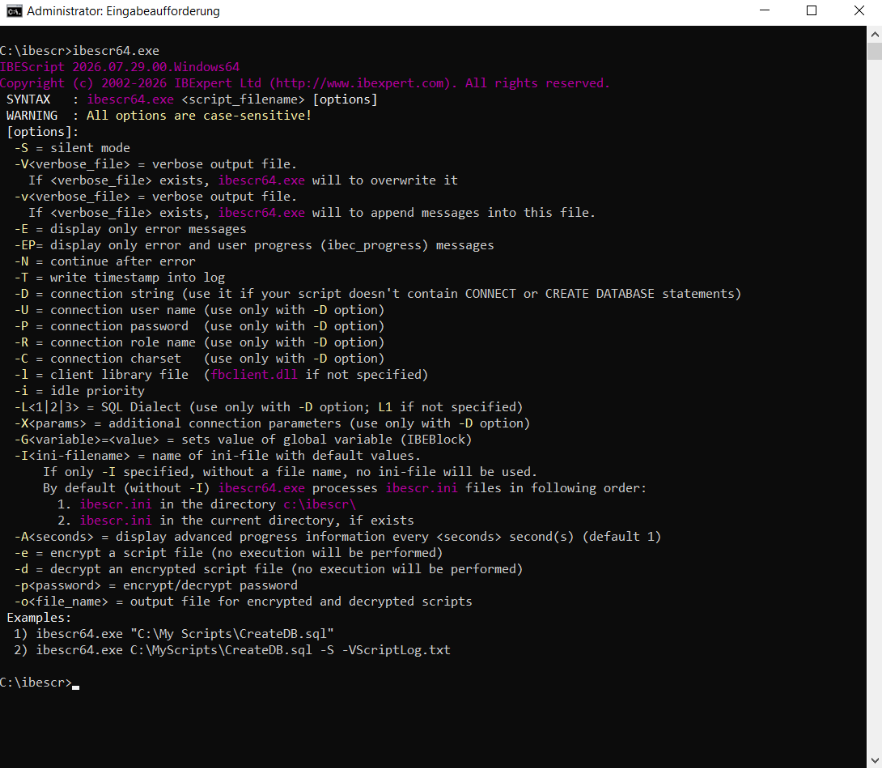
Die Abbildung zeigt die aktuelle Hilfeausgabe der 64-Bit-Windows-Version von IBEScript 2026.07.29.
Bereits der Aufruf von ibescr64.exe zeigt alle verfügbaren Kommandozeilenoptionen, darunter Funktionen für Protokollierung, Fehlerbehandlung, Verbindungen und Skriptverschlüsselung.
Automatisierung von Datenbankprozessen
IBEScript befindet sich im IBExpert-Installationsverzeichnis und kann direkt über die Kommandozeile gestartet werden. Dadurch lassen sich wiederkehrende Aufgaben zuverlässig automatisieren, beispielsweise:
- Erstellung und Einrichtung von Firebird-Datenbanken
- Ausführung von Update- und Wartungsskripten
- Datenmigrationen
- automatisierte Reports und Exporte
- Integration in Installations- und Deployment-Prozesse
Die grundlegende Syntax:
IBEScript script_filename [options]Beispiel:
IBEScript C:\Scripts\CreateDB.sqlUmfangreiche Steuerungsmöglichkeiten
IBEScript bietet zahlreiche Optionen zur Kontrolle der Skriptausführung:
- ausführliche Ablaufprotokolle und Fehlerausgaben
- Speicherung von Logdateien mit Zeitstempel
- Fortschrittsanzeige bei umfangreichen Skripten
- flexible Übergabe von Verbindungsparametern
- Verschlüsselung und Schutz von Skriptdateien
Leistungsfähige IBEBlock-Unterstützung
Durch die integrierte IBEBlock-Technologie können auch komplexe Datenbankoperationen automatisiert durchgeführt werden.
Mögliche Einsatzbereiche:
- Übertragung von Daten zwischen mehreren Firebird- oder InterBase®-Datenbanken
- Zugriff auf externe ODBC-Datenquellen wie Microsoft Access®, Oracle® oder IBM DB2®
- Vergleich und Synchronisation von Datenbankstrukturen über
ibec_CompareMetadata - automatisierte Erstellung von Reports aus dem IBExpert Report Manager
Zusätzlich unterstützt IBEScript den Import und Export von Dateien in Datenbankfeldern, beispielsweise für BLOB-Daten, sowie die Verwendung von Umgebungsvariablen für flexible Installationen.
Warum sich IBEScript lohnt
IBEScript erweitert IBExpert um eine leistungsfähige Kommandozeilen-Schnittstelle für professionelle Datenbankautomatisierung.
Von einfachen SQL-Ausführungen bis hin zu komplexen Migrationen, Datenbankvergleichen und automatisierten Reports bietet IBEScript alle Werkzeuge, um Firebird-Prozesse effizient und zuverlässig zu steuern.
IBEScript ist damit eine ideale Ergänzung für Entwickler, Administratoren und Unternehmen, die wiederkehrende Datenbankaufgaben automatisieren möchten.
Hinweis: IBEScript ist Bestandteil der IBExpert Developer Studio Edition, der IBExpert Server Tools sowie der IBExpert Company Year Editions und steht in dieser Form nicht in der kostenlosen IBExpert Personal Edition zur Verfügung.
IBExpert Server Tools
(German-language version below)
The IBExpert Server Tools include IBEScript exe and dll, hkSCC.exe, the IBExpert Backup/Restore Scheduler and the IBExpert Encryption Plugin on Win32/Win64. The IBExpert Server Tools can also be deployed on virtual machines or in a cloud infrastructure.
- Hardware-independent activation, i.e. if the virtual machine is transferred to another host, the script engine will continue to run without re-registration.
- An unlimited right to use the software activation on the registered machine.
- Includes: IBEScript.exe, IBEScript.dll, hkSCC.exe, the IBExpert Backup/Restore Scheduler and the IBExpert Encryption Plugin on Win32/Win64.
- The Server Tools are available as a one-time download and must be downloaded and installed within 12 months from the date of purchase. Please pay attention to this period, especially if you have purchased a Server Tools package with multiple activations.
- Transfer to another (physical or virtual) machine is not possible.
- In virtual environments only 1 instance may be active per IBExpert Server Tools activation.
- 1 IBExpert Server Tools activation is required for each copy of the virtual machine on which the Script engine is to be used.
- The Server Tools include a single one-time download. Further unlock codes are not available following installation of the Server Tools.
- You may also purchase the IBExpert Server Tools from us and resell them on to your end customer or pass them on free of charge, if they are to be used on your customer's hardware. All the above rules remain applicable.
Please note that we cannot offer any software subscription services as the Server Tools include only a singular activation.
The IBExpert Server Tools do not include the IBExpert IDE.
All functionalities of the IBEBlock scripting language, for example, metadata and data comparison, multiple database access, etc. are also available. Details of the individual tools can be found here.
Please always use the current IBExpert Server Tools version, which is available in the IBExpert Download Center.
IBExpert Server Tools
Die IBExpert Server Tools enthalten die IBEScript exe und dll, hkSCC.exe, den IBExpert Backup/Restore Scheduler, und das IBExpert Encryption Plugin auf Win32/Win64. Die IBExpert Server Tools können auch auf virtuelle Maschinen oder in einer Cloud-Infrastruktur eingesetzt werden.
- Hardware-unabhängige Freischaltung, d.h. wenn die virtuelle Maschine auf einen anderen Host übertragen wird, läuft die Script Engine ohne erneute Registrierung weiter.
- Ein zeitlich unbegrenztes Nutzungsrecht der Software Installation auf der registrierten Maschine.
- Beinhaltet: IBEScript.exe, IBEScript.dll, hkSCC.exe, den IBExpert Backup/Restore Scheduler und das IBExpert Encryption Plugin für für Win32/Win64.
- Nachdem wir die IBExpert Server Tools auf Ihrem Kundenkonto im IBExpert Download Center freigeschaltet haben, stehen die Server Tools als einmaliger Download zur Verfügung und müssen innerhalb von 12 Monaten ab Kaufdatum heruntergeladen und installiert werden. Bitte achten Sie auf diesen Zeitraum, insbesondere, wenn Sie ein Server Tools Paket mit mehreren Freischaltungen erworben haben.
- Eine Übertragung auf eine andere (physische oder virtuelle) Maschine ist nicht möglich.
- In virtuellen Umgebungen darf pro Aktivierung der IBExpert Server Tools nur 1 Instanz aktiv sein.
- Für alle Kopien der virtuellen Maschine, auf der die Script Engine benutzt werden soll, ist jeweils 1 IBExpert Server Tools Installation erforderlich.
- Die Server Tools beinhalten je 1 einmaligen Download. Weitere Freischaltcodes stehen nach Installation der Server Tools nicht zur Verfügung.
- Sie dürfen auch die IBExpert Server Tools bei uns einkaufen und an Ihren Endkunden weiterverkaufen oder kostenlos weitergeben, wenn diese auf der Hardware Ihres Kunden eingesetzt werden soll. Alle oben aufgeführten Regeln gelten weiterhin.
Bitte beachten Sie, dass wir Ihnen keinen Software Subscriptionsservice anbieten können, da die Server Tools eine einmalige Installation beinhalten.
Die IBExpert Server Tools enthalten keine IBExpert IDE.
Alle Funktionalitäten in der IBEBlock Skriptsprache, wie beispielsweise der Metadaten- oder Datenvergleich, mehrfacher Datenbankzugriff, etc. sind verfügbar. Weitere Details zu den Server Tools Features finden Sie hier.
Verwenden Sie bitte immer die aktuelle IBExpert Server Tools Version, die Ihnen im IBExpert Download Center zur Verfügung steht.
IBExpertFunctionLibrary
(German-language version below)
A user-defined function (UDF) is utilized to perform tasks that Firebird can't. It is an external database function written entirely in another language, such as C++ or Pascal, to perform data manipulation tasks that not directly supported by Firebird/InterBase.
As a lot of Firebird-based software developers know, these functions help you to extend the SQL language as required. But on the downside, the binary implementation requires a compiler on the platform where you want to use the Firebird server. A UDF library available for Win64 can neither be used on Win32 nor on Linux.
Up to Firebird 2.5 the UDF was an extremely powerful implementation, but unfortunately also a critical point of failure. If any of your binary code was not as stable as it should be, especially in multi-user environments, it could crash the Firebird server completely. All connected users would be disconnected, and even though the database file itself should not contain a binary error after this happened, any user application had to be restarted. This might not have been such a big problem with the Firebird Classic version, but today, using a binary UDF is no longer recommended.
This was the reason for the Firebird Project to introduce the new and more stable UDR implementation. A UDR appears to be similar to a UDF, but it is loaded in a considerably more stable way on the server process, and an error in the implementation does not typically crash the server.
Since Firebird 3, it is recommended to use a UDR rather than a UDF and, starting with Firebird 4, the use of UDFs is deactivated by default in the firebird.conf file.
A further implementation for the functional extension of Firebird was also introduced with Firebird 3: stored functions. Similar to the UDR/UDF functions, a stored function can be implemented in the same way as it can be when using a stored procedure, but the concept of functions provides only one result based on the specified input params.
As you might know, there are widely-used UDF implementations, which are all too often completely outdated, such as the FreeAdhocUDF library, which has not been changed or improved during the last 12 years. Libraries like rFunc or FreeAdhocUDF often use very high know-how standards but, based on Firebird’s built-in functions such as substring, the parameter structure is not one-to-one compatible. If you want to use your existing Firebird 2.x-based software in a new non-UDF-based Firebird version 3 or 4, you will need a replacement.
For this reason we have developed a complete new set of functions called IBExpertFunctionLibrary.
IBExpertFunctionLibrary Enterprise Maintenance Subscription
Your company licenses the source code of the library as it is, but it is only permitted to use this with databases created by your company for internal or customer use.
This includes access to all new versions of the source code for 12 months.
These functional implementations are limited to the language features already possible in the Firebird language. External software required for the implementation, such as DLLs/SO or other libraries, are not covered by this, but on request, this can also be implemented.
Pricing
IBExpertFunctionLibrary Enterprise Maintenance Subscription: EUR 1,110
The current version 1.0 already basically covers almost all of the functions currently available in FreeAdhocUDF and rFunc. Some functions cannot be implemented or it no longer make any sense to implement them, but these will be available as empty non-functional prototypes, so that a call will not result in an error.
IBExpertFunctionLibrary
Wie viele Firebird Softwareentwickler wissen, helfen Ihnen diese Funktionen dabei, die SQL-Sprache nach Bedarf zu erweitern. Der Nachteil ist jedoch, dass die binäre Implementierung einen Compiler auf der Plattform erfordert, auf der Sie den Firebird Server verwenden. Eine UDF-Bibliothek, die für Win64 verfügbar ist, kann weder unter Win32 noch unter Linux verwendet werden.
Bis zu Firebird 2.5 war die UDF eine extrem leistungsfähige Implementierung, aber leider auch ein kritischer Fehlerpunkt. Wenn einer Ihrer Binärcodes nicht so stabil war, wie er sein sollte, insbesondere in Mehrbenutzerumgebungen, konnte er den Firebird Server komplett zum Absturz bringen. Alle Client-Verbindungen wurden getrennt, und obwohl die Datenbankdatei selbst keinen Binärfehler enthalten sollte, musste jeder Client neu verbunden werden. Dies mag in der Firebird Classic Version kein so großes Problem gewesen sein, aber heute wird die Verwendung einer binären UDF nicht mehr empfohlen.
Dies war der Grund für das Firebird Projekt, die neue und stabilere UDR-Implementierung einzuführen. Eine UDR scheint einer UDF ähnlich zu sein, aber sie wird auf eine wesentlich stabilere Art und Weise in den Serverprozess geladen, und ein Fehler in der Implementierung führt normalerweise nicht zum Absturz des Servers.
Seit Firebird 3 wird empfohlen, eine UDR statt einer UDF zu verwenden und ab Firebird 4 ist die Verwendung von UDFs in der Datei firebird.conf standardmäßig deaktiviert.
Eine weitere Implementierung für die funktionale Erweiterung von Firebird wurde ebenfalls mit Firebird 3 eingeführt: Stored Functions. Ähnlich wie die UDR/UDF-Funktionen kann eine Stored Function auf die gleiche Weise wie eine Stored Procedure implementiert werden, aber das Konzept der Funktionen liefert nur ein Ergebnis basierend auf den angegebenen Eingabeparametern.
Wie Sie vielleicht wissen, gibt es weit verbreitete UDF-Implementierungen, die allzu oft völlig veraltet sind, wie z. B. die FreeAdhocUDF-Bibliothek, die in den letzten 12 Jahren weder geändert noch verbessert wurde. Bibliotheken wie rFunc oder FreeAdhocUDF verwenden oft sehr hohe Know-How-Standards, aber, basierend auf Firebirds eingebauten Funktionen wie z.B. substring, ist die Parameterstruktur nicht eins-zu-eins kompatibel. Wenn Sie Ihre bestehende Firebird 2.x-basierte Software in einer neuen, nicht UDF-basierten Firebird Version 3 oder 4 verwenden möchten, benötigen Sie einen Ersatz.
Aus diesem Grund haben wir einen komplett neuen Satz von Funktionen mit dem Namen IBExpertFunctionLibrary entwickelt.
IBExpertFunctionLibrary Enterprise Maintenance Subscription
Ihr Unternehmen lizenziert den Quellcode der Bibliothek, wie er ist, aber es ist nur erlaubt, diesen mit Datenbanken zu verwenden, die von Ihrem Unternehmen für den internen oder Kundengebrauch erstellt wurden.
Dies beinhaltet den Zugriff auf alle neuen Versionen des Quellcodes für 12 Monate.
Diese funktionalen Implementierungen sind auf die Sprachfeatures beschränkt, die bereits in der Firebird-Sprache möglich sind. Externe Software, die für die Implementierung benötigt wird, wie z.B. DLLs/SO oder andere Bibliotheken, sind davon nicht abgedeckt, können aber auf Anfrage ebenfalls implementiert werden.
Preisgestaltung
Die aktuelle Version 1.0 deckt im Grunde bereits fast alle Funktionen ab, die derzeit in FreeAdhocUDF und rFunc verfügbar sind. Einige Funktionen können nicht implementiert werden oder es macht keinen Sinn mehr, sie zu implementieren, aber diese werden als leere nicht-funktionale Prototypen verfügbar sein, so dass ein Aufruf nicht zu einem Fehler führt.