System objects RDB$, MON$, IBE$
<< Firebird 3.0 USAGE privileges | IBExpert | SQL code editor >>
Firebird/InterBase® and IBExpert generate system database objects, and store their own specific system information about the database objects in system tables. System objects are displayed in the DB Explorer in red, if the system options have been flagged in the Register Database dialog (called using the right mouse button Additional/DB Explorer).
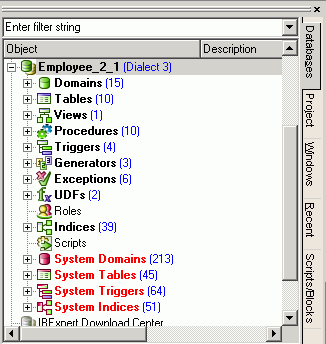
Firebird and InterBase® system objects contain the prefix RDB$ and Firebird monitoring tables contain the prefix MON$; IBExpert system objects contain the prefix IBE$.
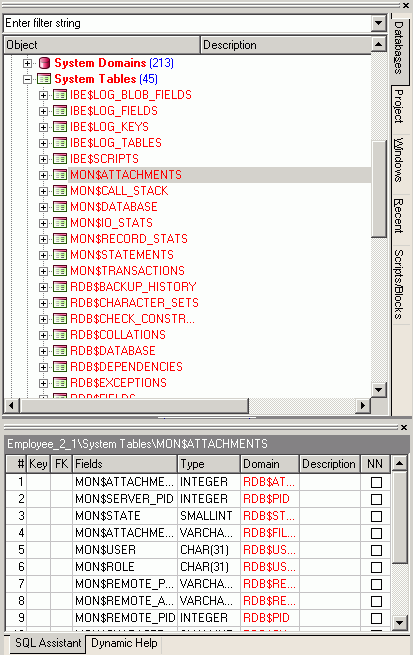
A newly created database is almost 0,5 MB large. This is due to the system tables that are automatically generated by Firebird/InterBase® when a database is created.
new:
These system tables contain a wealth of information, which IBExpert uses in many of its functionalities. Although you may consult and study the information in these system objects, please do not manipulate any data contained in them, as it will almost certainly result in a corrupt database!
RDB$ system objects
These are the Firebird and InterBase® objects. All field names in these tables are also prefixed RDB$ for identification. They include the following:
System tables relating to the database
- RDB$DATABASE: as with all system tables there is column included for a description, to aid database documentation. The database description can be specified and is subsequently displayed in the SQL Assistant, on the Descriptions page. The database description is also included in the HTML documentation if the Include descriptions... option is enabled. This table also includes the RDB$CHARACTER_SET_NAME column, displaying the database default character set.
- RDB$FILE: administrates all secondary files and shadows, if any exist. The RDB$FILE_SEQUENCE column contains a SMALLINT number specifying the file sequence. A miximum of 65535 secondary database files and shadow files are permitted.
- RDB$PAGES: administrates the database pages. RDB$RELATION_ID points to the respective table and RDB$PAGE_TYPE specifies whether it is a data or index page.
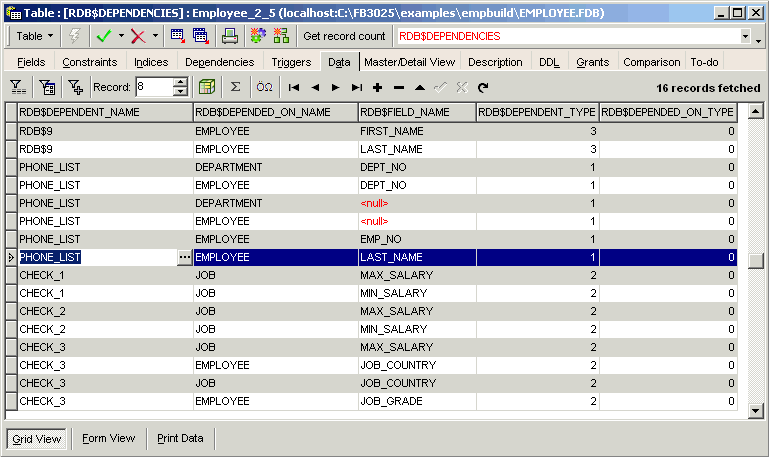
- RDB$DEPENDENCIES: this displays dependencies between tables, views and constraints:
System tables relating to tables and views
- RDB$RELATIONS: all tables and views are stored in this table. View definitions are stored in RDB$VIEW_SOURCE; the binary definition in RDB$VIEW_BLR. System tables are flagged with a 1 in the RDB$SYSTEM_FLAG column, user tables with 0. If the table is an external file, its name can be found in the RDB$EXTERNAL_FILE column. The table owner is named in the RDB$OWNER_NAME field.
- RDB$RELATION_FIELDS: stores the column definitions of the individual tables. The sequence in which Firebird/InterBase® displays individual fields following a SELECT * query, is determined by the value in RDB$FIELD_POSITION column, the value 0 appearing first. Each table column is based on a domain, which is displayed in RDB$FIELD_SOURCE. If a field has been specified as NOT NULL, the value 1 is displayed in the RDB$NULL_FLAG column. An anomalous collation order can be viewed in the RDB$COLLATION_ID column. Two new columns were added to this system table in Firebird 3.0 to support identity columns: RDB$GENERATOR_NAME and RDB$IDENTITY_TYPE. Please refer to IDENTITY data type for details.
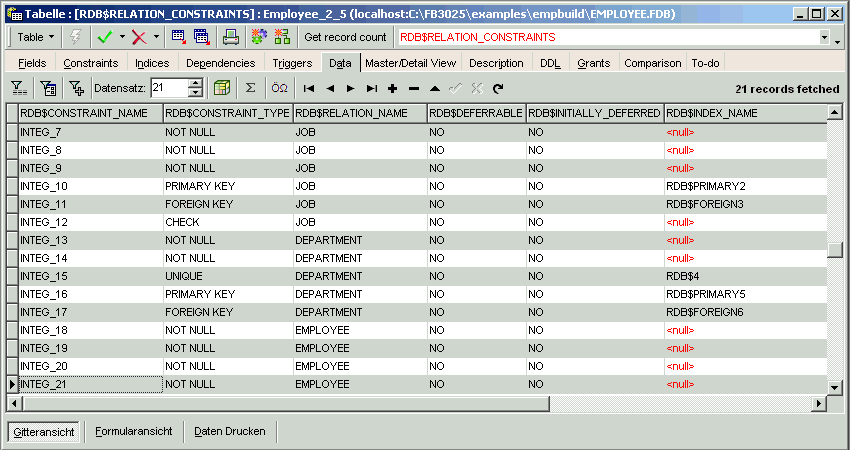
- RDB$RELATION_CONSTRAINTS: constraints, in the broadest sense, can be found in this table. The name is stored in RDB$CONSTRAINT_NAME, the respective table in RDB$RELATION_NAME. RDB$CONSTRAINT_TYPE contains one of the following values:
- PRIMARY for primary keys
- UNIQUE for secondary keys
- FOREIGN KEY for foreign keys
- PCHECK for user-defined validity checks and
- NOT NULL for forcing data input.
* RDB$INDICES: here you can view the index names (RDB$INDEX_NAME) and the table names (RDB$RELATION_NAME). Those indices belonging to a specific table are numbered sequentially, beginning with the number 1 (displayed in RDB$INDEX_ID). Unique indices are displayed in RDB$UNIQUE_FLAG with the flag 1, RDB$INDEX_TYPE shows whether the index is ascending (0) or descending (1) and RDB$INDEX_INACTIVE displays inactive indices with the value 1. The index selectivity is stored in the RDB$STATISTICS column.
- RDB$INDEX_SEGMENTS: this stores the columns that the index is composed of. Their order can be viewed in the RDB$FIELD_POSITION.
- RDB$REF_CONSTRAINTS: this stores how key violations are to be handled. The foreign key name can be found in RDB$CONSTRAINT_NAME, the corresponding primary key or secondary keys can be viewed in RDB$CONST_NAME_UQ. Specification of the treatment of key violations can be separately defined for UPDATE and DELETE actions and can be viewed in RDB$UPDATE_RULE and RDB$DELETE_RULE respectively. Actions include the default value, RESTRICT, NO ACTION, CASCADE, SET NULL and SET DEFAULT.
- RDB$CHECK_CONSTRAINTS: validity checks are stored here. Validity checks are made using triggers, the trigger name can be seen in the column, RDB$TRIGGER_NAME, and the name of the validity check in RDB$CONSTRAINT_NAME. If the name of a column is displayed in the RDB$TRIGGER_NAME column, then this indicates a NOT NULL constraint, which are also stored in this table.
- RDB$VIEW_RELATIONS: this system table stores all tables belonging to a view. The individual tables are numbered sequentially in the RDB$VIEW_CONTEXT column. If a table alias is used, this is displayed in the RDB$CONTEXT_NAME field.
System tables relating to domains
- RDB$FIELDS: this stores the definition of all domains, including data type, size, character set and collation. If a field definition includes a computed by statement, this can be viewed in RDB$COMPUTED_SOURCE.
- RDB$TYPES: this stores data types and object types (VIEW, TRIGGER, PROCEDURE), character sets and some other information.
- RDB$FIELD_DIMENSIONS: this stores array definitions.
- RDB$CHARACTER_SETS: here you can find a full list of character sets available in your Firebird/InterBase® version.
- RDB$COLLATIONS: this table stores a list of all collations available for the character set IDs, found in RDB$CHARACTER_SETS.
System tables relating to procedures and triggers
- RDB$PROCEDURES: all stored procedures in a database are stored in this system table. The procedure name is stored in RDB$PROCEDURE_NAME and it is allocated a sequential numbered identifier in RDB$PROCEDURE_ID. The number of parameters can be viewed in the RDB$PROCEDURE_INPUTS column the values output by the procedure in RDB$PROCEDURE_OUTPUTS. The source code is stored in RDB$PROCEDURE_SOURCE and its binary translation in RDB$PROCEDURE_BLR. Only the procedure owner (displayed in RDB$OWNER_NAME) and the SYSDBA may assign rights to a procedure. The RDB$PACKAGE_NAME field was added in Firebird 3.0 to store package metadata.
- RDB$PROCEDURE_PARAMETERS: this stores information about the individual parameters, and in which procedure they are used. The individual parameters are each assigned a sequential number beginning with 0. If the field, RDB$PARAMETER_TYPE displays the value 0, then it is an input parameter, an output parameter displays the value 1. This also references the RDB$FIELDS source.
- RDB$TRIGGERS: this table stores a list of all triggers in the database. Along with the trigger name you can find the name of the corresponding table (RDB$RELATION_NAME) to which the trigger applies, the trigger type (RDB$TRIGGER_TYPE) and, if several triggers for a single table have the same RDB$TRIGGER_TYPE value, the field, RDB$TRIGGER_SEQUENCE decides in which order the triggers are executed, starting with the lowest value. If duplicate values are found in this column the triggers with the same value are executed in alphabetical order. The trigger source code can be found in RDB$TRIGGER_SOURCE with its binary translation in RDB$TRIGGER_BLR. Deactivated triggers are flagged with a 1 in the RDB$TRIGGER_INACTIVE column.
- RDB$PACKAGES: A new system table, RDB$PACKAGES, has been added in Firebird 3.0 to store package metadata.
System tables relating to user rights
- RDB$ROLES: this includes the role names defined for the database and the role owners, the users who defined them.
- RDB$PRIVILEGES: this table stores details of which rights which users have received and who granted them. The RDB$PRIVILEGE field displays the type of right granted: S (select), I (insert), U (update), D (delete), R (reference), X (execute). If the RDB$GRANT_OPTION field is flagged with 1, then the grantee may grant this right to to others. RDB$RELATION_NAME shows for which table or procedure the permissions have been granted, and if the permission is restricted to a specific column, this is displayed in the RDB$FIELD_NAME field.
Other system tables
- RDB$EXCEPTIONS: contains a full list of all exceptions.
- RDB$FILTERS: this table contains all blob filters. The routine is specified in RDB$ENTRYPOINT, the DLL file name in RDB$MODULE_NAME.
- RDB$FUNCTIONS: this includes all UDFs incorporated in the database. The routine is specified in RDB$ENTRYPOINT and the DLL file name in RDB$MODULE_NAME. RDB$RETURN_ARGUMENT displays which of the parameters is the return value.
- RDB$FUNCTION_ARGUMENTS: this table lists the individual UDF parameters. The parameters are numbered sequentially in RDB$ARGUMENT_POSITION, parameter types are displayed in RDB$FIELD_TYPE, this column referencing the table, RDB$TYPES. RDB$MECHANISM display either the value 0 when the parameter is passed by value, and 1 when the parameter is passed by reference. Particularly of interest with strings is the length recorded in RDB$FIELD_LENGTH. RDB$CHARACTER_SET_ID indicates the character set.
* RDB$GENERATORS: this table stores the generator name and a unique number. The generator value is not stored in this system table.
- RDB$TRANSACTIONS: this system table displays transactions running across multiple databases. 0 indicates that the transaction is in limbo, 1 that it has been committed, 2 that it has been rolled back.
See also:
The mystery of RDB$DB_KEY
Firebird Internals
Firebird Database Cache Buffer: The Firebird cache
MON$ system tables
Firebird monitoring tables were introduced in Firebird 2.1. and enable run-time database snapshot monitoring (of transactions, tables, etc.) via SQL over some new virtualized system tables.
By querying these system tables you get a snapshot of the current activities in the database. For example, MON$DATABASE provides a lot of the database header information that could not be obtained previously via SQL: such details as the on-disk structure (ODS) version, SQL dialect, sweep interval, OIT and OAT and so on.
You can view other activites, such as who is connected to your database, which transactions and statements are running and so on. You even can cancel a running query by executing a DELETE statement on MON$STATEMENTS.
When querying the monitor tables it's important to remember that it's just a snapshot.
The Firebird MON$ system tables include the following in Firebird version 2.1:
- MON$DATABASE: connected database.
- MON$ATTACHMENTS: connected attachments.
- MON$TRANSACTIONS: started transactions.
- MON$STATEMENTS: prepared statements.
- MON$CALL_STACK: call stack of active PSQL requests.
- MON$IO_STATS: I/O statistics.
- MON$RECORD_STATS: record-level statistics.
Further details can be found in the Firebird 2.1 Release Notes chapter, Administrative features, and in the Firebird 2.5 Release Notes.
The following improvements have been incorporated in Firebird 2.5:
- MON$CONTEXT_VARIABLES: delivers data about context variables, (includes an overview of all user-defined context variables set by RDB$SET_CONTEXT).
- MON$MEMORY_USAGE: includes current memory usage at database, session, transaction or statement level) in ODS 11.2 and higher databases. Also, in these databases, it becomes possible to terminate a client connection from another connection through the MON$ structures.
- The original design in Firebird 2.1 allowed non-privileged database users to see monitoring information pertaining only to their CURRENT_CONNECTION. In Firebird 2.5 they can request information for any attachment that was authenticated using the same user name.
- New MON$ metadata for ODS 11.2 databases.
- Terminating a client: the MON$ structures are, by design, read-only. Thus, user DML operations on them are prohibited. However, a mechanism is built in to allow deleting (only) of records in the MON$STATEMENTS and MON$ATTACHMENTS tables. The effect of this mechanism is to make it possible, respectively, to cancel running statements and, for ODS 11.2 databases, to terminate client sessions.
See also:
Firebird Internals
Firebird Database Cache Buffer: The Firebird cache
IBE$ system objects
IBExpert creates its own system objects to support features such as logging and version history:
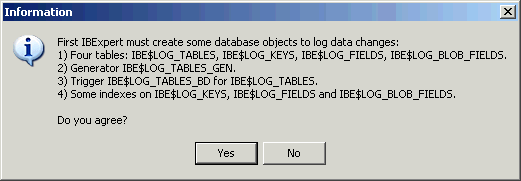
These objects should not be manipulated in any way, otherwise certain IBExpert functionalities will be detrimentally affected.
IBE$VERSION_HISTORY system table
A special browser is implemented for the IBE$VERSION_HISTORY table. When IBE$VERSION_HISTORY is opened in the Table Editor, a new Version Browser page is automatically opened:
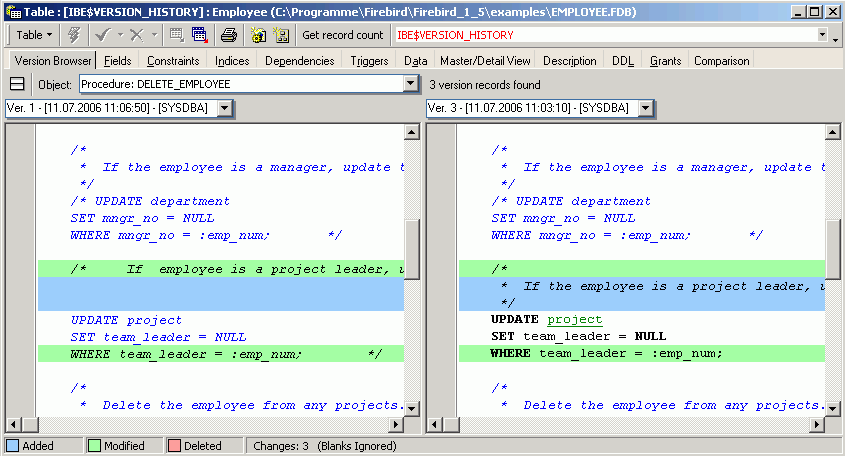
Select the database object and the versions you wish to compare. Text and code is highlighted according to whether it has been added, modified or deleted.
If the IBE$VERSION_HISTORY table already exists in your database you should add the following changes manually if you need to log the client address and the RDB$GET_CONTEXT function is available:
New column in the IBE$VERSION_HISTORY table:
     ALTER TABLE IBE$VERSION_HISTORY ADD IBE$VH_CLIENT_ADDRESS VARCHAR(32) CHARACTER
     SET NONE;
Additional line of code in IBE$VERSION_HISTORY_BI trigger:
NEW.IBE$VH_CLIENT_ADDRESS = RDB$GET_CONTEXT('SYSTEM', 'CLIENT_ADDRESS');
See also:
Verson History
IBE$DBINSIDE$ERRORS system table
This table is automatically created by IBExpert, when you use the Extract data/metadata on a corrupt database in Database Inside.
back to top of page
<< Firebird 3.0 USAGE privileges | IBExpert | SQL code editor >>